
Preview




Description
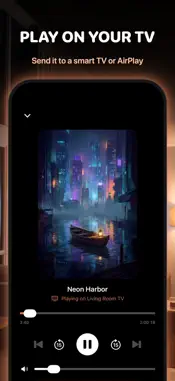
VidHub is a video player for iPhone and iPad that plays MKV, AVI, WMV, WebM and 20+ other formats from your device, a NAS, cloud storage or a Jellyfin, Emby or Plex server, with no converting first. WHO IS VIDHUB FOR? People whose videos live in more than one place (a NAS at home, a Plex or Jellyfin server, a cloud drive, files on the phone) and who want one player for all of them, in their own language. VidHub is available in 50 languages. WHAT CAN VIDHUB PLAY? • Video: MKV, AVI, WMV, FLV, WebM, RMVB, DivX, VOB, MPG, 3GP, OGV, MP4, MOV, M4V, TS and M2TS. • 4K, Blu-ray and DVD ISO files, M3U lists and STRM links. • Dolby Vision, HDR and Atmos in MKV files, on devices that support them (Pro). WHERE CAN IT PLAY FROM? • Videos on your iPhone or iPad, imported from Files or Photos. • Network shares on a NAS or computer over SMB or WebDAV, found automatically on your Wi-Fi. • Synology and fnOS NAS. • Dropbox, Google Drive and OneDrive. • Jellyfin, Emby and Plex media servers. • Wi-Fi Transfer: upload files from a browser on your computer. DOES VIDHUB WORK OFFLINE? Yes. Videos on your device play with no internet, and Pro downloads videos from network and cloud sources to watch later. CAN I WATCH ON MY TV? Yes. With Pro, send videos to your TV with AirPlay, Chromecast or a smart TV. Photos can go to a smart TV too. HOW DOES IT ORGANIZE A LIBRARY? • A poster wall of your movies and shows, with their details (Pro). • Folders, favorites, ratings, playlists and search. • Watch history grouped by day, and Continue Watching. HOW DOES VIDHUB HANDLE SUBTITLES? • Loads SRT, ASS/SSA, VTT and SUB files that sit next to the video, plus subtitle tracks inside the file. • Change size and timing. Pro adds font, color, outline and background, and two subtitles at once. • Comments over the video from a file beside it. • No subtitles? VidHub can create them on your device with speech recognition and translate them into another language. WHAT IS THE PLAYER LIKE? • Swipe to change volume, brightness and position. • Playback speed from 0.5x to 2x, sleep timer, bookmarks, and resume where you left off. • Hold to speed up, with speeds up to 4x in Pro. • Mark openings and credits to skip them. • Adjust brightness, contrast and saturation (Pro). • Switch audio tracks, change the aspect ratio, repeat or shuffle a playlist. • Picture in Picture and AirPlay for videos iOS plays natively (MP4, MOV, M4V). • Control playback from your Apple Watch. CAN IT OPEN COMICS AND BOOKS? Yes. Open your own comics and books (CBZ, CBR, PDF, EPUB and TXT) and have VidHub read them aloud. Reading and read-aloud are free; Pro adds natural voices, translation and chapter summaries. IS MY LIBRARY PRIVATE? • No account and no ads. • App Lock with Face ID or Touch ID, and an Incognito Mode that keeps what you watch out of your history. FREE AND PRO Playing videos on your device and from network shares (SMB, WebDAV, Synology, fnOS) is free. VidHub Pro adds the poster wall, Dolby Vision, HDR and Atmos in MKV files, AirPlay, Chromecast and smart TVs, Jellyfin, Emby and Plex servers, cloud storage, downloads, Wi-Fi Transfer, iCloud Sync, the sleep timer, subtitle styling and generation, a second subtitle, picture adjustment, faster speeds, App Lock and all color themes. Pro is a monthly or annual subscription (the annual plan starts with a free trial) or a one-time Lifetime purchase. Prices are shown in the app. Subscriptions renew automatically unless auto-renew is turned off at least 24 hours before the end of the current period. Payment is charged to your Apple Account when you confirm the purchase. Manage or cancel in your Apple Account settings. Privacy Policy: https://vidhub.mobilealchemy.co/privacy Terms of Use (EULA): https://www.apple.com/legal/internet-services/itunes/dev/stdeula/
What's New
Version 2.0 2026-11-13
• A poster wall of your movies and shows, with their details • Dolby Vision, HDR and Atmos in MKV files • Play on your TV with Chromecast or a smart TV, and con...• A poster wall of your movies and shows, with their details • Dolby Vision, HDR and Atmos in MKV files • Play on your TV with Chromecast or a smart TV, and control it from your iPhone or iPad • Smart TVs play more: formats the TV can't play are converted, with your subtitles • Sleep mode: the sound plays on while the screen goes dark • Two subtitles at once, and comments over the video • Hold to speed up, speeds up to 4x, and mark openings and credits to skip • Adjust brightness, contrast and saturation • Blu-ray and DVD ISO files, M3U lists and STRM links • Jellyfin and Emby: browse your libraries, resume where you left off, skip intros and play the next episode automatically • New Home tab, a tab bar you can rearrange, and 50 languages Technical Analysis
Package Overview Basic metadata
Bundle ID
vidhub.app Current Version 2.0
Minimum iOS 16.0
Package Size App Store Size
Package Metadata 1 / 3 version records
Detailed binary, privacy manifest, framework, and Info.plist results have not been indexed for this package yet. The verified App Store and archive metadata above remains available.
Developer Information
Known Version Records
1 version record with stored package metadata • 3 known version records
Stored metadata does not guarantee a package is currently available to download.
| Details | Version / IDs | Version date | Action |
|---|---|---|---|
| 49.02 MB | v1.2 App Store ID: 884367341Build: 1.2 | 2026-04-13 22:04:04 | Get Version |
| Not archived | App Store ID: 884015001 | Unknown | Request Version |
| Not archived | App Store ID: 883794667 | Unknown | Request Version |