
Preview









Description
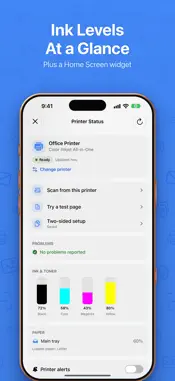
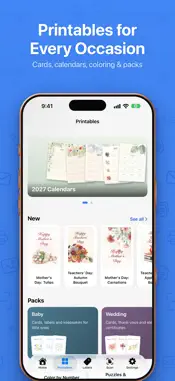
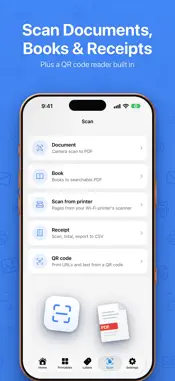
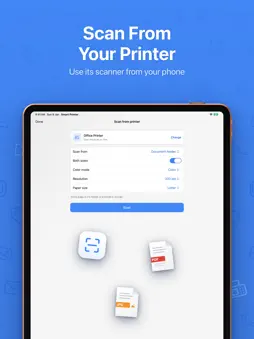
Smart Printer & Scanner is a mobile printing and document app that helps phone and tablet users print photos, documents and PDFs on a Wi-Fi printer, scan paper into PDF, make ID photos and send faxes, by combining a print queue, a camera scanner with OCR, an ID photo maker and label and template printing in one app. Print to more than 10,000 Wi-Fi and network printer models, with no drivers to install. WHAT YOU CAN DO • Print photos, PDFs, Word, Excel and PowerPoint files, webpages, emails, contacts and clipboard content straight from your phone • Print from iCloud Drive, Google Drive and Dropbox without downloading the file first • Scan paper with the camera, let auto-scan capture each page, extract text with OCR and save a PDF • Make passport, visa and ID photos in 35×45 mm, 50×50 mm and 25×35 mm and print them as a ready A4 sheet • Print labels, invoices, receipts and templates • Fax documents to numbers worldwide with a country code selector • Retouch photos before printing with 15 filters, crop, rotate, brightness, blur and collage layouts • Print many items in one go with a print queue, page ranges, watermarks and 10 paper sizes from A3 to Envelope • Print from any app through the Share Sheet, or use the Home Screen widget BUILT FOR SECURE, RELIABLE PRINTING • Print jobs can use IPPS (IPP over TLS) for encrypted transfer • Low ink and toner alerts come from IPP supply levels • A step-by-step Wi-Fi setup guide covers WPS and laptop-assisted setup • The interface uses a modern glass design and supports foldable phones, including their inner and outer displays • 35 in-app languages QUESTIONS AND ANSWERS How do I print from my phone? Connect the phone and the printer to the same Wi-Fi network, open Smart Printer & Scanner, pick a file and tap Print. A test page confirms the connection. Can I scan a document to PDF? Yes. Scan with the camera, use auto-scan for multi-page documents, run OCR to extract the text and save the result as a PDF. Can I make a passport or ID photo? Yes. The ID photo maker offers 35×45 mm, 50×50 mm and 25×35 mm sizes and lays them out on an A4 sheet for printing. Can I send a fax from my phone? Yes. Choose a country code, enter the number and send. Fax is part of the Premium subscription. Can I print from cloud storage? Yes. iCloud Drive, Google Drive and Dropbox files print directly. Download Smart Printer & Scanner to turn your phone into a printing and scanning station. SUBSCRIPTION INFORMATION • Smart Printer & Scanner offers a Premium subscription for unlimited printing and full access to all features • Payment will be charged to your account at confirmation of purchase • Subscription automatically renews unless auto-renew is turned off at least 24 hours before the end of the current period • Your account will be charged for renewal within 24 hours prior to the end of the current period • You can manage and cancel your subscriptions by going to your account settings on the App Store after purchase • Privacy Policy: https://printsmart.app/privacy.html • Terms of Use: https://printsmart.app/terms.html
What's New
Version 4.1 2026-10-30
Version 4.1 lets you print through your Mac and reach more printers: • New: print to any printer your Mac can use, USB printers included, with the free Mac com... Technical Analysis
Package Overview Basic metadata
Bundle ID
print.smart.app Current Version 4.1
Minimum iOS 16
Package Size App Store Size
Package Metadata 2 / 15 version records
Detailed binary, privacy manifest, framework, and Info.plist results have not been indexed for this package yet. The verified App Store and archive metadata above remains available.
Developer Information
Known Version Records
2 version records with stored package metadata • 15 known version records
Stored metadata does not guarantee a package is currently available to download.
| Details | Version / IDs | Version date | Action |
|---|---|---|---|
| 18.32 MB | v2.4 App Store ID: 889745128Build: 2.4 | 2026-08-19 11:43:19 | Get Version |
| Not archived | v2.3 App Store ID: 889411281Build: 2.3 | 2026-08-11 12:24:54 | Request Version |
| Not archived | v2.2 App Store ID: 888953799Build: 2.2 | 2026-08-06 20:00:40 | Request Version |
| 18.32 MB | v2.4 App Store ID: 887411091Build: 2.4 | 2026-08-19 11:43:19 | Get Version |
| Not archived | v2.0 App Store ID: 886638470Build: 2.0 | 2026-06-10 11:19:01 | Request Version |
| Not archived | v1.9 App Store ID: 886171778Build: 1.9 | 2026-06-03 00:31:46 | Request Version |
| Not archived | v1.8 App Store ID: 885774219Build: 1.8 | 2026-05-19 11:32:01 | Request Version |
| Not archived | v1.7 App Store ID: 885305658Build: 1.7 | 2026-05-06 18:28:02 | Request Version |
| Not archived | v1.6 App Store ID: 885185043Build: 1.6 | 2026-05-04 20:19:34 | Request Version |
| Not archived | v1.5 App Store ID: 885152188Build: 1.5 | 2026-05-01 21:25:49 | Request Version |
| Not archived | v1.4 App Store ID: 884972404Build: 1.4 | 2026-04-28 10:27:58 | Request Version |
| Not archived | v1.3 App Store ID: 884874741Build: 1.3 | 2026-04-24 08:55:24 | Request Version |
| Not archived | v1.2 App Store ID: 884064695Build: 1.2 | 2026-04-09 02:30:18 | Request Version |
| Not archived | v1.1 App Store ID: 883727126Build: 1.1 | 2026-03-26 11:00:37 | Request Version |
| Not archived | v1.0 App Store ID: 883142930Build: 1.0 | 2026-03-24 14:07:45 | Request Version |