
Preview




Description
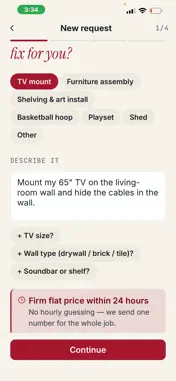
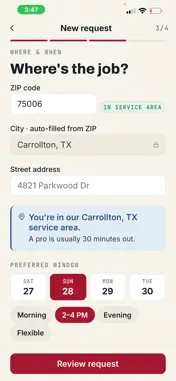
MiraclePros connects you with trusted local home-service professionals and keeps you in the loop from your first request to the finished job. Need a repair or service assembly at home? Tell us what you need, where, and when. We match you with a qualified MiraclePros technician and keep you updated every step of the way. WHY MIRACLEPROS • Request in minutes: choose the service you need and your address, and add photos so your pro arrives prepared. • Real-time tracking: follow your job's status live, from confirmation to completion. • Clear quotes: review your estimate before any work begins. No surprises. • In-app messaging: chat directly with your technician and share photos. • Stay notified: get push updates the moment your booking status changes. • Secure sign-in: fast, password-free login with your phone number. HOW IT WORKS 1. Request a service and share a few details and photos. 2. Get matched with a trusted MiraclePros technician. 3. Track progress and message your pro in real time. 4. Sit back while the job gets done right. FOR TECHNICIANS Already part of the MiraclePros network? Sign in as a technician to receive job offers, manage your calendar and availability, message customers, and track your earnings; all from one app. Get trusted home service, on demand.
What's New
Version 1.2.0 2026-07-23
Thanks for using MiraclePros! This update includes: Performance and stability improvements throughout the app. General bug fixes. Technical Analysis
Package Overview Basic metadata
Bundle ID
com.miraclepros.mobile Current Version 1.2.0
Minimum iOS 16.4
Package Size App Store Size
Package Metadata 0 / 0 version records
Detailed binary, privacy manifest, framework, and Info.plist results have not been indexed for this package yet. The verified App Store and archive metadata above remains available.
Developer Information
Known Version Records
0 version records with stored package metadata
Stored metadata does not guarantee a package is currently available to download.
| Details | Version / IDs | Version date | Action |
|---|