
Preview



Description
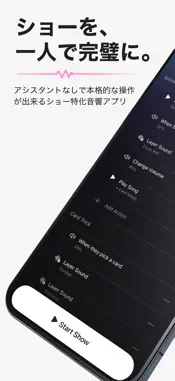
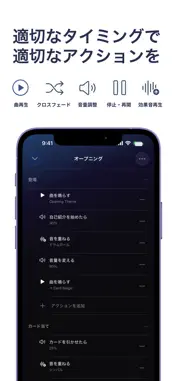
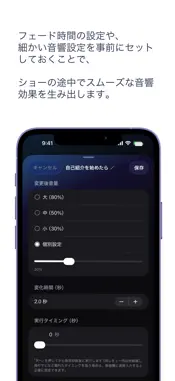
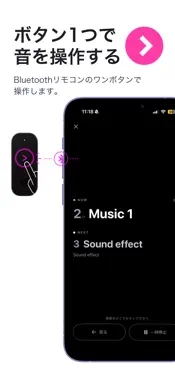
OneCue is a show audio app for performers who run the show alone — magicians, street performers, dancers and MCs. During a show you are performing. You do not have time to look at a screen. With OneCue, one press of Next on a Bluetooth remote plays the next song, fires a sound effect, changes the volume or stops the music — in the order you set. ■ Preparing is just lining things up Put what happens in order, from top to bottom, and your show is ready. - Play Song (including a crossfade from the current song) - Layer Sound (a sound effect over the music, without stopping it) - Change Volume (drop it while you talk, then bring it back) - Stop Song - Pause / Resume Group them into parts, one per routine, so even a long show stays easy to read. ■ No need to watch the screen Show mode is built for one glance in a dark venue: a black screen with the song playing now and what happens next. Tapping anywhere on the screen also advances, so you can hit it by feel. ■ Recover when the show goes off script Shows do not always run in order. Open the cue list and jump straight to the point that matches what you are doing now. ■ Name cues in your own words Write your own trigger, like "When they pick a card", for the ones that are hard to remember. Leave the obvious ones unnamed. ■ Volume presets per venue Set High / Medium / Low once and reuse them across the show. ■ OneCue Pro (one-time purchase) The free version holds one cue sheet with up to 15 actions. Upgrading to OneCue Pro gives you: - Unlimited cue sheets and actions - iCloud sync between iPhone and iPad It is a one-time purchase, not a subscription. Note: a Bluetooth remote that sends the media "next track" signal gets the most out of OneCue, but you can use the app with screen taps alone.
What's New
Version 1.5 2026-11-08
Back is now an undo. If you press Next one time too many, the song and the volume return to where they were just before you pressed. • The song fades back in f...Back is now an undo. If you press Next one time too many, the song and the volume return to where they were just before you pressed. • The song fades back in from where it left off, so the audience never hears the mistake. • Cue numbers in Show Mode, so you can tell where you are even in the dark. • Back and Pause buttons in Show Mode, for when the remote isn't in your hand. • A large pause mark on screen while playback is paused. • Choose what happens when a song ends: Play Next Song, Repeat, or Stop Here. • Repeated or double presses on a remote no longer skip a song. • Delayed actions are no longer missed or lost while playback is paused. • New Show Mode settings: Fade When Going Back, Tap Screen to Go Next, Ignore Repeated Presses, and Show Cue Numbers. • Import audio from an SD card or a USB drive. Pick several files at once, with no freeze while copying and a clear reason if it fails. • A cleaner, easier-to-scan cue sheet list. • A log of what happened during a show (Settings → View Show Log). Technical Analysis
Package Overview Basic metadata
Bundle ID
com.minori.onecuelite Current Version 1.5
Minimum iOS 16.0
Package Size App Store Size
Package Metadata 0 / 0 version records
Detailed binary, privacy manifest, framework, and Info.plist results have not been indexed for this package yet. The verified App Store and archive metadata above remains available.
Known Version Records
0 version records with stored package metadata
Stored metadata does not guarantee a package is currently available to download.
| Details | Version / IDs | Version date | Action |
|---|