
Preview







Description
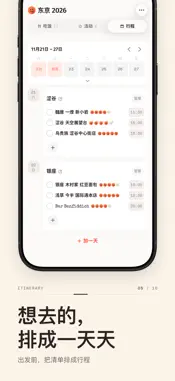
funlist keeps two things in one app: where you save the restaurants and activities you want to try, and how you decide where to eat tonight — for one dinner, a weekend or a whole trip. There's a hidden KTV mode too! — Your own lists — Open it and start. No sign-up, no login. · See a place you want to try? Paste the link or the shared text and it's saved — the app helps identify the name. Or just type the name; nothing else is required · Categories, notes, several links, how badly you want to go, a rating, whether you've been — record as much or as little as you like · Filter by city, sort by craving, search names and notes · Each list has its own city tags: rename, clear or reorder them as you go · Keep several lists: home, a trip, one per group of friends · Not just restaurants: shops and sights go in too, and you can add your own types · Been there? Check in, and a receipt prints on the spot · Plan it yourself: a weekend out, a short trip or a long one — split it into days and put places and activities on each · Mark a place "Skipped" or an event "Ended": it drops to the bottom of the list and the random pick leaves it out · Save the whole list as one tall image to your photos · One tap opens the place in Apple Maps, Google Maps or Amap Your lists stay on this device by default; our server does not keep them. Bind a recovery email and a backup copy goes to the cloud — you can switch it off and delete that copy any time. — Lists you share with friends — Send an invite link, or let them scan the QR code. They're in as soon as they open it — no sign-up for them either. · Everyone adds restaurants and activities to the same list · Tap "I want this" to say so — the card lights up a smiley for each person who's in · Plan the days: split into days, pick a few places for each and note what time to arrive · Check in when you get there and everyone's phone prints the same receipt · Up to 15 photos per place — Can't decide? Let it pick one at random — Tap once and the app picks one of your saved places, each equally likely, then prints a paper-style receipt with tonight's place on it. Pick from the whole list, or shortlist a few first and let it choose among those. The receipt can be shared straight out, or saved as an image to send to friends. — Hidden KTV mode — Add a karaoke activity to a shared list. Set the prompts and pick your songs before you reach the room: · Term Relay: one person opens a prompt, then everyone piles on conditions — "trendy guy" + "Cantonese" + "a colour in the title" — until finding the one song that fits them all is the whole game · One each: everyone writes a few prompts into the pool, or lets the app settle the real ones at random; once they're settled, nobody sees what the others picked until the reveal · Song Desk: the queue gets shuffled, and when the mic goes live everyone's phone pops the reveal · When the night ends, a receipt lists the songs that were sung — a keepsake — Switching phones — · Bind a recovery email (it only ever receives verification codes) and get your lists back on the new device · Or export the whole list as a file and keep it yourself — import it back any time · Don't want to bind an email? Then don't. Nothing stops working — Bring your AI assistant along — Connect the AI assistant you already use to funlist and let it read your shared lists — which restaurants you're keen on, who wants to go where. Turn on "Allow itinerary edits" and it can lay out the days too. Bind a recovery email first, and disconnect any time under "Connect an agent" in Settings. — About privacy — · No sign-up needed; bind an email only if you want to restore on a new phone · No ads, no third-party tracking · No location permission, no access to your contacts · You can delete your account from inside the app; if you can't open the app, write to us and we'll delete it for you Available in 简体中文, English and 日本語.
What's New
Version 2.0.380 2026-10-23
• New "Connect an agent" (in Settings): link your own AI assistant to read your shared lists and, if you allow, plan itineraries. • New three-step intro for you... Technical Analysis
Package Overview Basic metadata
Bundle ID
xyz.designskills.funlist Current Version 2.0.380
Minimum iOS 15.1
Package Size App Store Size
Package Metadata 0 / 0 version records
Detailed binary, privacy manifest, framework, and Info.plist results have not been indexed for this package yet. The verified App Store and archive metadata above remains available.
Known Version Records
0 version records with stored package metadata
Stored metadata does not guarantee a package is currently available to download.
| Details | Version / IDs | Version date | Action |
|---|