
Preview


Description
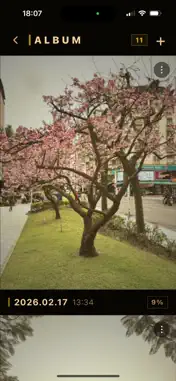
Every photo you take is rendered with an 80s film look — warm tones, lifted blacks, soft grain, gentle vignette. But the moment you press the shutter, it starts fading. Slowly. Irreversibly. HOW IT WORKS Photos live only inside CamBe. Each time you open your album, the app calculates exactly how much time has passed since each shot was taken and renders the current fade state in real time. 0–3 months — Film original. Warm, grainy, alive. 3–8 months — Blues pull back. A pink-red drift sets in. Contrast softens. 8–12 months — Detail blurs. The image starts dissolving. After 1 year — Terminal state. Almost white. A faint ghost of what was there. WHAT YOU CAN DO · Shoot with a built-in film look · Watch your photos age over real calendar time · Import photos from your camera roll — if timestamp data exists, they get sorted by when they were actually taken and rendered with the fade they've already earned · Export the current faded state to your camera roll at any point · Delete a photo permanently WHAT YOU CAN'T DO Terms of Use (EULA): https://www.apple.com/legal/internet-services/itunes/dev/stdeula/ You can't slow it down. You can't speed it up. You can't restore the original. That's the point. Terms of Use (EULA): https://www.apple.com/legal/internet-services/itunes/dev/stdeula/
Technical Analysis
Package Overview Basic metadata
Bundle ID
app.dasto.cambe Current Version 1.0.0
Minimum iOS 15.1
Package Size App Store Size
Package Metadata 1 / 1 version records
Detailed binary, privacy manifest, framework, and Info.plist results have not been indexed for this package yet. The verified App Store and archive metadata above remains available.
Developer Information
Known Version Records
1 version record with stored package metadata
Stored metadata does not guarantee a package is currently available to download.
| Details | Version / IDs | Version date | Action |
|---|---|---|---|
 24.01 MB | v1.0.0 App Store ID: 883462590Build: 5 | 2026-03-21 09:44:42 | Get Version |