Preview


Description
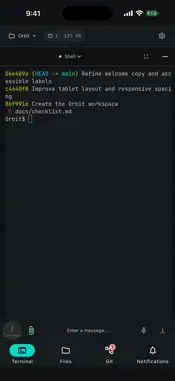
PadRemote AI lets you keep working on your own development computer from a tablet or phone. Your projects, Git repositories and AI coding tools stay on your computer; the app gives you a touch-friendly workspace to drive them remotely. AI TERMINALS FOR EVERY PROJECT • Use the AI coding tools already signed in on your computer: Claude Code, Codex CLI, Grok Build, Antigravity CLI and GitHub Copilot CLI, or a plain shell. • Each project keeps its own terminals. Switch projects or AI tools and come back to the same conversation. • Work keeps running on the computer when your phone or tablet disconnects. • A key bar with Esc, Tab, arrow keys and custom shortcuts, plus a slash command menu for the current AI. FILES AND GIT • Browse project folders, edit text files and save them straight to your computer. • Review uncommitted changes, stage files and commit; browse commit history with line-by-line diffs. • Open the files and links the AI produced from a list kept for each terminal. VOICE, ATTACHMENTS AND NOTIFICATIONS • Speech is transcribed on your own computer with whisper.cpp (installed separately), and you can review the text before sending it. Optional AI correction remembers the terms you teach it. • Send images and files to the current AI conversation; interrupted uploads can be resumed. • Optional notifications when the AI finishes a task or needs your answer. CONNECTION AND PRIVACY • Pair with a connection code or QR code plus the password you set on the computer. • Connections prefer encrypted peer-to-peer and switch to an encrypted relay when a direct connection is not possible. • Available in 16 interface languages. REQUIREMENTS • PadRemote Host running on a Windows, macOS or Linux computer that stays on and awake. • Install and sign in to your AI tools on that computer yourself. PadRemote AI does not include accounts or subscriptions for any AI tool; each provider bills its own usage. • Sign in to a PadRemote AI account in the app; an active subscription is required to connect. • Understanding images requires an AI model with vision support. Terminals run with your computer account's full permissions and are not a sandbox. Terms of Use (EULA): https://www.apple.com/legal/internet-services/itunes/dev/stdeula/ Privacy Policy: https://pad-remote-ai.sakilu.com/en/data/
What's New
Version 0.67.0 2026-11-03
Added new features and subscription plans. Technical Analysis
Package Overview Basic metadata
Bundle ID
dev.padremote.padremote Current Version 0.67.0
Minimum iOS 15.0
Package Size App Store Size
Package Metadata 0 / 0 version records
Detailed binary, privacy manifest, framework, and Info.plist results have not been indexed for this package yet. The verified App Store and archive metadata above remains available.
Developer Information
Known Version Records
0 version records with stored package metadata
Stored metadata does not guarantee a package is currently available to download.
| Details | Version / IDs | Version date | Action |
|---|