
Preview




Description
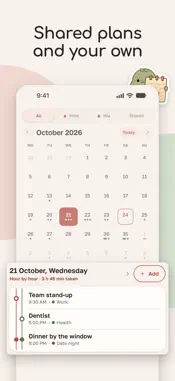
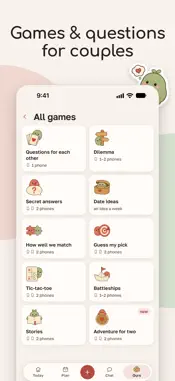
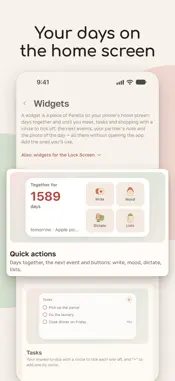
Parella is an app for couples: a shared calendar, a chat, a days-together counter, shared goals, and games and questions for two. No feed, no likes, nobody else: one calm place for the two of you. No ads. The author answers in the "Write to us" chat too and takes requests. WHAT'S INSIDE • Shared calendar Date nights, trips, appointments, birthdays — one schedule for both. Anniversaries repeat every year, an event that matters can remind you, and a ticket or booking goes with it. • A chat for two No group threads, no outsiders. Photos, voice messages, video circles, reactions, replies and read receipts. • "Together for" counter The date it all started and the days since — on the home screen and widget. • Widgets for the home screen Days together, moods, events, tasks and shopping you can tick off, how long until you meet, a note, the photo of the day and the cycle day — without opening the app. • Mood of the day Log how your day goes and see your partner's, with a month of history for both. • Games and questions for couples Questions for each other, "Secret answers", "Which of us?", a reaction duel, tic-tac-toe, Battleships. "Dilemma" — on one phone or on two: see where you agree. • Assistant Say or type "dinner with Anya on Saturday at seven" and it makes the event, chore or shopping item, showing what it will create first. It answers questions about your week, too. • Cycle calendar Whoever has a cycle marks a period's first and last day; the app works out the cycle and the next date, and your partner sees what to expect once you choose to show it. If you both have one, each gets their own — and only you two see it. • Shared goals The dream trip, the renovation, the half marathon — with a checklist, a cover and progress you both see. If it is about money, set an amount: you see what is saved and what is left, and the pot is shared. • Letters to the future A letter that opens no earlier than the day you pick. Until then nobody can read it, the author included: it stays sealed on the server. • Wishlists Each of you keeps a list with photos, prices and links. Your partner can reserve a gift without you knowing — the surprise stays a surprise. • Agreements Write down what you two settled on: who cooks, how you argue, what matters. Stopped working? Tap "Talk it over" and your partner sees it on the home screen. • Lists A shopping list, films and books, places to go — a place gets an address and directions. A tick shows on their phone at once; films and books get a genre and a rating. Chores are shared: "I'll take it" or "For Asya" — you both see who took what. • Notes The door code, the Wi-Fi at your parents', a weekend idea. Pinned ones come first and show on the home screen; one can greet your partner on opening. • Documents Policies, tickets, contracts and scans — one shared folder, up to 50 MB. • Loyalty cards Store cards for both: a barcode or QR code at the till. • Shared contacts One address book for two: doctor, plumber, parents, friends. • Album of memories Shared photos with captions and dates. Up to 75 MB per couple. • App lock It opens the way your phone does — fingerprint, face or passcode. HOW IT WORKS One of you creates the couple space and gets a code or link; the other joins — and everything shared appears for both. Changes sync in real time across different phones. Good for long-distance couples too. Russian and English interface, light and dark themes. For couples at any stage: just dating, living together or married for years.
What's New
Version 1.68.0 2026-11-18
• Glimpse: once a day, at a random minute, the app calls you both to take a shot — five minutes for whatever is around you. Camera only, no filters. Your partne...• Glimpse: once a day, at a random minute, the app calls you both to take a shot — five minutes for whatever is around you. Camera only, no filters. Your partner’s shot opens once you take yours. Turn it on in “Settings” → “Notifications” → “Glimpse”. • Glimpse shots gather in the gallery: day by day under “Glimpses”, and among your other photos under “All”. • You can download all the shots in one file: “Settings” → “Data and account” → “Export archive” → “Glimpses”. Only a browser can save the file, so in the phone app you’ll find the web version’s address there. • “Our place” now draws the places in fine detail too — the lake with fishing, the beach, the park, the country house, the café — and the bus, plus the sky and weather: clouds, sun, moon, stars, snow on the roof, fog and raindrops. • The Cozy Corner shop now has New Year items: a Christmas tree, a snow globe, a gingerbread house, a sledge, mugs of cocoa and more. • The home screen is shorter. Days together are now under the title, “Our place” is a row, and so is “Photo of the day” until someone sends a photo. A letter that has opened, your partner’s new photo of the day and anything new they’ve pinned to the board, your answer in a game and an agreement on the table are gathered under “Waiting for you”. The line with your relationship start date is gone from the home screen; the date itself is still in “Settings” → “Our couple”. • If you haven’t set up the home screen yourself, the “Assistant” card is no longer on it, the “Board” card shows up once something is pinned to the board, and “Our place” sits right below the touches, above “Today and coming up”. The board also opens from the “Ours” tab; the assistant, from the “+” button or the search on that tab. To bring the cards back, go to “Settings” → “Look and home” → “What to show”. • On the “Ours” tab, the main sections are now tiles (up to six), the rest are listed right below them, and games have moved to the very end. Each row in the list shows what’s inside: how many notes, what’s under discussion, how many letters are sealed. You choose which ones are tiles: press and hold a section and drag it, or pick “Move to the shelf”. If you arranged “Ours” yourself, your order and what’s in each group haven’t changed. • The “New story” and “A tour of the app” banners at the top of the home screen are now a single line, and only one of them appears each day. In “Update history”, your version is expanded — tap any other to open it. • In “Plan”, the month now sits higher: you switch between “Calendar” and “Lists” with the words in the title, and choose whose events to show with the “All” button next to them. To start a new list, tap the round “+” on the right of the row of lists; with no lists yet, “Shopping” and “To-do” are ready in one tap. • Settings now show what’s chosen right on the rows: theme and language, whether notifications are on, whether your email is confirmed. Your own birthday and gender have moved to “Settings” → “Profile”, where the “Account” row also takes you to your email and password. On “Our couple”, the couple’s name comes first — and, until your partner joins, the code for them sits right below. • The cycle line and moods on widgets now have their own switch: “Settings” → “Look and home” → “Widgets”. People nearby can see your phone’s home screen too, so after the update it’s off. • On iPhone, while it’s locked, widgets in StandBy and to the left of the Lock Screen hide the note, moods, cycle and event titles, and you can tick off a task or a shopping item there only after unlocking. • Your partner now sees the cycle only while “Show to my partner” is turned on: until then they have no cycle screen, calendar line or home-screen card. • If your period started earlier than you marked, tap the real first day on the cycle screen: “Move the start here” moves the mark instead of starting a second cycle. “Usual cycle length” now goes up to 60 days. Technical Analysis
Package Overview Basic metadata
Bundle ID
dev.misha98857.youandme Current Version 1.68.0
Minimum iOS 17.0
Package Size App Store Size
Package Metadata 0 / 22 version records
Detailed binary, privacy manifest, framework, and Info.plist results have not been indexed for this package yet. The verified App Store and archive metadata above remains available.
Developer Information
Known Version Records
0 version records with stored package metadata • 22 known version records
Stored metadata does not guarantee a package is currently available to download.
| Details | Version / IDs | Version date | Action |
|---|---|---|---|
| Not archived | App Store ID: 892500460 | Unknown | Request Version |
| Not archived | App Store ID: 892445100 | Unknown | Request Version |
| Not archived | App Store ID: 892399563 | Unknown | Request Version |
| Not archived | App Store ID: 892333515 | Unknown | Request Version |
| Not archived | App Store ID: 892288394 | Unknown | Request Version |
| Not archived | App Store ID: 892230384 | Unknown | Request Version |
| Not archived | App Store ID: 892185987 | Unknown | Request Version |
| Not archived | App Store ID: 892117327 | Unknown | Request Version |
| Not archived | App Store ID: 892077368 | Unknown | Request Version |
| Not archived | App Store ID: 892025044 | Unknown | Request Version |
| Not archived | App Store ID: 891867556 | Unknown | Request Version |
| Not archived | App Store ID: 891274483 | Unknown | Request Version |
| Not archived | App Store ID: 891232831 | Unknown | Request Version |
| Not archived | App Store ID: 891182538 | Unknown | Request Version |
| Not archived | App Store ID: 891140319 | Unknown | Request Version |
| Not archived | App Store ID: 891096688 | Unknown | Request Version |
| Not archived | App Store ID: 891060678 | Unknown | Request Version |
| Not archived | App Store ID: 891038175 | Unknown | Request Version |
| Not archived | App Store ID: 890990940 | Unknown | Request Version |
| Not archived | App Store ID: 890897129 | Unknown | Request Version |
| Not archived | App Store ID: 890886798 | Unknown | Request Version |
| Not archived | App Store ID: 890669738 | Unknown | Request Version |