
Preview

Description
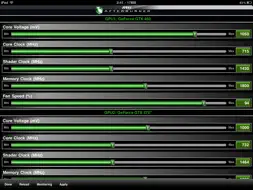
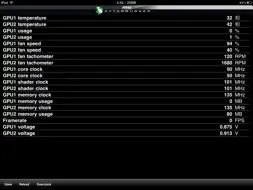
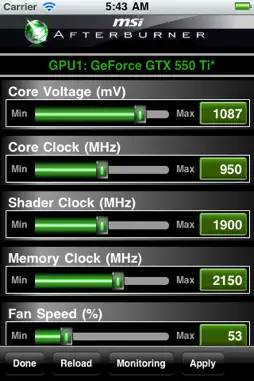
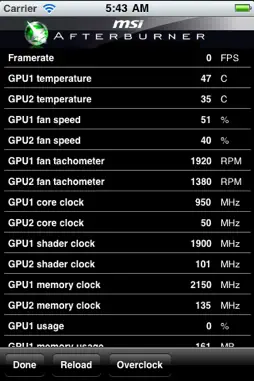
This iOS overclocking utility “Afterburner APP” was co-developed by MSI and well-known software programmer Nick Connors. This new Afterburner utility allows the iPhone, iPod Touch and iPad devices to adjust or monitor MSI Afterburner settings on PC over a Wi-Fi connection. In addition to monitoring the temperature, voltage and fan speed, the utility can also be used for overclocking and overvoltaging! Quick installation guide: Before you want to test MSI Afterburner APP on iOS, you will need: 1. A windows xp sp3 (with .NET 2)/vista/7 system with a discrete graphics card and is able to connect to internet/intranet. 2. An iPhone, iPod Touch or iPad with wifi function. (the O/S should be higher v3.2) 3. The system and iOS device can connect to each other over internet or intranet. “RemoteServer” is a utility which should be placed in the host system. Just make sure all files are under in the same folder. Make sure the system has installed the afterburner 2.1.0 or above version, and it has to be started so RemoteServer can read the H/W status through it. How to work - Step by step: 1. Put the folder for RemoteServer on desktop for easy access 2. Run Afterburner (2.1.0 or above version) 3. Run "MSIAfterburnerRemoteServer.exe" to open up the RemoteServer 4. Verify that the remoteServer is running in background 5. Run Afterburner APP on iOS device 6. Enter the system IP (you can find ip over RemoteServer) into the IP settings of Afterburner APP to make a connection of Afterburner APP and Remote Server. 7. If the monitoring and OC funtions work properly, now it's time to enjoy it! BTW, each clock/voltage/fan adjustment over afterburner app, you will have to press "apply"! RemoteServer can be download from here: http://event.msi.com/vga/afterburner/images/MSIAfterburnerAPP_Android_10.rar
What's New
Version 1.0.1 2011-11-09
Support for iOS 5 Version 1.0.0 2011-10-28
App Store User Reviews
Dizzysleep 2016-02-26
Great concept...
This app is a great idea that was never finished. The app is very unstable now and is useless for overclocking. The only thing you can do is monitor your system...
Borlosky 2017-03-13
Doesn't work
First off, app doesn't work, there are ZERO instructions to setup in the download of remote server itself or from MSI's website. Secondly, app hasn't been updat...
BeSweeet 2011-11-10
Doesn't seem to work
Was pretty excited to see this app hit the App Store, but not anymore... The RemoteServer doesn't work for me no matter what. It would often error out or crash...
Adamr1113 2016-10-27
Why even advertise this?
I saw this when I went to re-download MSI afterburner for my PC and it was advertised full page like it was a huge new thing! MSI be like: "are you still usin...
KennyD 2013-06-15
Broken, doesn't work
Understand that when I say, "doesn't work" I'm operating on the general assumption that EVERYONE has that if they install a program/app it should be able to ope...
Faizoff 2011-11-12
Not bad at all
Used it for a while today for the first time. When it works it updates in real time. Has to have afterburner on the pc open for the app to be able to monitor. ...
cpthom79 2014-03-12
Works for the most part...
Works ok, but it will crash from time to time. Then I can't open it or any other app until I reset the entire iPad. Would love to see and update for this soo...
xxbikerj1985xx 2011-11-24
It's ok
Everything worked just fine an dandy for me, using Win7. after i completely disabled my firewall that is. no matter what i tried to allow it in the firewall it ...
Some Random Bloke 2013-05-22
No appropriate link on website to report crash.
The app crashes on every attempt to go into the overclocking function and deletes the port number from configuration every time. There appears to be no proper w...
Tiffany4456 2012-04-20
Awesome!
Great app! And please, I beg you, trust me when I say that the reason it doesn't work for some of you is because you don't know 100% how to do it. Please, trust...
Technical Analysis
Package Overview Basic metadata
Bundle ID
com.msi.afterburner Current Version 1.0.1
Minimum iOS 3.2
Package Size App Store Size
Package Metadata 1 / 2 version records
Detailed binary, privacy manifest, framework, and Info.plist results have not been indexed for this package yet. The verified App Store and archive metadata above remains available.
Related Apps


Developer Information
Known Version Records
1 version record with stored package metadata • 2 known version records
Stored metadata does not guarantee a package is currently available to download.
| Details | Version / IDs | Version date | Action |
|---|---|---|---|
 1.61 MB | v1.0.1 App Store ID: 4818964Build: 1.0.1 | 2011-11-03 21:15:14 | Get Version |
| Not archived | v1.0.0 App Store ID: 4436882Build: 1.0.0 | 2011-10-28 03:19:08 | Request Version |