
Preview







Description
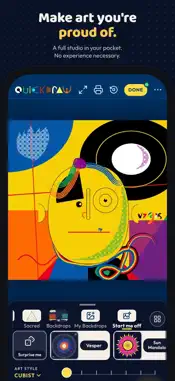
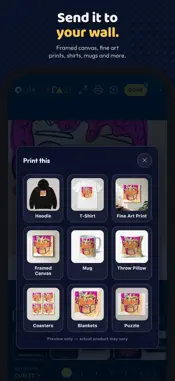
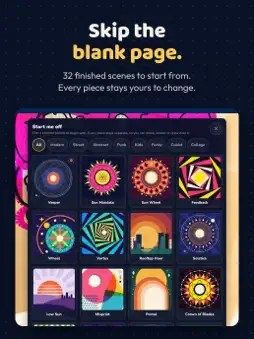
No experience necessary. Limitless possibilities. Art in minutes, delivered in days. Quickdraw is a full art studio on your iPad and iPhone. Draw freehand, mix in hundreds of ready-made pieces, or combine both into something entirely your own. Whether you're a lifelong artist or picking up a stylus for the very first time, Quickdraw meets you where you are and gets out of your way. CREATE YOUR WAY • Draw: seven brushes (Pencil, Marker, Brush, Ink, Pastel, Rake and Spray), each in several styles, from charcoal and crayon to ballpoint and splatter. Tuned for Apple Pencil on iPad and for your finger on both. • Build: hundreds of ready-made heads, features, hair, hats, shapes and backdrops. Assemble a piece without drawing a single line, or pick one of 32 abstract scenes to start from. • Mix: bring in your own photos, cut them out, recolor everything with one tap, and watch a scene come together. SEVEN ART STYLES, ALL INCLUDED Cubist, Modern, Street, Punk, Abstract, Kids and Funky. Every style pack is hand-built with its own faces, features, hair and shapes. LEARN AS YOU GO On iPad, Art School offers twelve guided lessons: trace each line over a faint guide, one at a time, and build up to a finished picture. On iPhone and iPad, Learn shows short how-to videos for each skill, in English and Spanish. REAL STUDIO TOOLS Layers with opacity and blend modes, texture and gradient fills, symmetry, paper textures, a cut tool for collage, Timelapse that records your process as a video, and a Gallery with folders for everything you save. FROM SCREEN TO YOUR HANDS Love what you made? Send it straight to Print Shop for framed canvas, fine art prints, shirts, hoodies, mugs and more, shipped to your door. No account needed. Just tap and start creating. SUBSCRIPTION Quickdraw is free to download and needs a subscription to use, with a 1-week free trial for new subscribers. Choose monthly or annual. Payment is charged to your Apple Account at confirmation of purchase. The subscription renews automatically unless you cancel at least 24 hours before the end of the current period. Manage or cancel any time in Settings > your name > Subscriptions. Terms of Use: https://www.apple.com/legal/internet-services/itunes/dev/stdeula/ Privacy Policy: https://www.ilovequickdraw.app/privacy.html
What's New
Version 1.3 2026-11-15
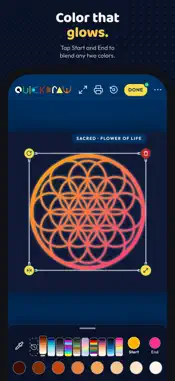
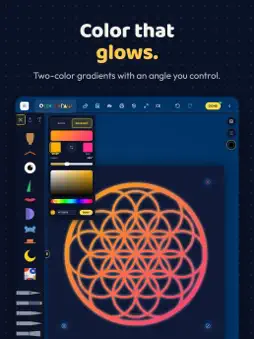
Quickdraw 1.3: more color, more room, and a safer Timelapse. • Gradients. Give any shape or Sacred Geometry piece a two-color gradient and set its angle. The F...Quickdraw 1.3: more color, more room, and a safer Timelapse. • Gradients. Give any shape or Sacred Geometry piece a two-color gradient and set its angle. The Fill tool paints gradients too, with the bucket, the brush or the lasso. Gradients carry into Save, Print and Timelapse exactly as you see them. • Start me off. Pick one of 32 abstract scenes and make it yours. Surprise me now builds color-led pictures from shapes, Sacred Geometry and patterned backdrops. • Timelapse, rebuilt. Choose Quick or Every step for your video. Recordings are kept safely on your device, so one that was interrupted comes back, and a new shelf lets you watch, make a video, or delete. • Cut shows a bold trail with a start marker, so you can stay on the line you are tracing. • Any piece can now grow as large as the canvas. • Flip a piece from its corner handle. • Bloom: tap a card to go to that piece, tap it again to Select, Duplicate or Color it, and hold a single piece to open the same card. • Every premade piece now takes your color, and Color Themes no longer wash a picture down to one color. • Rotate shows its degrees beside the piece, not over it. • iPhone: a Full screen button in the top bar hides the tools and shows only your piece. Tap Exit to bring them back. • iPhone: Drawing speed, the Turtle to Rabbit slider, now sits right in the Draw panel. Turtle smooths shaky lines; Rabbit follows your finger exactly. • iPad: one studio for every age, with every brush and tool always there (the Kids art style is still in the tray). The iPad also gets Done with autosave, Clear Canvas, Tint, a Paper chip, a size and opacity card, recent colors, and Learn videos. • A slide-over tool rail tucks away while you draw and comes back with a swipe. • Clearer message if your connection drops during a purchase. No experience necessary. Mistakes welcomed. Technical Analysis
Package Overview Basic metadata
Bundle ID
art.quickdraw.app Current Version 1.3
Minimum iOS 15.0
Package Size App Store Size
Package Metadata 0 / 0 version records
Detailed binary, privacy manifest, framework, and Info.plist results have not been indexed for this package yet. The verified App Store and archive metadata above remains available.
Developer Information
Known Version Records
0 version records with stored package metadata
Stored metadata does not guarantee a package is currently available to download.
| Details | Version / IDs | Version date | Action |
|---|