Preview



Description
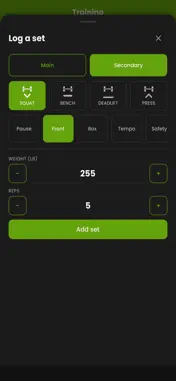
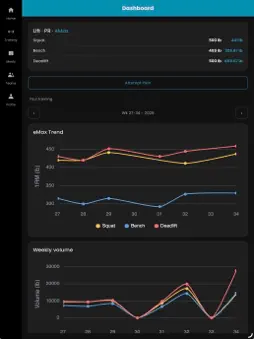
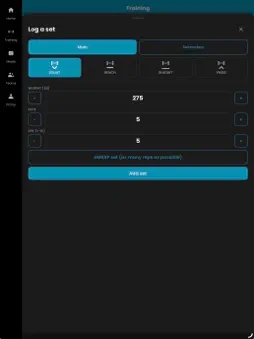
Platform Manager — Training and Meet Management for Powerlifters Whether you're chasing a new PR or prepping for your next meet Platform Manager keeps everything in one place. Training Log Log every set with real weight, reps, and RPE. Track estimated 1-rep max over time with built-in charts for squat, bench, and deadlift. Add session notes and body weight so your training history tells the whole story — not just the numbers. Attempt Planner Plan your openers, second, and third attempts before you ever step on the platform. Weights display in both kg and lb, so there's no last-minute math on meet day. Meets Discover upcoming meets, save the ones you're attending, and pull up the full roster before you compete. On meet day, follow live platform-by-platform lifting order, upcoming lifters, and attempts in real time. Federation Cards Keep your USAPL, USPA, Powerlifting America, and IPF memberships in one place. Make It Yours Choose light, dark, or system theme, and pick an accent color that matches your gym, your team, or just your taste. Built for lifters who want less time managing spreadsheets and more time under the bar. Subscriptions: Team Manager and Athlete, monthly or yearly, with a 14-day free trial. Payment is charged to your Apple ID and renews automatically unless cancelled at least 24 hours before the period ends; manage or cancel in your Apple ID settings. Terms of Use: https://platformmanager.bigdawg.dev/terms Privacy Policy: https://platformmanager.bigdawg.dev/privacy
What's New
Version 1.13 2026-10-23
What’s new in 1.1.3. Coach Only mode. People who coach or manage a team can choose how they use the app (Profile tab, “How You Use Platform Manager”: Coach Onl...What’s new in 1.1.3. Coach Only mode. People who coach or manage a team can choose how they use the app (Profile tab, “How You Use Platform Manager”: Coach Only or Athlete & Coach). Coach Only hides the Training tab and the athlete settings. The switch only appears for someone who has been given a coach role on a team (a team manager adds coaches, or you create a team with a Team Manager plan), so the demo account below, which has no team, will not show it. A second demo account that manages a team is available on request. Join as camera. A coach in Coach Only mode has a camera button on the Home tab; it opens the camera to scan a QR code and join another phone’s set recording as an extra camera angle. Athletes have the same button in the Training tab header. Background upload. If the person has an Athlete or Team Manager plan and turns on Cloud Backup (Profile, Video), set videos finish uploading after the app is closed, using iOS background processing. The “processing” background mode is declared for this only. An interrupted upload now resumes instead of starting over. New app icon. Technical Analysis
Package Overview Basic metadata
Bundle ID
com.rulandgroup.platformmanager Current Version 1.13
Minimum iOS 15.0
Package Size App Store Size
Package Metadata 0 / 0 version records
Detailed binary, privacy manifest, framework, and Info.plist results have not been indexed for this package yet. The verified App Store and archive metadata above remains available.
Known Version Records
0 version records with stored package metadata
Stored metadata does not guarantee a package is currently available to download.
| Details | Version / IDs | Version date | Action |
|---|