Preview



Description
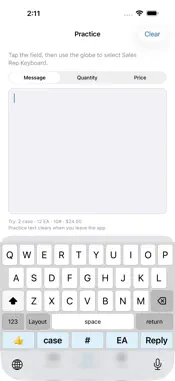
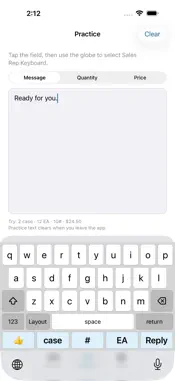
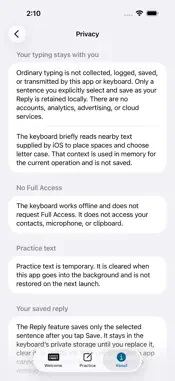
Sales Rep Keyboard keeps everyday food-order quantities and replies within reach. The original layout combines a permanent number row with familiar English QWERTY letters. Five shortcuts stay directly below the space bar: yellow thumbs-up emoji, smile emoji, case, #, and EA. Prefer larger letter keys? Tap Layout for taller letters without the number row. This layout keeps thumbs-up, case, #, EA, and Reply below Space. Numbers and punctuation remain available through 123. The original layout is still the default. SAVE A SENTENCE FOR QUICK REPLIES Type a sentence and select it in your message or the Practice field. Hold Reply, review the selected sentence, and tap Save. Tap Reply to insert it exactly, without sending the message. Hold Reply to replace or clear it. Save up to 500 characters, including punctuation and emoji. MADE FOR EVERYDAY ORDERS • Enter quantities, prices, decimal values, and punctuation. • Insert lowercase case, uppercase EA, and an exact # for orders such as 10#. • Use Shift, Caps Lock, repeating backspace, and the host app's Return action. • Switch between letters, symbols, number, and decimal layouts. • Use light or dark appearance in portrait or landscape. • Practice with fictional orders and follow the included setup instructions. PRIVATE AND OFFLINE No Full Access, account, subscription, or additional purchase is required. Ordinary typing is not logged, saved, or transmitted. Only a sentence you explicitly choose and Save for Reply is retained in the keyboard's private local storage. You can clear it at any time. Nearby text is used transiently for spacing and capitalization. Practice text clears when the app enters the background. The app where you type controls its own messages and documents. GET STARTED Enable the keyboard in Settings > General > Keyboard > Keyboards > Add New Keyboard. Hold the globe to choose Sales Rep Keyboard in a supported text field. Made for iPhone running iOS 17 or later. Secure fields, some phone-number fields, and apps that block custom keyboards use Apple's keyboard instead. This keyboard does not provide swipe typing, predictions, or spelling correction. For voice input, use Apple's system Dictation where available or switch to an Apple keyboard, dictate, then switch back. Availability depends on the device, language, settings, and host app. This keyboard does not record audio or provide a transcription service.
What's New
Version 1.1 2026-09-25
Added an optional Large keys layout with taller letters and no number row. The original number-row layout remains the default; tap Layout to switch. The new la...Added an optional Large keys layout with taller letters and no number row. The original number-row layout remains the default; tap Layout to switch. The new layout keeps thumbs-up, case, #, EA, and Reply directly below Space. Use 123 for numbers and symbols. Select a sentence, hold Reply, and Save for one-tap reuse. Your saved reply stays locally in the keyboard, works without Full Access, and can be replaced or cleared. Updated setup and privacy instructions explain both layouts and the saved Reply. Technical Analysis
Package Overview Basic metadata
Bundle ID
com.mikemeffe.foodsaleskeyboard Current Version 1.1
Minimum iOS 17.0
Package Size App Store Size
Package Metadata 0 / 0 version records
Detailed binary, privacy manifest, framework, and Info.plist results have not been indexed for this package yet. The verified App Store and archive metadata above remains available.
Developer Information
Known Version Records
0 version records with stored package metadata
Stored metadata does not guarantee a package is currently available to download.
| Details | Version / IDs | Version date | Action |
|---|