Preview






Description
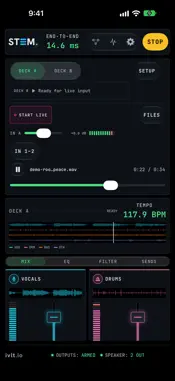
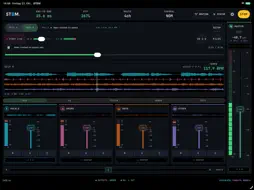
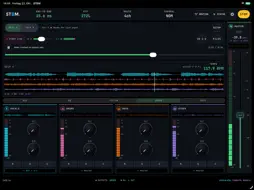
Plug in your audio interface, start the record, and the vocal is on its own fader. STEM splits what is playing — or what is coming in from your mixer — into vocals, drums, bass and everything else, live, on your iPad or iPhone. Each stem lands on its own pair of hardware outputs, so your desk does the mixing. No upload. No render queue. No waiting for a track to be analysed before you can play it. LIVE IN, STEMS OUT Feed STEM from your interface — a turntable through your mixer, a booth output, an instrument — and it separates what is coming in, with the engine aimed at a live source instead of a file. The mix you did not make, taken apart. EVERY STEM ITS OWN OUTPUTS Each stem takes its own pair of hardware channels — vocals to 3-4, drums to 5-6 — up to 16 channels, assigned in a routing matrix that remembers each interface. Outputs start muted until you confirm the routing, because a misrouted stem into a PA is the mistake worth preventing. On a device alone the four stems fold down to stereo, and the console says so. TWO DECKS, ONE CROSSFADER One setting runs a second deck: its own separation engine, its own four stems, its own routing. A crossfader between them, constant-power or cut. HANDS ON THE HARDWARE Map any MIDI CC by tapping a control and moving the knob. Soft takeover means a hardware fader never makes the mix jump, and positions are sent back, so motorised faders and LED rings follow the console. A CONSOLE, NOT A DIALOG Long-throw faders with a 0 dB detent, mute and solo per stem, LED metering, a master strip with BS.1770 loudness. Per-stem three-band EQ and a resonant filter — ladder or state-variable, your choice. Cue any stem to a headphone pair before you bring it up. Save the whole desk as a scene and recall it. SENDS, INSIDE OR OUT Up to four stereo sends, each per stem and post-fader. Send one to a hardware pair for your outboard, or to the built-in tempo-synced delay or plate reverb. STEMS WHILE IT PLAYS Load a track and it comes apart as it plays. Seek anywhere and the stems follow, because the separation is happening now rather than being read from a file somebody prepared earlier. TAKE THE STEMS WITH YOU Write a loaded track back out as four 24-bit WAV files, latency-compensated so they sit at zero in a DAW, rendered by the larger offline model. MEASURED, NOT QUOTED Latency, load and real-time margin are read from the running session and shown while you work. The app never displays a number it has not measured. iPad, iPhone AND Mac Use the console in portrait or landscape on iPad and iPhone. The same app also runs on Apple-silicon Macs. Real-time performance depends on your device and session settings. PRIVACY No accounts, no analytics, no network. Your music never leaves the device. AUV3 PLUG-IN — Load STEM as an effect in AUM: audio in, the remix on the first bus and each stem on its own bus. In a host with one output, such as GarageBand, the first bus plays the remix. PREVIEW AUDIO “Rooted In Peace” by Admiral Bob (ccMixter), with “In Peace” by snowflake. CC BY 3.0. Excerpted and processed by STEM. ccmixter.org/files/admiralbob77/33646 · creativecommons.org/licenses/by/3.0/
What's New
Version 1.1 2026-10-23
STEM 1.1 brings STEM into your host app. • New: the STEM AUv3 plug-in. Add it to a channel in AUM and each stem — vocals, drums, bass, other — arrives on its o... Technical Analysis
Package Overview Basic metadata
Bundle ID
io.ivlt.stem Current Version 1.1
Minimum iOS 26.0
Package Size App Store Size
Package Metadata 0 / 0 version records
Detailed binary, privacy manifest, framework, and Info.plist results have not been indexed for this package yet. The verified App Store and archive metadata above remains available.
Developer Information
Known Version Records
0 version records with stored package metadata
Stored metadata does not guarantee a package is currently available to download.
| Details | Version / IDs | Version date | Action |
|---|