
Preview





Description
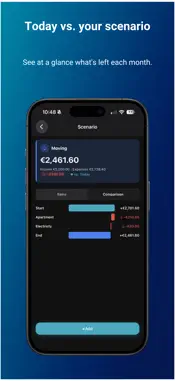
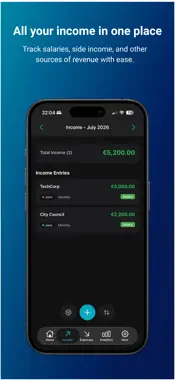
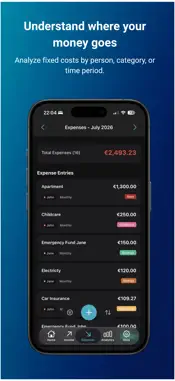
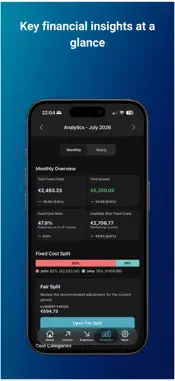
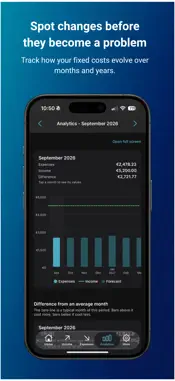
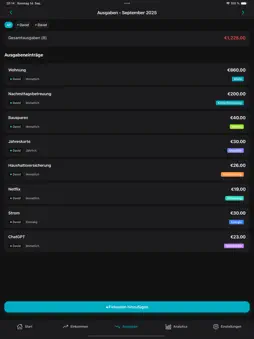
Finally know what's actually left at the end of the month. MonoBudget is a household budget planner built around your fixed costs. Enter your income and your recurring bills, and within minutes you'll see how much money is genuinely free to spend each month. No bank connection, no account, no ads. SET UP IN 5 MINUTES Add your salary, add your fixed costs, done. No lengthy onboarding, no category spreadsheets to fill in first. → Enter your income: salary, side job, benefits → Add your fixed costs: rent, insurance, utilities, subscriptions → MonoBudget immediately shows you what's left Once a cost is set up, MonoBudget keeps creating its monthly entries for you. There's nothing to maintain. NOT AN EXPENSE TRACKER You don't log every coffee here. This is about your fixed, predictable costs, so you know what's genuinely available to spend and where to start if you want to save. YOUR DATA STAYS WITH YOU No account, no sign-up, no MonoBudget server, no tracking. Your financial data lives locally on your iPhone. Back up only if you want to. Encryption happens on the device with a passphrase only you know, and you decide whether a backup stays in the app or goes to your iCloud Drive. You can also export plain JSON at any time and take your data with you. FREE FEATURES - Unlimited income sources and fixed costs - Repeats monthly, quarterly, semi-annually, yearly, or on your own interval in days, weeks, months, or years - Yearly bills counted either in the month they're due or spread evenly across the year - Home leads with the amount left, with your income and fixed costs by category as bars - Your own categories and colors - Sort and filter by person, category, and interval - A reminder before bigger payments like insurance or an annual subscription - App lock via Face ID, Touch ID, or your passcode - 14 color themes, light and dark - Move between months, past and future - Export and import your data: open JSON or passphrase-encrypted - Export all entries as a table (CSV) for Excel, Numbers or Google Sheets - English, German, French and Serbian MONOBUDGET PRO - Analytics: key figures, expenses and income in one chart with past and forecast kept apart, and breakdowns by category and person - Scenarios: work out what a new job, a move or a bigger purchase would do to your budget, without changing your real data. Compare a scenario against your real figures or against another scenario - Fair Split: divide fixed costs fairly between two people, 50/50, by income, by your own percentage, or so both keep the same amount. Personal costs stay out of it. Includes a preview for next year and a monthly adjustment the app enters for you - Add a second person, ideal for couples and shared households - Automatic encrypted backups, created daily in the background - 2 additional premium themes Pro is a one-time purchase. No subscription, no recurring cost. WHAT IF? (PRO) A new job, a move, a loan paid off? The question is always what would be left each month. Copy your real figures into a scenario, adjust what the change would cost or bring in, and compare the result against today. Your real budget stays untouched. WHO IS MONOBUDGET FOR? → You want to know how much is left once every fixed cost is paid → Your fixed costs are high: rent, car, childcare, insurance → Other budget apps feel too complicated → You share costs with a partner or flatmates → Privacy matters to you Made in Austria. No ads, no tricks.
What's New
Version 2.4.0 2026-11-11
NEW: Next due • Home now shows the next three fixed costs that don't come every month, such as insurance or annual fees, with their date and full amount. • Tap ...NEW: Next due • Home now shows the next three fixed costs that don't come every month, such as insurance or annual fees, with their date and full amount. • Tap one to edit it right away. • Home has a new look: the amount left is the big number at the top, with a slim bar for the share already committed. Two cards with your income and fixed costs by category replace the donut chart. • Below the available amount, Home now tells you whether you have more or less left than last month and, when one fixed cost explains the difference, which one. Tap it to open Analytics. NEW: Export as a table • Under More → Data Management you can export all income and expenses as a CSV file for Excel, Numbers or Google Sheets. • Separator and number format match your region. Expenses are negative, so you can add things up right away. NEW: French and Serbian • MonoBudget now speaks French and Serbian too. Both are marked Beta until native speakers have reviewed the texts. NEW: 38 currencies • Choose from 38 currencies instead of 10, among them the złoty, forint, lira and dinar. Search finds them by name or code. • Currencies without cents, such as the yen or won, no longer show decimals. NEW: Fair Split (Pro) • Choose which costs you actually share. What belongs to one person only, like their own phone contract, is no longer split. • New mode "Remainder": after your share of the shared costs, you both keep the same amount, and each of you pays their own costs from what's left. • Amounts per person are shown as monthly averages, and "What is shared" shows each cost's rhythm. • Looking at a past month? One tap takes you back to the current one. • After entering an adjustment you get a short confirmation. CHANGED: Backups • "Save backup as file" and "Restore backup" now live under More → Backup & Security, right above the automatic cloud backups. They used to be called "Export Data" and "Import Data". • After a fresh install you can start the restore straight from Home. IMPROVED • Amounts and percentages follow your region's number format everywhere. • Amount fields now read numbers the way your region writes them. • Exports and backups always contain your latest saved changes. • Fixed costs and entries left behind after a person was deleted are removed and no longer count in your totals. • Duplicate fixed costs and income that older versions created after an amount change are removed once. Anything you edited yourself stays. • Costs repeating every few days or weeks no longer shift by a day when the clocks change. • "Restore purchase" now finds Pro after reinstalling the app, too. • Importing a backup from Home no longer leaves the app stuck. • The theme picker stays open after you tap a theme, and every dark theme now has a dark header. • Resuming cloud backups now shows that something is happening. Technical Analysis
Package Overview Basic metadata
Bundle ID
com.migu.monobudget Current Version 2.4.0
Minimum iOS 16.4
Package Size App Store Size
Package Metadata 0 / 7 version records
Detailed binary, privacy manifest, framework, and Info.plist results have not been indexed for this package yet. The verified App Store and archive metadata above remains available.
Developer Information
Known Version Records
0 version records with stored package metadata • 7 known version records
Stored metadata does not guarantee a package is currently available to download.
| Details | Version / IDs | Version date | Action |
|---|---|---|---|
| Not archived | App Store ID: 889201411 | Unknown | Request Version |
| Not archived | App Store ID: 886681575 | Unknown | Request Version |
| Not archived | App Store ID: 886138778 | Unknown | Request Version |
| Not archived | App Store ID: 881824148 | Unknown | Request Version |
| Not archived | App Store ID: 881384811 | Unknown | Request Version |
| Not archived | App Store ID: 881289179 | Unknown | Request Version |
| Not archived | App Store ID: 878713804 | Unknown | Request Version |