
Preview





Description
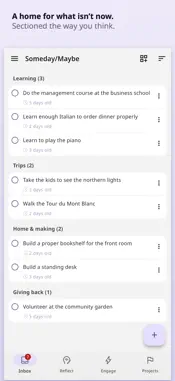
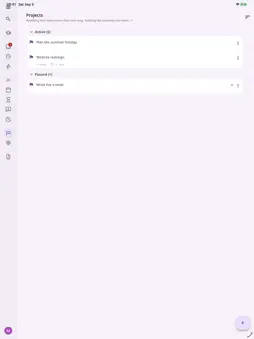
Relay is a complete task, project and goal management app built for Getting Things Done. CAPTURE ANYTHING, ANYWHERE Type it into the app, share to Relay from any app's share sheet on iPhone and iPad, press Control+Option+N on a Mac to capture over whatever you are working in, or forward an email to your own private Relay address. Everything lands in the Inbox and waits there until you decide what it is. CLARIFY, THEN ENGAGE A short step-through turns each item into a next action, a project with a defined outcome, something you are waiting on, a Someday/Maybe item, reference, or something to drop. Engage then shows what you can do now, filtered by where you are, how much time you have, and whether you have the energy for it. GUIDED REVIEWS The weekly review is where most systems quietly fail, because it depends on remembering to check everything. Relay turns it into a wizard that walks you through clearing the Inbox, updating each project and checking your higher horizons, one step at a time. Trigger lists run you through the ordinary categories people skip, so open loops surface instead of staying in your head, and a five-minute daily review shapes each day. HORIZONS, NOT JUST A LIST Relay models the altitudes above the ground floor: the areas you are responsible for, the goals you are working towards, and the vision and purpose above them. A next action belongs to its project, and the project can link up to the goal or area it serves, so you can see what a piece of work is for and notice when a whole area has gone quiet. SHARED WORKSPACES A shared workspace is for a family, a couple or a small team: up to ten people, each with a Relay account of their own, invited with a link or by email. Delegate a task to someone: it lands in their Inbox and waits in your Waiting For. Each shared workspace has its own Agenda and a shared review. Comments on any item keep the discussion with the task. WIDGETS On iPhone and iPad, put a Relay list such as Inbox, Next Actions or your Soft Landscape on the Home Screen, tick something off without opening the app, or tap to capture. On a Mac, add a widget for Inbox, Next Actions, Soft Landscape, Scheduled, Waiting For or Projects. Widgets need iOS 17 or macOS 14. WORKS WITH THE APPS YOU ALREADY HAVE Apple Calendar, Apple Reminders, Google Calendar, Outlook Calendar, Google Tasks, Microsoft To Do, Todoist, Notion and Linear. Your calendar sits beside today's actions, and tasks you keep elsewhere come across without being retyped, into your Inbox first. ON EVERY DEVICE Relay runs on iPhone, iPad and Mac, on Windows and on the web, on one account. Sign in with Google to use one account on every device; Sign in with Apple works everywhere except the Windows app. AI THAT WAITS TO BE ASKED Ask and it helps you clarify. It questions a vague capture, says when something you wrote as a task is really a project, and holds a project's "done when" to a standard someone else could check. It never writes your next actions for you, never rewrites your words, and reads nothing unless you ask. SUBSCRIPTION Relay is a paid product, and every account gets the whole app. New accounts get 30 days free, with no card needed, starting when you choose. After that, pay monthly or yearly. Payment is charged to your Apple Account at confirmation of purchase. A subscription renews automatically unless it is cancelled at least 24 hours before the end of the current period. Manage or cancel yours on iPhone or iPad in Settings, under your name, then Subscriptions; on a Mac, in the App Store app, under your account. Terms of use: https://relaygtd.com/terms Privacy policy: https://relaygtd.com/privacy Getting Things Done and GTD are registered trademarks of the David Allen Company. Relay is not affiliated with, authorised by, or endorsed by the David Allen Company.
What's New
Version 1.1.5 2026-11-01
- An item that holds files, such as the attachments of an email sent to your Email to Inbox address, now shows them as Action Support, right under its descripti... Technical Analysis
Package Overview Basic metadata
Bundle ID
com.relaygtd.relay Current Version 1.1.5
Minimum iOS 15.0
Package Size App Store Size
Package Metadata 0 / 0 version records
Detailed binary, privacy manifest, framework, and Info.plist results have not been indexed for this package yet. The verified App Store and archive metadata above remains available.
Developer Information
Known Version Records
0 version records with stored package metadata
Stored metadata does not guarantee a package is currently available to download.
| Details | Version / IDs | Version date | Action |
|---|