
Preview


Description
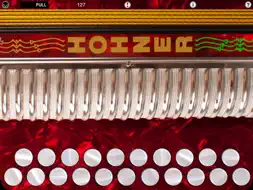
The Hohner MIDI Melodeon is a Button Accordion / Melodeon CoreMIDI control surface for the iPad. The app doesn't produce any sound on it own, it is designed for playing hardware and software VST-style MIDI synthesizers via a CoreMIDI compatible interface connected to the dock connector or virtual MIDI instruments like Roland Sound Canvas for iOS, IK Multimedia SampleTank®, or Sonosaurus ThumbJam running on your iPad. The button layout is based on the iconic Hohner Erica diatonic accordion, and the built-in note guide will help you quickly learn your way around the buttons. The app has essentially the same button spacing as the real instrument. Touch the buttons with the fingers on your right hand to play. Buttons light up in green when touched. This style of accordion plays different notes depending on whether you are pushing or pulling on the bellows. Touch the anywhere in the bellows image at the top of the screen for PUSH notes, lift your finger for PULL notes. The PUSH/PULL indicator shows the current bellows direction. Also, the sides of the bellows light up tracking the bellows motion You may slide your fingers between the buttons. Touch the MIDI connector icon at the upper left corner to show the MIDI controls. Using the controls, you may set the overall instrument MIDI volume, MIDI modulation, MIDI channel (1-8), key attack velocity playing style (fixed or variable), velocity min/max, and transposition (+/- 12 semitones). Both fixed and variable velocity modes are provided to allow for expressive playback. In the variable velocity modes, the X or Y touch position within the bellows sets the velocity for the notes being played. The range for the velocity is set using the Min and Max Velocity sliders. For fixed velocity, the Max Velocity slider value is used. You may also set the Max Velocity to less than the Min Velocity to reverse the direction for velocity mapping in the bellows touch areas. Select between B/C or D/G based layout. Other common tunings can be achieved by setting the transposition control. For example, for C#/D tuning, select the B/C layout and set a +2 transposition. Use the "Transmit MIDI Port" switch to choose between "Omni" sending MIDI data to all CoreMIDI apps (matches previous versions of MIDIFlute) or "Virtual Port" sending to a named CoreMIDI virtual output port. When the "Virtual Port option is selected, MIDIFlute will show up as an input option in apps that support virtual ports like Sonosaurus ThumbJam and MidiBridge. "Omni" mode is selected by default. Touch the '?' icon to show the base layout note names for each button (without transposition). Touch the '!' icon at the top center to send an "All Notes Off" message to silence any "stuck" notes should they ever occur. Touch the 'i' icon to show the instructions page. All settings are saved when the app exits. Settings for use with other MIDI synthesizer apps: Sonosaurus ThumbJam: - In "Preferences", under "Options", enabled "Background Audio". If using the "Virtual Port" transmit port option, enable the input port under Preferences / MIDI Control / MIDI Input Connections. IK Multimedia SampleTank: - In Settings (touch the gear icon), enable "Background Audio". IK Multimedia iRig MIDI Hardware MIDI Interface: - For simple direct connection, in MIDI Melodeon, set the "Transmit MIDI Port" option to "Omni" . - If using a MIDI filtering app like MidiBridge to modify the data stream, in MIDI Melodeon, set the "Transmit MIDI Port" option to "Virtual Port". Other CoreMIDI compatible synth apps will have similar settings. Check out my "Celtic Sound" sound module app for Accordion and Concertina sounds. A perfect match for this app! Be sure to visit the AppCordions.com website for MIDI setup and demo videos!
What's New
Version 4.0 2023-01-02
Updated for iOS 13. Technical Analysis
Package Overview Basic metadata
Bundle ID
com.tradlessons.midimelodeon Current Version 4.0
Minimum iOS 13.0
Package Size App Store Size
Package Metadata 1 / 10 version records
Detailed binary, privacy manifest, framework, and Info.plist results have not been indexed for this package yet. The verified App Store and archive metadata above remains available.
Developer Information
Known Version Records
1 version record with stored package metadata • 10 known version records
Stored metadata does not guarantee a package is currently available to download.
| Details | Version / IDs | Version date | Action |
|---|---|---|---|
| 37.72 MB | v4.0 App Store ID: 853984244Build: 4.0 | 2023-01-02 20:56:51 | Paid / Arcade |
| Not archived | App Store ID: 833517023 | Unknown | Paid / Arcade |
| Not archived | App Store ID: 824574634 | Unknown | Paid / Arcade |
| Not archived | App Store ID: 815727553 | Unknown | Paid / Arcade |
| Not archived | App Store ID: 812787470 | Unknown | Paid / Arcade |
| Not archived | App Store ID: 12785633 | Unknown | Paid / Arcade |
| Not archived | App Store ID: 12013836 | Unknown | Paid / Arcade |
| Not archived | App Store ID: 11771691 | Unknown | Paid / Arcade |
| Not archived | App Store ID: 3189128 | Unknown | Paid / Arcade |
| Not archived | App Store ID: 3163378 | Unknown | Paid / Arcade |