Preview






Description
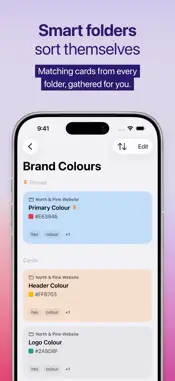
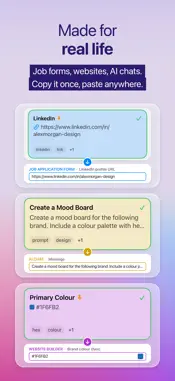
ClipDeck keeps the text you use most often ready to copy in a single tap. Organise reusable text into folders and cards, add tags, apply colours and quickly search within the current folder or across every folder. Tap any card to copy its contents instantly. With iCloud sync, your folders and cards stay available across iPhone, iPad and Mac. Features: • One-tap copying • Fill-in blanks: add {name} to a card and fill it in as you copy • Copy colours as RGB or HSL • Open links, emails and phone numbers straight from a card • Organise cards into folders • Search within one folder or across all folders • Tags and colour coding • Reorder folders and cards • iCloud sync across iPhone, iPad and Mac • Light and Dark Mode • Mac keyboard shortcuts for pinned cards • CSV import and export on Mac Buy ClipDeck once and you get the full app on iPhone, iPad and Mac, with no subscription. From 16 November 2026, new downloads include a 14-day trial of everything. After that, a one-off in-app purchase unlocks adding and editing cards and folders, and your cards stay ready to view and copy either way.
What's New
Version 1.2.1 2026-11-02
New in 1.2.1: • Fill-in blanks: add {name} (or any word in curly brackets) to a card, and ClipDeck asks for it when you copy. • Copy colours as RGB or HSL. • Pa... Technical Analysis
Package Overview Basic metadata
Bundle ID
com.michaelcollett.clipdeck Current Version 1.2.1
Minimum iOS 17.0
Package Size App Store Size
Package Metadata 0 / 0 version records
Detailed binary, privacy manifest, framework, and Info.plist results have not been indexed for this package yet. The verified App Store and archive metadata above remains available.
Developer Information
Known Version Records
0 version records with stored package metadata
Stored metadata does not guarantee a package is currently available to download.
| Details | Version / IDs | Version date | Action |
|---|