
Preview





Description
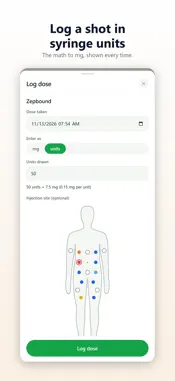
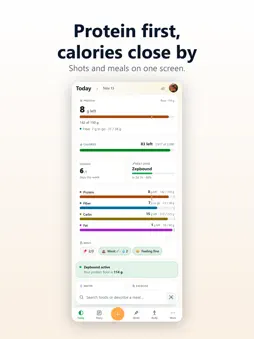
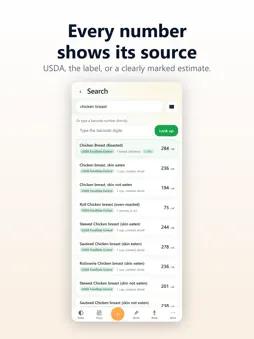
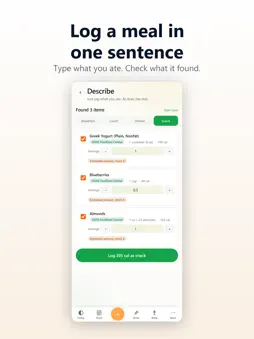
Macroline is a calorie and macro tracker that shows where every number comes from. Each food carries its source: USDA, the manufacturer, the restaurant, the Open Food Facts community, or an estimate that says it is one. Type what you ate, scan a barcode, or search, and see what's left for the day at a glance. KNOW WHERE YOUR NUMBERS COME FROM Every food shows a source badge. Tap the badge to see exactly where the numbers came from. We never pass a guess off as a fact: an AI estimate is always labeled as one, and you can always adjust it. LOG WITHOUT THE BURDEN - Describe: type "grilled chicken with brown rice and broccoli" and Macroline turns it into logged entries, each with its source. No ten-tap forms. - Scan: point your camera at any barcode. We match it against USDA, Open Food Facts, and our own catalog. Scanning is free. - Search: type-ahead with brand, alias, and fuzzy matching. - Recents, favorites, and saved meals: you eat the same foods on repeat. Re-log your usuals, or a whole meal, in a couple of taps. HIT YOUR PROTEIN Set a protein target with the built-in calculator and track toward it every day. (It is a starting point, adjust it with your dietitian.) GLP-1 AND WEIGHT-LOSS MEDICATION TRACKING Track semaglutide, tirzepatide, naltrexone-bupropion, phentermine, and more. See your dose-in-system over time, log side effects, and watch how it lines up with your week. (Macroline does not provide medical advice.) YOUR BODY LOG Bathroom breaks, how you feel, supplements, and your cycle, one tap each, right alongside your meals. Turn on only the sections you want. WEIGHT TRENDS, NOT DAILY NOISE Sync your weight with Apple Health and watch the trend over weeks instead of obsessing over the daily number. CONNECT YOUR AI ASSISTANT Macroline ships with an MCP server, so you can connect Claude or other AI tools to log meals, query your diary, and ask "how much protein have I had this week?" straight from your assistant. USE IT ANYWHERE Macroline also runs in your browser at my.macroline.app, so your diary follows you across your devices. NO DIET SHAME No streak pressure. No fasting nudges. No "you ate too much" messages. Tracking is for awareness. What you do with it is up to you. PRO FEATURES - Unlimited Describe (AI meal parsing) - Cross-source food research - MCP integration for AI assistants - Priority support Free tier includes search, scan, manual logging, recents, weight tracking, medication tracking, Apple Health sync, the protein calculator, and 3 Describe parses per day. PRICING Free with optional Pro: - $4.99/month - $39.99/year (save 33%) Auto-renews unless canceled at least 24 hours before the end of the period. PRIVACY No third-party analytics, no ad SDKs, no selling your data. Account deletion is one tap in Settings. Read our policy at macroline.app/privacy.
What's New
Version 1.11.1 2026-11-13
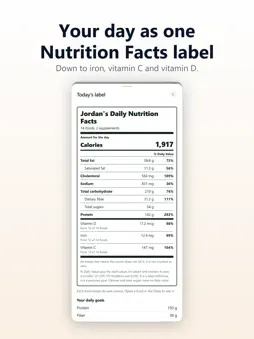
New in this update: - Shots has a new body map with 16 spots, including middle left and middle right on the abdomen. Inner thigh is no longer on the map; shots ...New in this update: - Shots has a new body map with 16 spots, including middle left and middle right on the abdomen. Inner thigh is no longer on the map; shots you logged there keep their name. - Rotation order: if you rotate around your abdomen in a set order, pick Clockwise or Counter-clockwise, and the Shots card reads back the next spot in your order. It stays off until you pick one. - The dose chart colours each stretch by the dose you logged, leaves room above the highest point, and opens on the last 4 weeks. - Pinch to zoom on the weight, body composition and measurement charts. Swiping back on the weight chart stops at your first weigh-in. - Supplements have their own section in the Diary, with what each one added from its label. - Rows of numbers now read in one order: protein, fiber, water, calories, carbs, fat. - The day's Nutrition Facts label has your name at the top, then your daily goals and the day's steps and workouts. - Pro custom colours: give Today, Diary, Shots and Body their own card colour. - When you edit a dose, or look at a supplement you took, the time shows in the time zone you logged it in. - If you delete your account on the web or another phone, its progress photos are removed from this iPhone the next time Macroline opens with a connection. - What's new now shows once after each update, and you can send us an idea from More, Help and support. - The daily reminder has a different line each day, and reminders keep working after you sign out and back in. Technical Analysis
Package Overview Basic metadata
Bundle ID
app.macroline.app Current Version 1.11.1
Minimum iOS 15.0
Package Size App Store Size
Package Metadata 0 / 0 version records
Detailed binary, privacy manifest, framework, and Info.plist results have not been indexed for this package yet. The verified App Store and archive metadata above remains available.
Developer Information
Known Version Records
0 version records with stored package metadata
Stored metadata does not guarantee a package is currently available to download.
| Details | Version / IDs | Version date | Action |
|---|