
Preview



Description
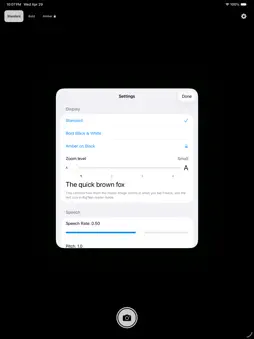
BigWord Magnifier turns your iPhone or iPad into a powerful reading aid. Point your camera at any small text — a menu, a prescription label, a stamp, a tag, a foreign word — and BigWord makes it BIG. Tap any word to magnify it across your entire screen. Tap again to hear it spoken aloud in a clear, natural voice. No fiddling with pinch-to-zoom. No squinting. Just point, tap, read. — PERFECT FOR — Low-vision and aging eyes Seniors who can't read fine print anymore Language learners decoding signs and menus abroad Anyone tired of squinting at tiny labels — HOW IT WORKS — 1. Open BigWord Magnifier. Point your camera at the text. 2. Real-time text recognition highlights every word it sees. 3. Tap any word — it fills your screen, BIG. 4. Tap the speaker icon to hear it pronounced clearly. 5. Tap anywhere to go back and read more. That's it. No tutorials. No accounts. No setup. — DESIGNED AROUND PRIVACY — All text recognition runs ON YOUR DEVICE No images, no text, no data ever leaves your iPhone Works fully offline — even on airplane mode No accounts, no sign-ups, no email required No ads, no tracking, no analytics No third-party services Free to use — no subscriptions, no in-app purchases Your camera stays your camera. What it sees is yours. — ACCESSIBILITY FIRST — • High-contrast modes for low-vision users • Adjustable text size • VoiceOver compatible • Large tap targets throughout • Clear, distraction-free UI • Portrait and landscape supported • Works on iPhone and iPad — REAL-WORLD USES — Prescription labels too small to read Restaurant menus in dim light Price tags and store labels Junk mail and bills Shipping labels and serial numbers Foreign menus, signs, instructions Difficult passages in books Medication dosage instructions Ingredient lists and expiration dates — WHY I MADE BIGWORD MAGNIFIER — Phones already have powerful cameras and brilliant screens. They should be the world's best magnifying glasses. Most apps overcomplicate it — accounts, ads, in-app purchases, dark patterns. BigWord Magnifier does one thing well. Point. Tap. Read. That's the whole product. If something doesn't work, please email support and tell me. — PRIVACY POLICY & SUPPORT — Privacy: https://bigword.app/privacy/ Support: https://bigword.app/support/ Made with care.
What's New
Version 1.0.1 2026-05-23
Pro feature update Technical Analysis
Package Overview Basic metadata
Bundle ID
com.irinabaumer.bigword Current Version 1.0.1
Minimum iOS 17.0
Package Size App Store Size
Package Metadata 0 / 0 version records
Detailed binary, privacy manifest, framework, and Info.plist results have not been indexed for this package yet. The verified App Store and archive metadata above remains available.
Developer Information
Known Version Records
0 version records with stored package metadata
Stored metadata does not guarantee a package is currently available to download.
| Details | Version / IDs | Version date | Action |
|---|