Preview





Description
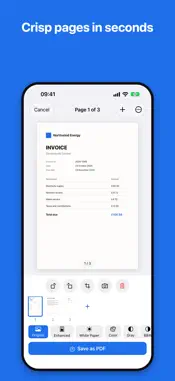
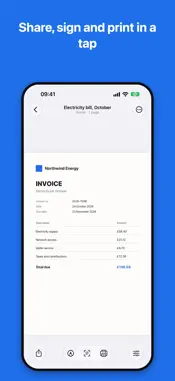
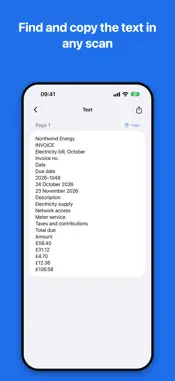
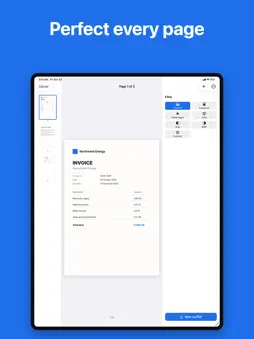
DocClair turns your iPhone and iPad into a fast, private document scanner and PDF editor. Scan with the camera or straight from your printer, sign and annotate, and get a clean, sharp PDF in seconds. No account, no ads, no tracking: everything stays on your device. Automatic edge detection and perspective correction straighten every page, while smart filters (Document, Black & White, Whitening) make text crisp and backgrounds clean. Live framing, lighting and focus guidance, plus a flash for low light, help you capture the perfect page every time. Add pages, reorder them and export a polished multi-page PDF. SCAN FROM YOUR PRINTER • Works with AirScan (eSCL) and Mopria printers and scanners on your Wi-Fi • Flatbed or document feeder, single or double-sided • Quick scans for documents, text and photos, or choose the file type, colour mode, resolution and paper size • Save your favourite settings as presets • Scan several batches in a row into one PDF • Scans travel only over your local network DESIGNED FOR iPHONE AND iPAD • iPhone: search and Scan at the bottom of the screen, folder and tag filters, your latest documents at the top • iPad: a sidebar with your folders and tags, a grid of documents, and details and tools beside every PDF DRAFTS AND EDITING • Save a document in progress as a draft and finish it later: every page keeps its crop, rotation and filter • Edit a saved PDF: add pages from any source, delete them, or drag them into a new order • PDFs are named after your document, ready to share SPECIAL CAPTURE MODES • ID Card mode: front and back on a single, tidy page • Book mode: capture a two-page spread and split it into two pages YOUR DATA, SAFE AND YOURS • Recently Deleted: restore deleted documents for up to 30 days • Local Backup & Restore: save your whole library to one file and bring it back anytime, with no cloud and no account PART OF YOUR DEVICE • Scan with Siri and Shortcuts • One-tap scan from the Lock Screen and Control Centre • A Recent Scans Home Screen widget • Find documents in Spotlight by title or by the text inside them FREE • Scan or import documents up to 3 pages • Automatic edge detection and perspective crop • Enhancement filters • Recently Deleted and local backup • Save, share, rename and print your PDFs DocClair Pro: one-time purchase, no subscription • Unlimited pages per document • Save scans from network printers and scanners • ID Card and Book capture modes • Text recognition (OCR) to search and copy text • Annotate and sign your documents • Compress, merge, split and reorder PDFs • Organise with folders and tags • Password-protect your PDFs Available in English, French, German, Spanish, Italian, Portuguese and Russian, with VoiceOver and Dynamic Type support. Private by design: DocClair works fully offline. Your scans and recognised text are processed and stored only on your device, never uploaded. No subscription. No account. No data collection.
What's New
Version 2.1 2026-10-23
DocClair 2.1 lets you build a document over several sittings, and change it after it is saved. Drafts • Save a document in progress as a draft and finish it la...DocClair 2.1 lets you build a document over several sittings, and change it after it is saved. Drafts • Save a document in progress as a draft and finish it later. Every page keeps its crop, rotation and filter. • Your drafts appear at the top of your library. Edit your PDFs • Open any saved document to add pages from the camera, a network scanner, Photos or Files, or to delete pages. • Drag the page thumbnails to put them in a new order. Also new • PDFs are now named after your document, for example “Electricity Bill.pdf”. • On iPad, the PDF gets the full width, with a smoother page thumbnail column. As always, everything stays on your device: no account, no subscription, no cloud. Technical Analysis
Package Overview Basic metadata
Bundle ID
com.dim.DocClair Current Version 2.1
Minimum iOS 26.5
Package Size App Store Size
Package Metadata 1 / 2 version records
Detailed binary, privacy manifest, framework, and Info.plist results have not been indexed for this package yet. The verified App Store and archive metadata above remains available.
Known Version Records
1 version record with stored package metadata • 2 known version records
Stored metadata does not guarantee a package is currently available to download.
| Details | Version / IDs | Version date | Action |
|---|---|---|---|
| 9.87 MB | v1.1 App Store ID: 887054185Build: 1.1 | 2026-06-17 16:16:03 | Get Version |
| Not archived | App Store ID: 886781869 | Unknown | Request Version |