
Preview




Description
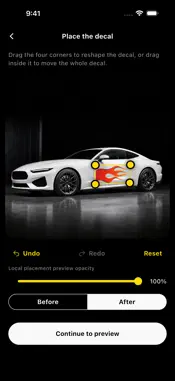
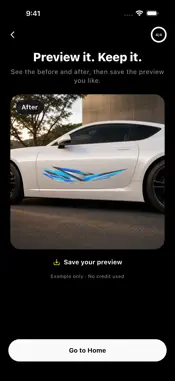
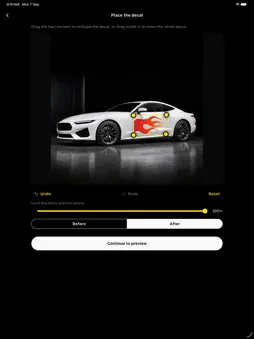
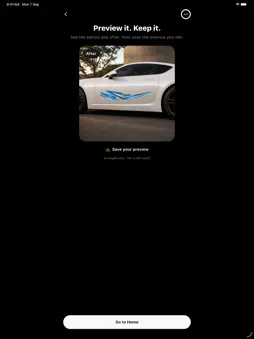
See your decal idea on your car before you commit. DecalFit is an AI-powered studio for creating car decal artwork and exploring how a design could look on a photo of your vehicle. Start with a ready-made design, bring your own artwork, or describe an original idea. CREATE YOUR OWN DIRECTION Describe the decal you have in mind and explore styles, shapes, and colors. Or browse the built-in collection for a starting point. USE YOUR CAR PHOTO Choose a photo from your library or take one with the camera. Select the surface you want to work with, including the hood, side, rear, or rear glass. SHAPE THE PLACEMENT Adjust the position, size, and perspective of supported artwork. Use your selected area and instructions to guide an AI preview. COMPARE, SAVE, AND SHARE Compare before and after, keep selected projects in My Decals, save results to Photos, or share them using your device’s share options. MAKE IT YOURS Use DecalFit in English, Arabic, or Spanish. Sign in with Apple or Google for account-backed credits and purchase recovery. GOOD TO KNOW AI features require an internet connection and credits. Available purchases are shown in the app. AI results can vary and may need another attempt or an adjustment. Previews are visual concepts, not guarantees of physical fit, color, or installation results, and are not print-ready production files. Only upload photos and artwork you have permission to use. Live AI features send your selected inputs to cloud processing as explained in our Privacy Policy. Saved projects are stored locally on your device; saving to Photos is a separate action. - Support: https://imagin4rylabs-e3583.web.app/apps/decalfit/support.html - Terms of Use (EULA): https://www.apple.com/legal/internet-services/itunes/dev/stdeula/ - Privacy Policy: https://imagin4rylabs-e3583.web.app/apps/decalfit/privacy.html
Technical Analysis
Package Overview Basic metadata
Bundle ID
com.imagin4ry.decalfit Current Version 1.0.0
Minimum iOS 15.0
Package Size App Store Size
Package Metadata 0 / 0 version records
Detailed binary, privacy manifest, framework, and Info.plist results have not been indexed for this package yet. The verified App Store and archive metadata above remains available.
Developer Information
Known Version Records
0 version records with stored package metadata
Stored metadata does not guarantee a package is currently available to download.
| Details | Version / IDs | Version date | Action |
|---|