
Preview






Description
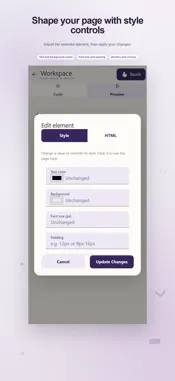
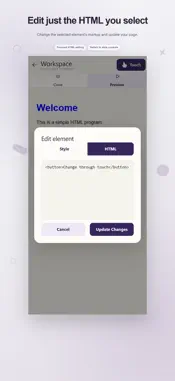
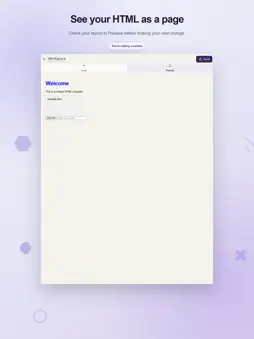
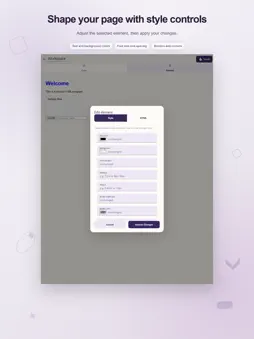
Bring a page idea to life with a workspace that connects your HTML source to its rendered result. Easy HTML Editor lets you write a document, inspect it in Preview, and select a source-backed element to edit its style or markup by touch. MAKE VISUAL ADJUSTMENTS WITH CONTEXT Open Preview, turn on Touch, and tap the part of the page you want to change. The Style panel offers controls for text and background colors, font size, padding, margin, border width, border color, border style, corner radius, and text alignment. Choose a color with the picker or enter a value. Apply your changes to update the selected element in the source and refresh the preview. You can see how a small adjustment affects the page without searching through the entire document to find that element. The HTML panel gives you direct access to the selected element's markup. Edit its text or structure, then use Update Changes to return to the refreshed page. Elements must match the original HTML; for content changed or generated by scripts, use the main code editor. WRITE WITH PRACTICAL EDITING TOOLS The Code workspace includes syntax highlighting, line numbers, wrapping for long lines, bracket matching, and HTML tag completion. Undo and Redo support quick experiments with markup and styles. An on-screen coding row provides commonly used punctuation, including angle brackets, quotes, a slash, and an equals sign. Indentation controls and left and right cursor actions help with precise changes on a touch screen. Find and replace lets you search through a document, move to the next match, replace one occurrence, or replace all matches. Enable Match Case when capitalization matters. Use Go to line to move to a specific place in a longer page. SEE THE PAGE YOU ARE BUILDING The Code and Preview tabs keep the source and output in the same workspace. Switching to Preview renders your current document, including styles and scripts written inside it. After editing in Code, open Preview again to inspect the latest result. Try a heading, a styled box, a button, or a form layout using the sample page supplied in the editor. This makes a useful starting point for understanding how HTML structure and styling affect what appears on screen. SAVE, REOPEN, AND PASS ALONG A PAGE Open saved documents from the app's Documents area, save your HTML work, or choose Save as to create a differently named copy. Share HTML passes the file to another compatible app using the device's sharing options. Local draft saving helps you resume the current document when you return to the editor. Draft recovery depends on available storage and does not replace saving an important page as a file. Give your document a name when you want to keep it for later. SET A COMFORTABLE WORKSPACE Choose a light appearance, a dark appearance, or the system default. The code editor responds to the app theme, keeping the source workspace consistent with your chosen look. Whether you are practicing markup, exploring spacing and colors, or revising a small web page, you can move from source to result and back in a few taps. Self-contained content can be edited and previewed locally, while resources loaded from the web require connectivity.
What's New
Version 2.4 2026-11-04
Bug fixes and performance improved Technical Analysis
Package Overview Basic metadata
Bundle ID
easy.html.touch.editor Current Version 2.4
Minimum iOS 15.0
Package Size App Store Size
Package Metadata 1 / 4 version records
2.0 / 5.0 (1 ratings)
Detailed binary, privacy manifest, framework, and Info.plist results have not been indexed for this package yet. The verified App Store and archive metadata above remains available.
Developer Information
Known Version Records
1 version record with stored package metadata • 4 known version records
Stored metadata does not guarantee a package is currently available to download.
| Details | Version / IDs | Version date | Action |
|---|---|---|---|
| 10.42 MB | v2.2 App Store ID: 862826827Build: 2.2 | 2026-08-21 04:19:34 | Get Version |
| Not archived | App Store ID: 860571580 | Unknown | Request Version |
| Not archived | App Store ID: 854933032 | Unknown | Request Version |
| Not archived | App Store ID: 854676476 | Unknown | Request Version |