
Preview



Description
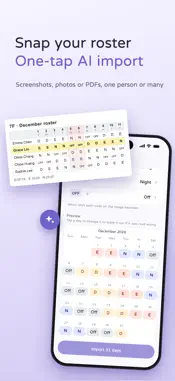
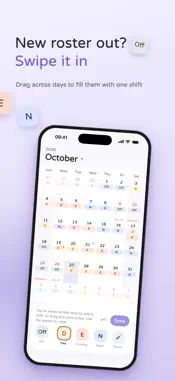
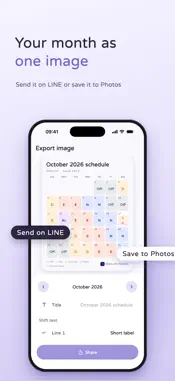
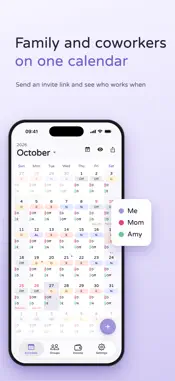
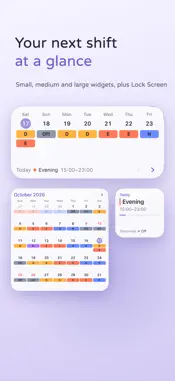
OmyShift is a shift calendar for shift workers in Taiwan: flight crew, nurses and healthcare staff, factory, restaurant, retail, security and call center workers. Swipe across days to fill in a whole month of shifts, see Taiwan's public holidays and make-up days at a glance, mark typhoon days yourself in one tap, and get overtime pay and annual leave calculated under Taiwan's Labor Standards Act. Form groups with coworkers and family to see each other's shifts on one calendar and find the days you're all off. No sign-in needed. Your schedule stays on your phone. SCHEDULING - Paint shifts: pick a shift, then tap or swipe across days. Eraser and undo included - Rotations: set up a pattern like 2 days, 2 evenings, 2 nights, 2 off once, and it fills in the future for you - More than one shift per day, plus custom times, overtime, move and copy - Custom shift names, abbreviations, times and colors EVENTS - Put plans beyond your shifts on the calendar, like dinners, appointments or classes - Get asked to confirm when an event overlaps a shift, and set reminders - Choose for each group whether it sees your events, or keep an event to yourself GROUPS - Invite coworkers, family or a partner by link and see everyone's shifts on the group calendar - Days off together: pick a few members and see the days nobody is working - Tap a day to see who in your groups is off - Board: post notices and to-do lists, and assign items to members - Overlay one group's shifts on your own calendar - Group covers, profile photos and member colors. Export the group calendar as an image - Share only the current month, or the current month and beyond TAIWAN HOLIDAYS - Built-in public holidays and make-up days, based on the official government calendar - Mark typhoon days and other emergency days off yourself in one tap INCOME AND OVERTIME - Labor Standards Act overtime rates built in: tiered rates on weekdays and rest days, double pay on public holidays - Monthly or hourly pay, overtime rates and holiday pay can all be adjusted to match your employer - Month and week views of shifts, hours, overtime and leave - Hourly leave tracking. Annual leave is calculated from your seniority, with rules you can customize MORE - Export your month as an image, send it on LINE or save it to Photos - Reminders before work - Home Screen and Lock Screen widgets: see your next shift, your week or your month without opening the app - Color themes and dark mode - Sign in with Apple or Google to sync across phones, or export a backup file without signing in Privacy Policy: https://omyshift.com/en/privacy Terms of Service: https://omyshift.com/en/terms Feedback: [email protected]
What's New
Version 2026.1108.1 2026-11-10
Now you can: - AI import: set up your whole schedule in one tap - Convert overtime to comp time, with your own multiplier if it counts double - Besides push not...Now you can: - AI import: set up your whole schedule in one tap - Convert overtime to comp time, with your own multiplier if it counts double - Besides push notifications, shifts can now have alarms (iOS 26 and later) - All group members can now invite friends - Besides recurring additions & deductions, you can now add one-time items from Estimated this month, for bonuses, late arrivals, birthday gifts and more - When adding a shift, use Quick fill to copy from an existing shift We've also polished screens and workflows, and fixed lots of little issues, seen and unseen. Technical Analysis
Package Overview Basic metadata
Bundle ID
com.omyshift.omyshift Current Version 2026.1108.1
Minimum iOS 17.0
Package Size App Store Size
Package Metadata 0 / 0 version records
Detailed binary, privacy manifest, framework, and Info.plist results have not been indexed for this package yet. The verified App Store and archive metadata above remains available.
Known Version Records
0 version records with stored package metadata
Stored metadata does not guarantee a package is currently available to download.
| Details | Version / IDs | Version date | Action |
|---|