
Preview



Description
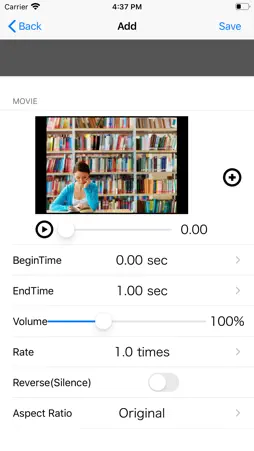
MyEditor can combine multiple videos. In addition, it provides transition, playback speed, reverse playback, volume and trimming. ◆ Watch the tutorial video. 1. If no video is loaded, the tutorial video will be displayed. 2. Press the play button at the top left of the top screen to play the tutorial video. ◆ Import and edit videos. 1. Press the "round icon button" at the bottom center of the top screen to display the list. 2. Press the "New button (blue)" to open the editor screen. 3. Edit the video on the editor screen. ・ Video Video selection: Select the video you want to edit from the photo album. Start position: Set the start position of the part you want to use in the video. End position: Set the end position of the part you want to use in the video. Volume: Set the video volume. Playback speed: Set the video playback speed. Reverse playback: Plays back the video in reverse. ・ Transition Type: Select the transition at the end of the video and the junction with the next video. : None: No transition * Crossfade: The video disappears while fading out. If there is the following video, the video will appear while fading in. : Zoom: The movie disappears while zooming out. If there is the following video, the video will appear while zooming in. Page turning: The video disappears as the page turns. Slide slide (to the left): The video slides to the left. If there is the following movie, it will appear from the right end and slide to the left. Slide slide (to the right): The video slides to the right. If there is the following movie, it will appear from the left end and slide to the right. * Slide (Up): The video slides upward. If there is the following movie, it will appear from the bottom and slide upward. * Slide (down): The video slides downward. If there is the following movie, it will appear from the top and slide down. Period: Set the period of the transition effect. The longer the period, the slower the transition effect will work. 4. To confirm editing, press the “Save button” in the upper right, and to cancel, press the “Back” button in the upper left. * By repeatedly loading multiple videos in the above procedure, the videos are automatically linked. ◆ I want to re-edit a video that has already been created. 1. Press the "round icon button" at the bottom center of the top screen to display the list. 2. Press the "arrow button" at the right end of the line you want to re-edit to open the editor screen. 3. Edit the video in the same way as the new creation procedure on the editor screen. ◆ I want to change the link order of videos. 1. Press the "round icon button" at the bottom center of the top screen to display the list. 2. Press the “edit button (green)” to put the list into “edit mode”. 3. Swipe the icon at the right end of the line you want to change the order to move to the line you want to change. 4). Press the "edit button (green)" again to confirm the change of order. ◆ I want to delete a created video. 1. Press the "round icon button" at the bottom center of the top screen to display the list. 2. There are two ways to delete videos from the list. Individual deletion: Press the "Delete button" displayed by swiping left or right on the line you want to delete. Delete all: Press the “Delete all button (red)”. ◆ I want to play the edited video. 1. Slide the slider at the top of the top screen to the left edge and press the "Play button" at the top left. ◆ I want to save the edited video in the photo album. 1. Select "Save" from the arrow button on the right side of the toolbar to save the video.
What's New
Version 8.0.0 2021-07-09
- iOS14 is now supported. Technical Analysis
Package Overview Basic metadata
Bundle ID
com.mekefactory.myeditor Current Version 8.0.0
Minimum iOS 14.5
Package Size App Store Size
Package Metadata 1 / 38 version records
Detailed binary, privacy manifest, framework, and Info.plist results have not been indexed for this package yet. The verified App Store and archive metadata above remains available.
Developer Information
Known Version Records
1 version record with stored package metadata • 38 known version records
Stored metadata does not guarantee a package is currently available to download.
| Details | Version / IDs | Version date | Action |
|---|---|---|---|
 60.72 MB | v8.0.0 App Store ID: 843016661Build: 8.0.0.0 | 2021-07-08 21:03:30 | Get Version |
| Not archived | App Store ID: 834507534 | Unknown | Request Version |
| Not archived | App Store ID: 834426643 | Unknown | Request Version |
| Not archived | App Store ID: 834258492 | Unknown | Request Version |
| Not archived | App Store ID: 834048205 | Unknown | Request Version |
| Not archived | App Store ID: 833920612 | Unknown | Request Version |
| Not archived | App Store ID: 833673402 | Unknown | Request Version |
| Not archived | App Store ID: 833543328 | Unknown | Request Version |
| Not archived | App Store ID: 833524289 | Unknown | Request Version |
| Not archived | App Store ID: 833421100 | Unknown | Request Version |
| Not archived | App Store ID: 833323454 | Unknown | Request Version |
| Not archived | App Store ID: 833126066 | Unknown | Request Version |
| Not archived | App Store ID: 832987886 | Unknown | Request Version |
| Not archived | App Store ID: 832870725 | Unknown | Request Version |
| Not archived | App Store ID: 832608874 | Unknown | Request Version |
| Not archived | App Store ID: 830429997 | Unknown | Request Version |
| Not archived | App Store ID: 821342291 | Unknown | Request Version |
| Not archived | App Store ID: 820722467 | Unknown | Request Version |
| Not archived | App Store ID: 820115678 | Unknown | Request Version |
| Not archived | App Store ID: 819924083 | Unknown | Request Version |
| Not archived | App Store ID: 817086200 | Unknown | Request Version |
| Not archived | App Store ID: 816786362 | Unknown | Request Version |
| Not archived | App Store ID: 812634470 | Unknown | Request Version |
| Not archived | App Store ID: 812295072 | Unknown | Request Version |
| Not archived | App Store ID: 811953317 | Unknown | Request Version |
| Not archived | App Store ID: 811897341 | Unknown | Request Version |
| Not archived | App Store ID: 811536379 | Unknown | Request Version |
| Not archived | App Store ID: 739392723 | Unknown | Request Version |
| Not archived | App Store ID: 723112679 | Unknown | Request Version |
| Not archived | App Store ID: 714482643 | Unknown | Request Version |
| Not archived | App Store ID: 699202871 | Unknown | Request Version |
| Not archived | App Store ID: 626263871 | Unknown | Request Version |
| Not archived | App Store ID: 577472742 | Unknown | Request Version |
| Not archived | App Store ID: 512442672 | Unknown | Request Version |
| Not archived | App Store ID: 451972646 | Unknown | Request Version |
| Not archived | App Store ID: 81993499 | Unknown | Request Version |
| Not archived | App Store ID: 56462660 | Unknown | Request Version |
| Not archived | App Store ID: 16006947 | Unknown | Request Version |