
Preview


Description
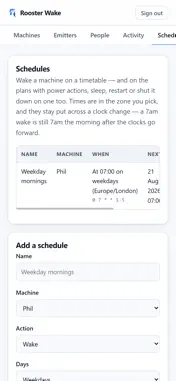
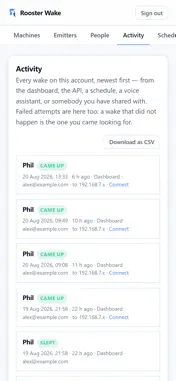
Rooster Wake is for a computer that should be asleep by default, awake while it is being used, and there when you need it. Send a machine to sleep from the sofa, or from another country. Hold it awake while a long job runs, and let it drop back to sleep ten minutes after the last activity. Wake it before you sit down at it. See what the arrangement saved. THE MACHINE'S DAY • Sleep — one tap, and the machine suspends in seconds • Keep awake — hold it up for a window you choose, and it sleeps again by itself when the window ends • It holds itself up while it is genuinely in use: a remote session, a file transfer, a download, a coding session — and lets go ten minutes after the last activity • Restart and shut down, with every action confirmed rather than assumed • Wake it before you sit down at it, or on a schedule that keeps to the clock through the daylight-saving changes WAKING: THE PART THAT DEPENDS ON YOUR HARDWARE A sleeping PC cannot wake itself, so the wake is sent by something on its own network that stays awake: an Amazon Echo you already own, through the free Alexa skill; the free Rooster Wake agent on a NAS, a Home Assistant box, a mini PC or a Raspberry Pi; or a small dongle you build. A wired desktop wakes on a packet. A laptop on Wi-Fi cannot be woken over the network at all — that is the radio, not us — so you sleep it from here and wake it at its own keyboard or by opening the lid. Everything else in this list still works on it. WHAT'S IN THE APP • One roster for every machine, with live presence and the state each one is in • Sleep, keep awake, restart, shut down and wake — with the reason when something does not land • Schedules: wake or power down on a timetable • Voice: "Alexa, turn on the office PC" — the Alexa skill is free on every plan • Share access with family or a team, with roles that limit what each person can do • Activity history: every wake and power action, who asked, and whether it worked • Push notifications when a machine comes up or goes down • An estimate of the electricity saved over the hours your machines spend asleep, priced at your own tariff Getting started is free: sign in with your email and install the free agent on the machine you want to control — it adds itself to your list. Setting up takes minutes at roosterwake.com. Terms of Use: https://www.apple.com/legal/internet-services/itunes/dev/stdeula/
What's New
Version 1.0.1 2026-11-16
A small update to the app’s store listing. Nothing changes in the app itself. Technical Analysis
Package Overview Basic metadata
Bundle ID
com.roosterwake.app Current Version 1.0.1
Minimum iOS 15.0
Package Size App Store Size
Package Metadata 0 / 0 version records
Detailed binary, privacy manifest, framework, and Info.plist results have not been indexed for this package yet. The verified App Store and archive metadata above remains available.
Developer Information
Known Version Records
0 version records with stored package metadata
Stored metadata does not guarantee a package is currently available to download.
| Details | Version / IDs | Version date | Action |
|---|