Preview




Description
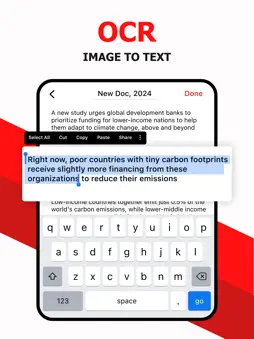
Scan PDF, photos, documents, papers, notes, books, and receipts with the versatile document scanner & converter. Turn your device into a portable mobile scanner. This is an easy and reliable PDF scanner. It allows you to perform various types of scans through the auto-capturing feature. Scan PDF, photos, receipts, notes, papers, documents, books, etc. and convert them to JPG or PDF. You can edit, delete, save, and share documents with this document scanner & PDF maker. You can also add signs and convert images to text (OCR) by using the PDF scanner. Key Features: - Scan PDF, photos, receipts, notes, papers, documents, books, etc. - Scan visiting cards and edit details. - Extract images and edit text (OCR). - Draw a sign on your document. - Edit, delete, save, and share information. - Import images and export as JPG or PDF. Document Scanner: Scan PDF, photos, papers, documents, books, notes, and receipts using the automatic capturing feature of this document scanner. The document scanner is very useful for students and professionals like managers, accountants, and lawyers. Edit, crop, filter, rotate, save, delete, and share features are also available. Make your file management easier and more organized with it. Book Scanner: Scan magazines, novels, notes, papers, and books with the book scanner app. It reduces the dependency on scanning and printing machines. The paper scanner and PDF maker can combine multiple images and create high-quality PDFs. Image to PDF Converter: Import images from the device gallery or scan anything and convert it to JPG or PDF. You can combine multiple photos in a single PDF file by using the PDF maker. OCR Text Scanner: You can extract text from the photo or document and convert it into editable text by using optical character recognition (OCR). With this text scanner, you can save time by avoiding manual data entry. Then you can save it or create a PDF. Add Signature: Sign PDF documents and photos anytime and anywhere. It saves you time and makes document management easier and smarter. Share: Share your scanned or created files via email, Facebook, WhatsApp, Drive, and more by using this PDF scanner.
What's New
Version 1.1.0 2026-10-09
- Smaller App Size, Faster App Launch - Quicker Loading Across the App. - Improved Stability. - Smoother Scrolling and Transitions. - Fixed Crashes and App Not ...- Smaller App Size, Faster App Launch - Quicker Loading Across the App. - Improved Stability. - Smoother Scrolling and Transitions. - Fixed Crashes and App Not Responding Issues. Technical Analysis
Package Overview Basic metadata
Bundle ID
com.pdfscanner.scandocuments.doc.sign Current Version 1.1.0
Minimum iOS 16.0
Package Size App Store Size
Package Metadata 0 / 8 version records
Detailed binary, privacy manifest, framework, and Info.plist results have not been indexed for this package yet. The verified App Store and archive metadata above remains available.
Developer Information
Known Version Records
0 version records with stored package metadata • 8 known version records
Stored metadata does not guarantee a package is currently available to download.
| Details | Version / IDs | Version date | Action |
|---|---|---|---|
| Not archived | App Store ID: 885155167 | Unknown | Request Version |
| Not archived | App Store ID: 879665802 | Unknown | Request Version |
| Not archived | App Store ID: 877701769 | Unknown | Request Version |
| Not archived | App Store ID: 876055577 | Unknown | Request Version |
| Not archived | App Store ID: 875256551 | Unknown | Request Version |
| Not archived | App Store ID: 874645789 | Unknown | Request Version |
| Not archived | App Store ID: 873317179 | Unknown | Request Version |
| Not archived | App Store ID: 871140632 | Unknown | Request Version |