
Preview




Description
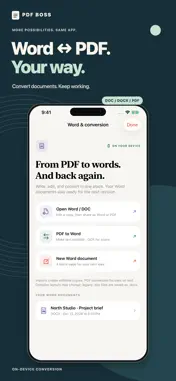
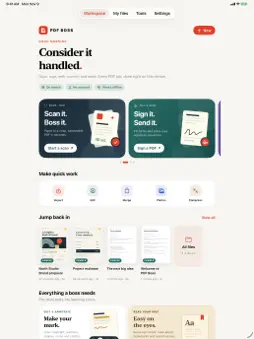
PDF Boss brings everyday PDF and Word work together on iPhone and iPad. WORD AND PDF • Import Word documents and edit text, formatting and lists in an editable copy. • Convert Word documents to selectable PDFs. • Turn PDF text into an editable Word document, with on-device OCR for scanned pages. • Export Word edits as DOCX. Legacy DOC files save as DOCX. PDF-to-Word focuses on text; complex original layouts and PDF images are not reconstructed. READ AND MARK UP • Open and search PDFs, then highlight, underline or strike through selectable text. • Draw with a pen, pencil or translucent highlighter. Change colors, width and opacity, use a straightedge, and erase part of a stroke. • Add movable text boxes, signatures, sticky notes, shapes and stamps. SCAN AND PREPARE • Scan paper or import PDFs and photos. • Make image-only scans searchable with on-device text recognition. • Merge, reorder, extract, crop and add pages. • Add page numbers, optimize images and prepare files to send. CONTROL WHAT YOU SHARE • Fill supported interactive PDF forms and make password-protected copies. • Erase or cover original content with a chosen color, or blur it, in a separate image-only copy. Inspect the result before sharing. Blur is a visual effect and should not be used for secure redaction. • Export, share or print through iOS. PDF BOSS PRO The optional auto-renewable subscription unlocks on-device comparison of searchable PDFs and shareable text change reports. The PDF, scanning and Word tools above are free. • Monthly plan: US $1.99 per month. • Yearly plan: US $9.99 per year. Prices vary by country and are shown before purchase. Payment is charged to your Apple Account. Subscriptions renew automatically unless canceled at least 24 hours before the current period ends. Manage or cancel in Settings > Subscriptions. Your library stays on your device. No account is required. Some features depend on your device and iOS version. Privacy Policy: https://github.com/MohammadJahirul/pdfboss-support/blob/main/privacy.md Terms of Use: https://www.apple.com/legal/internet-services/itunes/dev/stdeula/
What's New
Version 1.4.1 2026-11-19
Get to your PDF jobs faster with Siri and Spotlight. • New App Shortcuts: Scan Document, Sign a PDF, PDF to Word and Prepare to Send. Say “Sign a PDF with PDF ...Get to your PDF jobs faster with Siri and Spotlight. • New App Shortcuts: Scan Document, Sign a PDF, PDF to Word and Prepare to Send. Say “Sign a PDF with PDF Boss”, or find them in Spotlight, the Shortcuts app and on the Action button. • Shortcuts respect your workspace lock and never close a document you’re editing. Technical Analysis
Package Overview Basic metadata
Bundle ID
com.pdfboss Current Version 1.4.1
Minimum iOS 18.1
Package Size App Store Size
Package Metadata 0 / 0 version records
Detailed binary, privacy manifest, framework, and Info.plist results have not been indexed for this package yet. The verified App Store and archive metadata above remains available.
Known Version Records
0 version records with stored package metadata
Stored metadata does not guarantee a package is currently available to download.
| Details | Version / IDs | Version date | Action |
|---|