Preview




Description
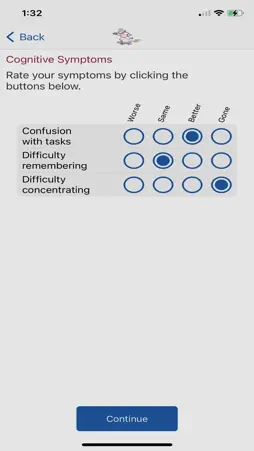
The presentation of symptoms after concussion can have a significant impact on your participation in daily life, including at school and in sport… but the Back2Play App is here to help! Whether you are in class or on the field, the Back2Play App will evaluate your concussion symptoms and provide you real-time activity data. The Back2Play App will also help guide you through the CanChild Return to Activity (RTA) and Return to Sport (RTS) protocols (https://canchild.ca/en/resources/249-concussion-mild-traumatic-brain-injury-guideline-brochures) and suggest activity adjustments to minimize your symptoms. The Back2Play App was designed by clinicians, engineers, exercise physiologists, and youth just like you! Our youth Advisory board helped us build the Back2Play App specifically for children/youth with concussion. The App is available in grey or dark mode for concussed children/youth with sensitivity to light and is available in French! Manage your concussion with key features of the Back2Play App: Symptom Tracking While using the Back2Play App, you will be asked to complete symptom surveys 3x/day (Morning, Afternoon and Evening) and report your stage of RTA and RTS. If you report worsening or increased symptoms, the Back2Play App will send you an alert. Cognitive/Physical activity Checklists and Assessments The Back2Play App will ask you to complete cognitive and physical activity checklists to help you identify what activities increase symptoms. As you move through the RTA/RTS stages, the Back2Play App will ask you to complete a cognitive challenge to see how well you are recovering. Real time activity monitoring The most unique function of the Back2Play App is the real time activity monitoring. The Back2Play App will track your total physical activity as well as time spent in light, moderate and vigorous activity using the Apple Watch. Measuring physical activity will allow you to compare your activity level to the RTA/RTS recommendations. If you exceed the physical activity recommendations listed within the RTA/RTS guidelines, you will receive a notification from the Back2Play App asking you to rest. In addition to tracking physical activity, the Back2Play App will monitor your heart rate and notify you if your heart rate is too high. This innovative assessment of concussion symptoms and real time biological feedback will provide you a detailed understanding of your injury and assist in your recovery. *Note: The Back2Play App uses Health Kit to read your heart rate and physical activity data Summary charts and the “sharing” function At the end of each day, the Back2Play App will provide you with summary charts such as “Total Symptoms”, “Total Activity Minutes” and “Moving through the Stages”. These charts will allow you to monitor your symptoms and stage of recovery. Most importantly, the Back2Play App will allow you to send email/text notifications to your parents or guardians and keep them informed about your recovery status. The issue of returning to activity after concussion is very important to the children and families of Canada. Protecting the brains of our children through increased knowledge and decision-making based on sound research is paramount. Through symptom and activity monitoring the Back2Play App is a critical tool necessary to assist you/your child in concussion management. Click here to download: *Note: 1. This is App does not provide medical advice. For diagnosis of concussion and presentation of severe symptoms, please contact your doctor. 2. Passcode required upon entry. Only valid passcodes permitted.
What's New
Version 2.0 2022-11-25
- update of information for strata B in concussion recovery guidelines - removal of notification for Braingames App which has been removed from the App store Version 1.6 2022-09-18
Technical Analysis
Package Overview Basic metadata
Bundle ID
com.canchild.Back2PlayPublic Current Version 2.0
Minimum iOS 13.0
Package Size App Store Size
Package Metadata 2 / 2 version records
Detailed binary, privacy manifest, framework, and Info.plist results have not been indexed for this package yet. The verified App Store and archive metadata above remains available.
Related Apps


More by McMaster University


Developer Information
Known Version Records
2 version records with stored package metadata
Stored metadata does not guarantee a package is currently available to download.
| Details | Version / IDs | Version date | Action |
|---|---|---|---|
 53.02 MB | v2.0 App Store ID: 853233781Build: 3 | 2022-11-24 06:48:36 | Get Version |
 53.01 MB | v1.6 App Store ID: 851506648Build: 2 | 2022-08-12 08:08:40 | Get Version |