Preview




Description
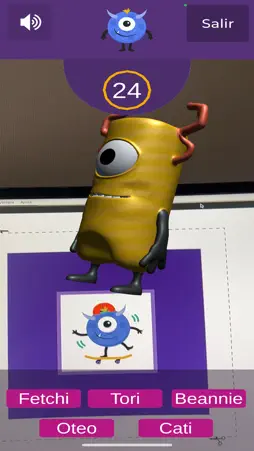
Turn learning into movement with Oteogo, an interactive educational game system where kids solve puzzles, scan cards, and move their bodies while learning vocabulary, numbers, and observation skills. Oteogo combines printable learning cards, a mobile gameplay app, and a synced web record system so kids can play actively while tracking their progress. Instead of sitting still, children move, scan, think, and solve challenges with every game. How Oteogo Works Step 1: Get the Cards Download the FREE Print & Play learning cards here: https://www.mayrariostheauthor.com/about-2 Print the cards and prepare them for the game. These cards are used to scan so that kids can see a 3d image using the Oteogo mobile app and match it to a word. Image = word. Step 2: Download the App and Create Your Record Download the Oteogo app and create your player record at app.oteogo.com. You can also access the synchronized web dashboard at: app.oteogo.com The web app and mobile app are synced. Use the same credentials on both platforms. • Mobile app → gameplay • Web app → records and statistics Step 3: Create a Play Zone Give the cards to the child and let them spread the cards around the room. This creates an active play area where kids move between cards during the game. Executive function in action! Oteogo encourages movement-based learning instead of sedentary screen time. Step 4: Choose a Game Select a game from the available options. You can: • Play the free games included • Unlock more games at app.oteogo.com Each game includes multiple levels and challenges. Step 5: Start the Game Press Start in the mobile app and begin moving. Kids activate the gyroscope step counter by making pendular movements while scanning cards and matching the correct word. During gameplay, kids: • Move around the play zone • Scan cards with the mobile app • Match images with the correct words • Complete levels to build their record Once the game ends, the results are saved automatically. To unlock full statistics and progress tracking, players must complete all levels of a game. Stats and records can be viewed anytime at: app.oteogo.com Why Parents and Teachers Love Oteogo • Encourages active learning through movement • Combines physical play and digital learning • Builds vocabulary and observation skills • Tracks learning progress through a personal record system • Works at home, in classrooms, or during therapy sessions Kids stay engaged because every challenge is a mix of matching, scanning, and movement. Perfect For • Parents looking for active learning games • Teachers creating movement breaks in class • Kids who enjoy augmented reality and discovery games • Families wanting less passive screen time The Oteogo Universe Inside the Oteogo app, players complete their registration by choosing a character. The selected character becomes the personal background theme of the player’s profile and adds a fun pretend-play element to every game. Kids can choose the personality they want to play with: Oteo – A stardust being with superpower eyes that help reveal hidden 3D clues. Tori – A determined bull who motivates players to finish every level. Fetchi – The curious pet who loves sniffing out the right answers. Catie – A speedy multi-legged insect that races through the play zone. Beanie – A happy jumping bean who celebrates every victory. Each character brings a playful style to the adventure while kids move and scan with the Oteogo app. Kids can also explore the puzzles through the Oteogo cartoons on YouTube. Solve the puzzle, then play a game in the App. Get the full Oteogo Universe! Start Your Learning Adventure Download the Oteogo App today and turn learning into an active game. Print the cards, spread them out, move, scan, and discover. Move • Learn • Play with Oteogo.
What's New
Version 1.9 2026-07-01
Mejoramos el rendimiento y la estabilidad general. Corregimos errores menores y mejoramos la confiabilidad. Realizamos mejoras generales para ofrecer una experi...Mejoramos el rendimiento y la estabilidad general. Corregimos errores menores y mejoramos la confiabilidad. Realizamos mejoras generales para ofrecer una experiencia más fluida. Technical Analysis
Package Overview Basic metadata
Bundle ID
com.SimaRobot.OteogoApp Current Version 1.9
Minimum iOS 12.0
Package Size App Store Size
Package Metadata 0 / 7 version records
Detailed binary, privacy manifest, framework, and Info.plist results have not been indexed for this package yet. The verified App Store and archive metadata above remains available.
Developer Information
Known Version Records
0 version records with stored package metadata • 7 known version records
Stored metadata does not guarantee a package is currently available to download.
| Details | Version / IDs | Version date | Action |
|---|---|---|---|
| Not archived | App Store ID: 883267410 | Unknown | Request Version |
| Not archived | App Store ID: 881814846 | Unknown | Request Version |
| Not archived | App Store ID: 873646198 | Unknown | Request Version |
| Not archived | App Store ID: 873274695 | Unknown | Request Version |
| Not archived | App Store ID: 870345329 | Unknown | Request Version |
| Not archived | App Store ID: 862883873 | Unknown | Request Version |
| Not archived | App Store ID: 861878671 | Unknown | Request Version |