Preview




Description
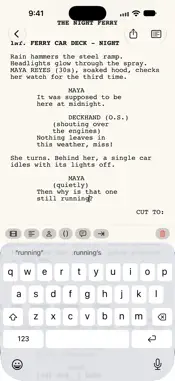
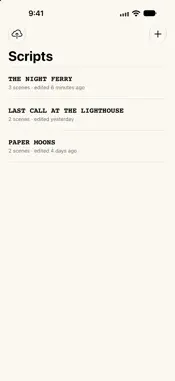
ScreenWriteMe is a focused, distraction-free place to write screenplays. Open a warm paper page, pick up where you left off, and let the formatting take care of itself. WRITE IN PROPER SCREENPLAY FORMAT • Scene headings, action, character names, parentheticals, dialogue and transitions, each laid out with industry-standard indents in classic Courier. • Press Return and the next element appears: a character name is followed by dialogue, dialogue by action, a transition by a new scene. • Build scene headings in seconds: choose INT., EXT. or INT./EXT., type the location and pick the time of day. • An element bar above the keyboard switches or inserts any element with one tap. MADE FOR EVERY SCREEN • Designed for iPhone Duo: start on the outer display, unfold and keep typing on the same line, with the cursor exactly where you left it. • On iPad and the open iPhone Duo, your scripts sit in a sidebar beside the page, with a scene navigator to jump anywhere in your story. • Full hardware keyboard support: Tab to change an element, ⌘1–⌘6 to set it, Shift-Return for a line break. EXPORT LIKE A PRO • PDF in industry-standard format: US Letter, Courier 12, correct margins, a title page and page numbers. Page breaks follow screenplay rules, with (MORE) and (CONT'D) when dialogue runs over a page. • Fountain plain-text export for Highland, Final Draft, WriterSolo and other screenwriting apps. YOUR WORK STAYS YOURS • Everything is saved automatically, as you type. • Automatic daily backups to a folder you choose, such as iCloud Drive, whenever you leave a script or close the app. Restore any day's backup without ever losing newer work. • No accounts, no ads, no tracking. Your scripts never leave your device unless you export or back them up. Fade in.
Technical Analysis
Package Overview Basic metadata
Bundle ID
com.mxvilla.screenwriteme Current Version 1.4
Minimum iOS 27.1
Package Size App Store Size
Package Metadata 0 / 0 version records
Detailed binary, privacy manifest, framework, and Info.plist results have not been indexed for this package yet. The verified App Store and archive metadata above remains available.
Developer Information
Known Version Records
0 version records with stored package metadata
Stored metadata does not guarantee a package is currently available to download.
| Details | Version / IDs | Version date | Action |
|---|