
Preview




Description
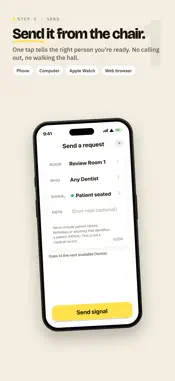
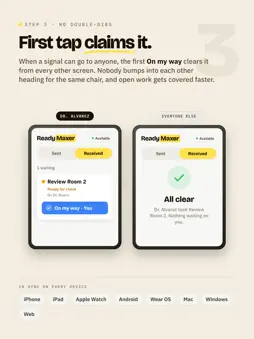
Ready when you are. ReadyMaxer helps clinic teams signal when a room is ready and keeps every request in a clear, prioritized queue. Staff can send from a phone, computer, or browser. The right teammate sees it on iPhone or Apple Watch and can answer with On my way or Done. STAY ON TOP OF THE DAY • See a live queue ordered by urgency and wait time • Send Ready for check, Patient seated, Step out first, Urgent, or your office's custom signals • Route a request to one person, a group, or the next available provider • Acknowledge and finish requests with one tap • Choose iPhone, Apple Watch, vibration, tone, and sound preferences • Keep the same queue in sync across phones, watches, computers, and the web KNOW WHAT'S READY AND WHERE TO GO Each signal shows what is ready, who it is for, and where to go. The live queue keeps the whole team coordinated from Waiting through Acknowledged to Done. Made for dental, medical, veterinary, eye care, dermatology, therapy, and other clinical teams. Important: ReadyMaxer is not a medical record, not for emergencies, and not for patient care decisions. A ReadyMaxer office account and the activation link your office sends you are required. Features may depend on your office's plan and connected devices.
What's New
Version 1.1 2026-10-02
A new look that matches on every device. Received now comes first, with Sent beside it, and tabs slide smoothly (or fade if you turn on reduced motion). Sending... Technical Analysis
Package Overview Basic metadata
Bundle ID
com.readymaxer.ios Current Version 1.1
Minimum iOS 17.0
Package Size App Store Size
Package Metadata 0 / 0 version records
Detailed binary, privacy manifest, framework, and Info.plist results have not been indexed for this package yet. The verified App Store and archive metadata above remains available.
Developer Information
Known Version Records
0 version records with stored package metadata
Stored metadata does not guarantee a package is currently available to download.
| Details | Version / IDs | Version date | Action |
|---|