Preview


Description
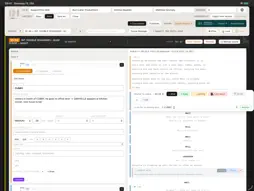
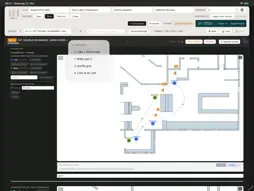
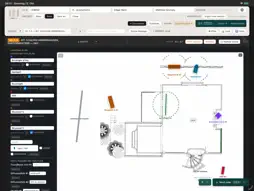
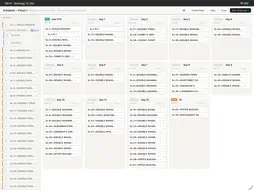
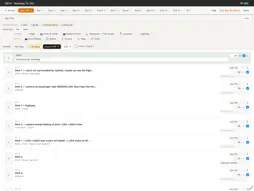
CINEside is for the conversation between cinematographer and director: how a screenplay becomes images. Every shot is anchored to the line in the script it comes from – not just to the scene – so the shot list never drifts away from the text, not even when the next draft arrives. Import the screenplay, plan the shots, place camera and light on the floorplan, write your notes for each department, work out your preferred shooting order – and export a shooting script with the script on the right, shots on the left. Made by a working cinematographer for narrative film. WHERE IT HELPS MOST - Revised drafts without starting over: import the new version and CINEside matches the scenes – your shots, notes, photos, and anchors stay attached. Anything it can’t match is flagged, and you re-anchor it in seconds. - Every department gets its part: notes for Director, Gaffer, AD, Art Department, Costume, Key Grip, and more – each exported as its own PDF, plus a Location Dossier for tech scouts. - Your director in the loop: send the project to the free CINEside CONNECT app – your director adds notes to shots, script passages, and images, and you import them back, highlighted in context. - Your script stays on your device: CINEside works fully offline – nothing is uploaded anywhere unless you export or share it yourself. CINEside doesn’t run your set live, sync your crew, or draw your storyboards – and it doesn’t replace the AD’s scheduling. Its schedule is the cinematographer’s tool for thinking through a shooting order and discussing it with the AD. It hands your departments what they need as documents – shooting order, notes, floorplans, lighting plans – and keeps the screenplay and the visual concept in one file, on your own device, from the first read-through to the last shooting day. No sign-up, no cloud, no subscription. WHAT IT DOES - Import screenplays as PDF – CINEside detects your scenes automatically, shows you uncertain cases, and lets you merge, split, or adjust scenes in the Scene Manager - Build your shot list with size, angle, lens, camera move, POV/OS, multi-camera setup, and unit assignment - Anchor shots directly to passages in the script – and see them as colored lines in the margin - Place camera, character, light, and grip positions right on floorplans and lighting plans, with position and rotation - Sketch right inside a shot – with Apple Pencil or your finger - Attach reference photos and location images – per scene, per shot, or per location – and floorplans per scene and per location - Color-tag scenes across the project for time period, mood, or any other category relevant to you - Flag VFX and SFX shots and export separate lists for post-production - Work out a shooting order across multiple days – drag scenes onto shoot days, order shots, and export it per day or for the whole shoot as the basis for your conversation with the AD - Export a facing-pages shooting script, shot lists, and notes sheets as PDF - Mark scenes as shot and filter for what’s still left to shoot NO AI, NO MAGIC CINEside doesn’t generate ideas, suggest shots, or have an opinion about your visual language – that’s entirely yours. It keeps your preparation organized: the script, the shots, the notes, the references, all in one place. FULL VERSION Try it free: a short sample project opens on first launch – or import your own screenplay right away. Saving your project, sharing, and CONNECT export are part of the full version; PDF exports in the free version are watermarked. Unlock the full version with a one-time in-app purchase – one purchase covers both the iPad and the Mac App Store version. Already own a CINEside license from cineside.app? Enter your license key and the email you used when purchasing instead – it unlocks both platforms, at no extra cost. CINEside for iPad is a companion to CINEside for Mac, sharing the same project format. Open a project started on your Mac right on your iPad, or vice versa.
What's New
Version 1.2.26 2026-11-15
New: Shots show INSERT and IF NEEDED. New: Shots marked as IDEA in CINEside appear in the app as ideas. They are not part of the PDF. Fixed: Scenes with more sh...New: Shots show INSERT and IF NEEDED. New: Shots marked as IDEA in CINEside appear in the app as ideas. They are not part of the PDF. Fixed: Scenes with more shots than fit on one page now continue on the next left-hand page. The script always stays on the right-hand page. Fixed: Very long shot cards continue on the next left-hand page with a "(cont.)" header. Improved: Long anchor texts on the shot header wrap to two lines. Technical Analysis
Package Overview Basic metadata
Bundle ID
com.cineside.ios Current Version 1.2.26
Minimum iOS 15.0
Package Size App Store Size
Package Metadata 0 / 0 version records
Detailed binary, privacy manifest, framework, and Info.plist results have not been indexed for this package yet. The verified App Store and archive metadata above remains available.
Developer Information
Known Version Records
0 version records with stored package metadata
Stored metadata does not guarantee a package is currently available to download.
| Details | Version / IDs | Version date | Action |
|---|