
Preview




Description
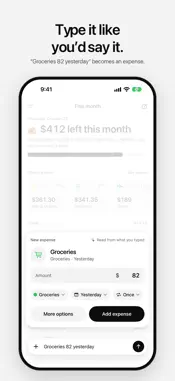
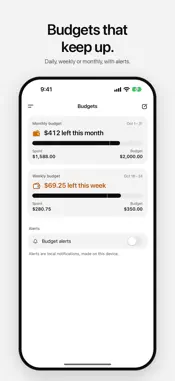
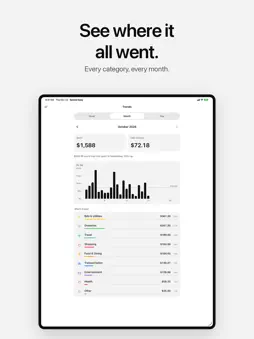
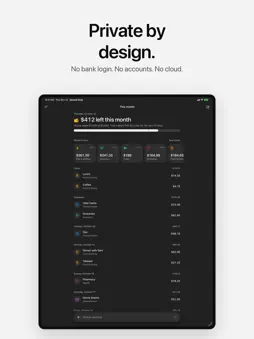
Know what’s left to spend, without handing over your bank login. Spend Easy is a simple, private expense tracker. Type what you spent in a few words, set a budget, and see what’s left this month. Everything stays on your device: no bank connections, no accounts, no cloud sync and no subscriptions. ADD AN EXPENSE IN A SENTENCE Type “Lunch 14.50” or “Groceries 82 yesterday” and Spend Easy reads the amount, the category and the day. Check it, then add it. Or use the full form, and read the total from a receipt photo on your device. SEE WHAT’S LEFT This month leads with what’s left in your budget and what that means for each day left. It tells you when you’re close to the limit, and where the money went, category by category. BUDGETS AND ALERTS Set a daily, weekly or monthly budget. Turn on budget alerts to get a heads-up when you reach the level you pick, and again if you go over. REPEATING EXPENSES Rent, phone, subscriptions: mark an expense as repeating and Spend Easy adds it again on each date. TRENDS Look back a week, a month or a year at a time, compare it with the one before, and see every category’s share. YOUR CATEGORIES Name them, pick an icon and a color, and put them in your order. WIDGETS See what’s left on your Home Screen and Lock Screen. The medium widget opens straight to a new expense. YOUR DATA, YOUR WAY Export every expense as a CSV file whenever you like. Amounts are exact, in your region’s currency or any currency you pick. PRIVATE BY DESIGN No bank login. No accounts. No cloud sync. No tracking. No subscriptions. Your expenses live in the app and its widget, on your device, and nowhere else.
What's New
Version 1.2 2026-10-26
On iPad and on iPhone Duo unfolded, the menu now stays on screen beside your spending, so This month, Expenses, Budgets and Trends are always one tap away. On i... Technical Analysis
Package Overview Basic metadata
Bundle ID
com.idlefusion.spendeasy Current Version 1.2
Minimum iOS 17.0
Package Size App Store Size
Package Metadata 0 / 1 version records
Detailed binary, privacy manifest, framework, and Info.plist results have not been indexed for this package yet. The verified App Store and archive metadata above remains available.
Developer Information
Known Version Records
0 version records with stored package metadata • 1 known version records
Stored metadata does not guarantee a package is currently available to download.
| Details | Version / IDs | Version date | Action |
|---|---|---|---|
| Not archived | App Store ID: 882521299 | Unknown | Request Version |