
Preview


Description
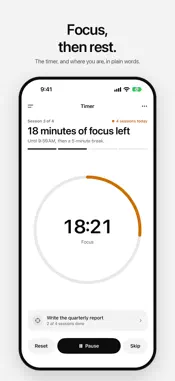
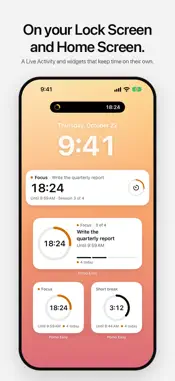
Pomo Easy is a calm Pomodoro timer. Focus for 25 minutes, rest for 5, and take a longer break after every four. The timer tells you where you are in plain words, “18 minutes of focus left” or “Break”, with one button to move forward. THE TIMER, RIGHT EVERY TIME • The countdown comes from when the session ends, so it stays right when you lock your iPhone, switch apps, restart, or change the clock. • Alerts arrive on time, even with Pomo Easy closed. They’re Time Sensitive, so they can come through during a Focus. • Breaks and focus sessions can start on their own, for one full cycle at a time. • Pick a chime: Chime, Bell or Singing bowl. ON YOUR WRIST AND YOUR LOCK SCREEN • Apple Watch: see the timer, the session you’re on and today’s sessions, and start, pause, reset or skip from your wrist. • A Live Activity on the Lock Screen and in the Dynamic Island. • Small, medium and Lock Screen widgets that roll into your next break on their own. TASKS AND HISTORY • Pick what you’re working on, and Pomo Easy counts the sessions it takes. • See today’s sessions, your last seven days, your streak and your best day. YOUR RHYTHM • Set each length, the sessions in a cycle, and what starts on its own. • Focus sounds (white, pink and brown noise, rain, café, ocean waves) that keep playing with your iPhone locked. • Light, Dark and System appearance, Graphite or Black dark style, and eight accents. The app icon follows your accent. PRIVATE BY DESIGN • No account. No analytics. No tracking. No ads. • Your sessions and tasks stay on your iPhone.
What's New
Version 1.2.0 2026-10-25
Made for iPhone Duo. Unfolded, the timer sits on one side and your session plan on the other: what’s done, what’s on the clock and what comes next, up to the lo... Technical Analysis
Package Overview Basic metadata
Bundle ID
com.idlefusion.pomo-easy Current Version 1.2.0
Minimum iOS 17.0
Package Size App Store Size
Package Metadata 0 / 1 version records
Detailed binary, privacy manifest, framework, and Info.plist results have not been indexed for this package yet. The verified App Store and archive metadata above remains available.
Developer Information
Known Version Records
0 version records with stored package metadata • 1 known version records
Stored metadata does not guarantee a package is currently available to download.
| Details | Version / IDs | Version date | Action |
|---|---|---|---|
| Not archived | App Store ID: 882548698 | Unknown | Request Version |