
Preview







Description
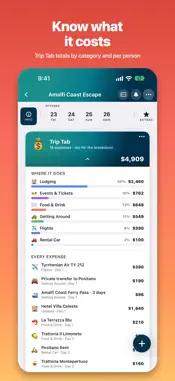
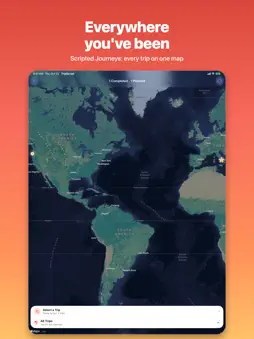
Your itinerary, beautifully organized. Every trip starts as a daydream — a coastline you keep coming back to, a city you've circled on the map, a long weekend with the people you love. TripScript is where the daydream becomes a plan. Drop in the confirmation emails, PDFs, and screenshots you've been collecting, and TripScript turns the mess into one clean, day-by-day itinerary: flights, stays, dinners, and tickets each on the right day, with the forecast for every city you'll wake up in. Plan it together with your crew, pack for the weather, and let it travel with you — Now & Next on your Lock Screen, directions a tap away. And when you're home, PostScript gathers the photos, the stats, and a map of everywhere you went, so the trip never really ends. FROM CHAOS TO ITINERARY • Import anything: drop in a PDF, a screenshot, a confirmation email, or share it straight into TripScript from any app. • It builds your trip: flights, stays, car rentals, dining, tickets, and tours are pulled out and placed on the right day. Parsing runs on-device with Apple Intelligence — private, free, and it works offline. • Honest details only: TripScript never invents a booking. Cards it isn't sure about are marked Recommended / Not Booked until you confirm. • Flights show who's flying, each person's seat, and live gates and delays (connect a free flight-data service once). • A stay becomes a check-in card, a nightly banner, and a checkout card across your days. A DAY-BY-DAY TIMELINE • One pill per day, with the forecast for each city on the days you're there. • Drag to reorder, drag a card onto another day, or snap everything back into time order. • Discover restaurants and things to do near your stays and drop them right onto a day. • Trip Tab: a running total of what the trip costs, by category and per person. IT TRAVELS WITH YOU • Now & Next on the Info tab, plus a Live Activity on your Lock Screen and in the Dynamic Island — and the Apple Watch Smart Stack. • A Home Screen widget with the countdown to your next trip. • Pack for the weather: packing suggestions from the forecast, and packing, shopping, and custom lists with templates. • Event reminders, Apple Maps directions, and a map of the whole trip. PLAN IT TOGETHER • Share a trip with your crew. The Pilot and co-pilots plan; everyone else can view, suggest ideas, and vote. • Put the big decisions to a vote with Event Picker polls, Stay Picker, and Transportation Picker cards. • Keep a card or a list just for you — or share it with specific people. • Lists, votes, and edits sync live through iCloud. POSTSCRIPT: RELIVE IT • When a trip wraps, PostScript gathers your photos, a journal, fun stats, star ratings, and a map of everywhere you went — shareable as an image, 4×6 prints, or a PDF. MAKE IT YOURS • Trip colors, gradients, cover photos, emoji and Genmoji icons, Create Art, and photo banners on any card. • Export a printable PDF, add events to your calendar, or back up everything as JSON. • Works on iPhone, iPad, and Mac, with iCloud sync. TRIPSCRIPT PRO (one-time purchase, yours forever) AI trip building with your own Claude or ChatGPT key, more than 3 trips, more than 3 saved ideas, inviting your crew to share a trip, PDF & JSON export, photo banners, Genmoji, and every gradient and custom color. Joining a shared trip is always free. PRIVACY Your trips live in your own iCloud. Imports are parsed on your device. TripScript never reads your email or contacts to build a trip, has no accounts, and no tracking. Cloud AI is optional and uses your own key — nothing is sent until you ask. Every trip has a story. TripScript is how you write it.
What's New
Version 1.10 2026-11-01
• Email to TripScript (Pro): your own forwarding address. Forward any booking email to it — from any mail app, or a Gmail filter that does it for you — and it l... Technical Analysis
Package Overview Basic metadata
Bundle ID
com.ThreeLuckyStars.TripScript Current Version 1.10
Minimum iOS 26.0
Package Size App Store Size
Package Metadata 0 / 0 version records
Detailed binary, privacy manifest, framework, and Info.plist results have not been indexed for this package yet. The verified App Store and archive metadata above remains available.
Developer Information
Known Version Records
0 version records with stored package metadata
Stored metadata does not guarantee a package is currently available to download.
| Details | Version / IDs | Version date | Action |
|---|