
Preview


Description
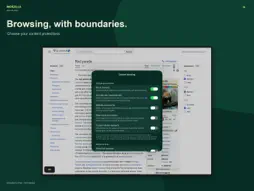
LESS BROWSER. MORE WEB. Give your websites room to breathe. Widezilla brings a compact, customisable browser to iPhone and iPad, plus a new native Mac app. Built around WebKit, with your favourite pages close and everyday tools within reach. MAKE WIDEZILLA YOUR DEFAULT BROWSER On iPhone and iPad, choose Widezilla as your default browser so links from apps like Mail and Messages open right in Widezilla. You can find the shortcut in the welcome tour and Widezilla’s settings. SMALL SCREEN. BIG DIFFERENCE. On iPhone and iPad, let the floating address bar tuck into a super compact corner control. Choose top or bottom placement, your collapse side, the icons you use and the actions that stay visible. Hold the compact bar for a quick-action menu. On iPhone Duo, make the most of both the outer and inner displays, with separate layout choices and desktop websites on wider windows. YOUR WEB, ACROSS YOUR DEVICES. iCloud can sync favourites, folders, Reading List links, recent pages, supported settings and open-tab links. Open a page from another device or continue with Handoff. Your address-bar layout stays local to each device. Website logins, form contents, downloaded files and live page state are not synced. AT HOME ON IPAD AND MAC. Open independent native windows for separate tasks. Use system windowing to browse side by side. The Mac app has a native toolbar, keyboard shortcuts, settings, file panels and sharing. iPad supports hardware-keyboard commands and flexible window sizes. These are the first iPad and Mac releases, and some edges may still feel rough. READ YOUR WAY. Reader Mode presents articles in a clean, adjustable reading view. Choose Day, Sepia, Dark or System, and keep your theme and text size in step with iCloud sync. Optional adaptive dark mode for websites follows system appearance, with a cool-to-warm tone control and individual website exceptions. Follow system text size or choose your own. Set a default page zoom and save zoom for particular sites. KEEP THE USEFUL STUFF. Organise favourites into folders. Save Reading List links. Bring over Safari bookmarks and Reading List links using the system transfer on iPhone and iPad or a Safari export file. Return to recent pages from Home and find open pages in visual tab cards. Manage downloads, save PDFs, find text on a page and print through native controls. Downloads and saved files remain local; transfer capabilities depend on the platform and server. LESS CLUTTER, MORE CONTROL. Built-in native ad and tracker blocking uses EasyList and EasyPrivacy. Choose additional protections for website annoyances, optional-cookie rejection and regional ad domains. Experimental YouTube protection is available. Pause enabled protection for an individual host. Blocking effectiveness varies by website; video services can change their behaviour. FIND IT FASTER. Instant address matches use your saved pages, open tabs, recent visits and a built-in website catalogue. Choose Google, DuckDuckGo, Bing, Ecosia or Kagi, or add a custom search service. Kagi requires its own account. Optional Apple Intelligence matching and search ideas run on device when available. Typing sends no suggestion request to your search provider; choosing a search loads that service. Make Home your own, choose what browsing data to clear, and keep separate schedules for tabs, recents and download history. Requires iOS/iPadOS 27.1 or macOS 27 or later. iCloud and Handoff depend on Apple Account and system settings.
What's New
Version 2026.11.18 2026-11-18
MAKE WIDEZILLA YOUR DEFAULT BROWSER Links from Mail, Messages and other apps can now open right in Widezilla on iPhone and iPad. Choose Widezilla in Settings → ...MAKE WIDEZILLA YOUR DEFAULT BROWSER Links from Mail, Messages and other apps can now open right in Widezilla on iPhone and iPad. Choose Widezilla in Settings → Apps → Default Apps → Browser App. You can jump there from the last welcome screen or from Widezilla’s settings. NEW READER MODE Give long articles the whole screen. Reader Mode brings the text, headings, images and links into a clean reading view. Choose Day, Sepia, Dark or System and adjust the text size. Widezilla remembers both choices and syncs them when iCloud sync is enabled. Add Reader Mode to your address bar, or open it from Quick Actions by holding the address bar. Close Reader to pick up where you left off on the original page. ALSO NEW IN THIS UPDATE • Bring over your Safari bookmarks and Reading List with a simpler import. • Swipe left or right over the address bar to tuck it away when auto-hide is enabled. • Widezilla tries HTTPS first and can reopen an existing tab when you tap a link to a page you already have open. • Add a site to your Home Screen from the Share menu. Technical Analysis
Package Overview Basic metadata
Bundle ID
com.matteodallombra.Widezilla Current Version 2026.11.18
Minimum iOS 27.1
Package Size App Store Size
Package Metadata 0 / 0 version records
Detailed binary, privacy manifest, framework, and Info.plist results have not been indexed for this package yet. The verified App Store and archive metadata above remains available.
Developer Information
Known Version Records
0 version records with stored package metadata
Stored metadata does not guarantee a package is currently available to download.
| Details | Version / IDs | Version date | Action |
|---|