Preview


Description
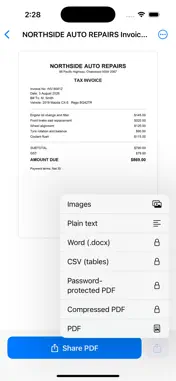
Glint turns your iPhone into a document scanner that does the filing for you. Point it at a receipt, a letter, a contract or a form. Glint finds the edges, straightens the page and cleans it up. Then it reads the page and gives it a real name — "Woolworths Receipt — 12 Aug 2026" — instead of Scan_0001. NAMES AND FILES ITSELF Glint reads every scan and pulls out what matters: who it is from, what it is, and the date on the document itself rather than the date you scanned it. Receipts go to Receipts, invoices to Invoices. You can rename anything, and once you do, Glint never overrides your name. SEARCHABLE PDFS THAT ACTUALLY SEARCH Most scanner apps export a picture of a page. Glint embeds a real text layer, so the PDFs you share are searchable in Preview, Acrobat, Files and Spotlight — not just inside this app. FIND IT BY WHAT IS ON IT Search across the contents of every scan, not just the file names. Remember the word on the page and Glint will find it. SIGN AND MARK UP WITHOUT PRINTING Draw your signature once and place it on any page. Drag and pinch to size it. Mark a scan up with a pen, a highlighter or a typed note, and black out anything private — redaction removes the text from the exported PDF instead of covering it, so it cannot be copied back out. Nothing is burned into the original, so any of it can be moved or removed later. BUILT FOR REAL PAGES Multi-page scanning, four enhancement modes, and page editing — reorder, rotate, delete or add pages at any time. Enhancement is never destructive: the original capture is kept, so you can change how a page looks whenever you like. STAYS YOURS Every scan is read, named and analysed on your iPhone. We do not run a server that holds your documents, and there is no account to create. Turn on iCloud sync and your scans travel between your own devices through your private iCloud account — ours is not a copy you have to trust us with. HONEST PRICING No ads. No watermarks. No page limits. Scanning, text recognition, searchable PDF export, markup and iCloud sync are free and stay free. Glint Pro adds automatic naming, search by meaning and an unlimited signature library — with monthly, yearly and one-off options, and no weekly subscription. SUBSCRIPTION DETAILS Glint Pro is available as an auto-renewing monthly subscription, an auto-renewing yearly subscription that starts with a 7-day free trial, or a one-off lifetime purchase that never renews. Prices are shown in your local currency in the app before you buy. Payment is charged to your Apple Account at confirmation of purchase. A subscription renews automatically for the same period unless it is cancelled at least 24 hours before the end of the current period, and your Apple Account is charged for renewal within 24 hours of the period ending. You can manage or cancel a subscription at any time in your Apple Account settings. Any unused portion of a free trial is forfeited if you buy a subscription during the trial. Terms of Use (EULA): https://www.apple.com/legal/internet-services/itunes/dev/stdeula/ Privacy Policy: https://botland.studio/privacy
What's New
Version 1.1 2026-09-05
MARKUP Draw on a scan with a pen or highlighter, add a note, or black out anything private. Redaction is real: the words underneath are removed from the exporte... Technical Analysis
Package Overview Basic metadata
Bundle ID
com.botlandstudio.docscanner Current Version 1.1
Minimum iOS 18.0
Package Size App Store Size
Package Metadata 0 / 0 version records
Detailed binary, privacy manifest, framework, and Info.plist results have not been indexed for this package yet. The verified App Store and archive metadata above remains available.
Developer Information
Known Version Records
0 version records with stored package metadata
Stored metadata does not guarantee a package is currently available to download.
| Details | Version / IDs | Version date | Action |
|---|