
Preview

Description
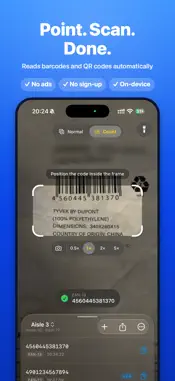
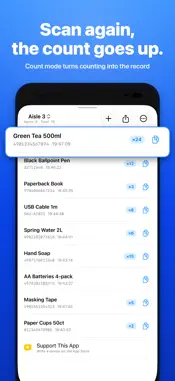
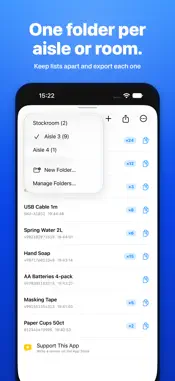
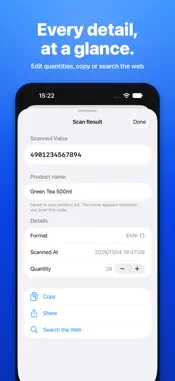
Scan barcodes and QR codes in a second, count stock as you go, and export everything to a spreadsheet. No ads, no account, no sign-up. Use it to check what a single code says, or to scan hundreds of items in a stocktake. Every scan is saved to your history and can be exported as a CSV file that opens in Excel, Numbers or Google Sheets. FEATURES • Automatic scanning: EAN/UPC, ISBN, Code 128, QR codes and more — just point the camera • Count mode: scan the same code again and its quantity goes up, so counting stock becomes the record itself • Product list: import a CSV of codes and product names (from Excel, Numbers or Google Sheets) and see the name as you scan. Name any unknown code on the spot • Folders: keep separate lists per aisle, shelf, room or job, and export each one on its own • CSV export with product name, code, quantity and date columns, plus optional operator and location columns. Add unscanned products with a quantity of 0 to spot what is missing • Adjustable scan interval (0.2–3 s) with an on-screen countdown, so you never double-count a code • Camera zoom (0.5× / 1× / 2× and more, depending on your device) for small or distant codes • Front-camera scanning and a flashlight with brightness control for dark stockrooms • Edit quantities afterwards, or add a code by hand when it will not scan • Copy, share, open links and search the web for any scanned value • iPhone Duo: on the inner display, the camera and your list are shown together GOOD FOR • Stocktakes, cycle counts and inventory checks • Receiving, picking and goods-in checks • Looking up an ISBN or product barcode • Event check-in with QR codes FOR BUSINESSES Available for bulk purchase and distribution through Apple Business Manager. PRIVACY Scanned data is stored only on your device and is never sent anywhere. Supported codes: QR, Micro QR, EAN-13/UPC-A (JAN), EAN-8, UPC-E, Code 128, Code 39, Code 93, ITF-14, Interleaved 2 of 5, Codabar (NW-7), GS1 DataBar, PDF417, MicroPDF417, Data Matrix, Aztec Languages: English, Japanese, German, French, Spanish, Italian, Portuguese (Brazil), Korean, Chinese (Simplified and Traditional)
What's New
Version 1.14.0 2026-11-14
Made for iPhone Duo. • On the large inner display, the camera and your scan list are now shown together, so the list no longer covers the camera • On the outer ...Made for iPhone Duo. • On the large inner display, the camera and your scan list are now shown together, so the list no longer covers the camera • On the outer display, the scan frame no longer overlaps the status bar • The camera image now stays level when the screen rotates Technical Analysis
Package Overview Basic metadata
Bundle ID
jp.masayuki.yamaji.barcodeReader.barcodeReader Current Version 1.14.0
Minimum iOS 18.0
Package Size App Store Size
Package Metadata 0 / 3 version records
Detailed binary, privacy manifest, framework, and Info.plist results have not been indexed for this package yet. The verified App Store and archive metadata above remains available.
Developer Information
Known Version Records
0 version records with stored package metadata • 3 known version records
Stored metadata does not guarantee a package is currently available to download.
| Details | Version / IDs | Version date | Action |
|---|---|---|---|
| Not archived | App Store ID: 888056562 | Unknown | Request Version |
| Not archived | App Store ID: 887858290 | Unknown | Request Version |
| Not archived | App Store ID: 870690471 | Unknown | Request Version |