
Preview





Description
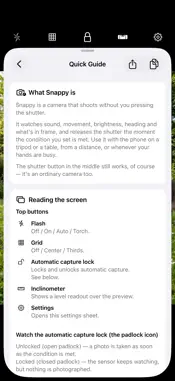
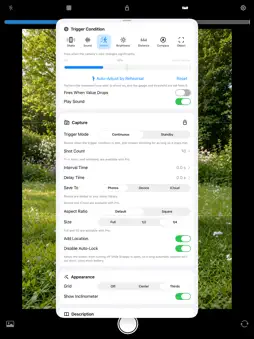
A camera that shoots without you pressing the shutter. Sound, movement, brightness, heading, what's in frame — Snappy watches the sensors and releases the shutter the moment the condition you set is met. Use it with the phone on a tripod or a table, from a distance, when your hands are busy, or when you want to be in the picture yourself. The shutter button still works, of course. It's an ordinary camera too. ■ Eight trigger conditions • Shake — shoots when you shake the phone • Sound — shoots when it hears a loud noise • Motion — shoots when something moves in frame, with a threshold you can set by performing the movement once • Brightness — shoots when it gets brighter • Distance — shoots when something comes closer than the distance you set, using LiDAR or TrueDepth • Compass — shoots when the phone faces a heading you choose • Object — shoots when something you picked appears in frame, from 77 kinds including people, cats, dogs, birds, animals and cars • Gesture — shoots on a peace sign held up to the camera, or on both arms raised, which reads from right across a room Most conditions can be flipped to shoot when the value *falls* instead. When it goes quiet, when it gets dark, when the movement stops — the reverse works too. ■ Set the threshold with your finger The indicator just above the preview shows what the sensor is feeling right now. Drag the white line and the threshold moves with it, while you watch the frame. No need to open Settings. ■ Two trigger modes • Continuous — keeps shooting for as long as the condition stays met • Standby — shoots once, then waits until the condition is no longer met before it will shoot again Choose Standby when the situation holds steady — someone standing still, a room that stays bright — so you don't end up with a hundred of the same photo. ■ Features • Shot count (1–10; 11–100 or unlimited with Pro) • Interval Time between shots, from 0.0 to 99.9 seconds • Delay Time before the shot, from 0.0 to 99.9 seconds, with a countdown ring around the shutter button • A sound when the condition is met, so you know it noticed even from behind the camera • Automatic capture lock — the sensors keep watching, but nothing is taken • Grid (thirds / center) • Inclinometer showing side-to-side and front-to-back tilt at once, turning with the way you hold the device • Aspect ratio (default / square) • Saved size (1/4; Full and 1/2 with Pro) • Save to Photos, or with Pro to a folder on this device or in iCloud Drive • Add location • Capture review • Disable Auto-Lock, so a long session isn't cut short by the screen turning off • Front and back camera Photos are saved to the iOS Photos library — or, with Pro, to a dated folder on this device or in iCloud Drive — with what triggered the shot written into the file's EXIF. ■ Some ways to use it • Leave it by the door or in the garden and catch whoever — or whatever — turns up • Clap your hands to take the shot from across the room • Raise both arms from across the room and be in the photo yourself • Catch fireworks and lightning on brightness • Put it beside a path and shoot whatever comes within a metre • Shake the phone to shoot • Shoot when the phone faces a particular direction Open the Quick Guide from Description in Settings. It includes recipes like these. This app shows ads. The Pro in-app purchase removes them, and unlocks the Full and 1/2 sizes, saving to this device or iCloud Drive, and shot counts of 11 or more and unlimited. Without Pro, photos are saved at 1/4 size to the Photos library, and Shot Count is 1 to 10.
What's New
Version 2.2.1 2026-09-21
Minor fixes (2.2.1) What's New (2.2.0) ■ Save to a folder Photos can now go to a folder on this device or in iCloud Drive instead of the Photos library — one ... Technical Analysis
Package Overview Basic metadata
Bundle ID
org.akamatsu.Snappy Current Version 2.2.1
Minimum iOS 17.6
Package Size App Store Size
Package Metadata 0 / 9 version records
Detailed binary, privacy manifest, framework, and Info.plist results have not been indexed for this package yet. The verified App Store and archive metadata above remains available.
Developer Information
Known Version Records
0 version records with stored package metadata • 9 known version records
Stored metadata does not guarantee a package is currently available to download.
| Details | Version / IDs | Version date | Action |
|---|---|---|---|
| Not archived | App Store ID: 891275115 | Unknown | Request Version |
| Not archived | App Store ID: 890869894 | Unknown | Request Version |
| Not archived | App Store ID: 890638438 | Unknown | Request Version |
| Not archived | App Store ID: 882061142 | Unknown | Request Version |
| Not archived | App Store ID: 2279682 | Unknown | Request Version |
| Not archived | App Store ID: 2015274 | Unknown | Request Version |
| Not archived | App Store ID: 1416501 | Unknown | Request Version |
| Not archived | App Store ID: 1410262 | Unknown | Request Version |
| Not archived | App Store ID: 1374781 | Unknown | Request Version |