Preview




Description
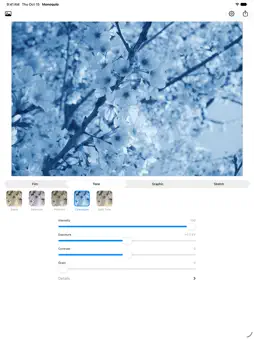
Monoqulo turns your photo into black and white. Tap one of 23 styles and you're done. No photography know-how or complicated settings needed. HOW IT WORKS 1. Choose a photo 2. Tap a style you like 3. Tap Export to save it to Photos or share it 23 STYLES Film (7) Black and white that looks like it was shot on a film camera. - Neutral: plain, natural black and white - Yellow Filter: blue skies get a little darker, so clouds stand out - Red Filter: blue skies turn dark and dramatic - Classic 400: the go-to black and white, crisp with visible grain - Fine 100: tiny grain and smooth tones - Push 3200: coarse grain and strong contrast, gritty and raw - Infrared: green leaves glow white, for a dreamlike look Tone (5) Adds a tint, such as brown or blue, to black and white. - Sepia: warm brown, like an old photograph - Selenium: cool blacks with a hint of purple - Platinum: soft, warm grays - Cyanotype: deep blue and white - Split Tone: bluish shadows and warm highlights Graphic (7) Redraws the photo with dots, lines and flat shapes, like a printed page or an old computer screen. - Halftone: tiny dots, like a photo in a newspaper - Line Screen: rows of lines that get thicker in darker areas - Threshold: only black and white, nothing in between - Atkinson: fine dots, like the screen of the original Macintosh - Bayer: an even grid of dots, like a retro video game - Posterize: a few flat shades, like a poster - Riso: patchy ink and slight misalignment, like a printed flyer Sketch (4) Looks like it was drawn by hand. - Line Art: the outlines, as if traced with a pen - Charcoal: a bold charcoal drawing - Pencil: a delicate pencil sketch - Blueprint: white lines on blue paper, like a technical drawing ADJUSTMENTS You don't have to touch the sliders. They are there for when you want a little more or less of something. - Adjust Intensity, Exposure (brightness), Contrast and Grain - Open Details to adjust bright and dark areas separately, or darken the corners - Tone, Graphic and Sketch styles also get a slider of their own, such as toning strength, dot size or line weight - Double tap a slider's name to reset it - Press and hold the photo to compare it with the original SAVING AND SHARING - Saved at the original size. Nothing is shrunk - No watermark - The date and camera details are kept. You can remove the location in the app's settings - Photos normally save as HEIC, the same format as iPhone photos. Graphic styles save as PNG so fine patterns stay crisp WHAT IT DOES NOT DO - No internet connection. The app never sends your photos anywhere - No tracking or analytics - No account, no sign-in - No ads - It doesn't ask for access to your whole photo library. It only opens the one photo you pick - The only permission it asks for is to save your finished photo to Photos
What's New
Version 2.0.0 2026-10-15
Now supports iPhone Duo. - On the folded screen, the style list no longer slides under the toolbar buttons, and all four sliders are visible Technical Analysis
Package Overview Basic metadata
Bundle ID
masamichiueta.Monoqulo Current Version 2.0.0
Minimum iOS 26.0
Package Size App Store Size
Package Metadata 0 / 0 version records
Detailed binary, privacy manifest, framework, and Info.plist results have not been indexed for this package yet. The verified App Store and archive metadata above remains available.
Developer Information
Known Version Records
0 version records with stored package metadata
Stored metadata does not guarantee a package is currently available to download.
| Details | Version / IDs | Version date | Action |
|---|