Preview





Description
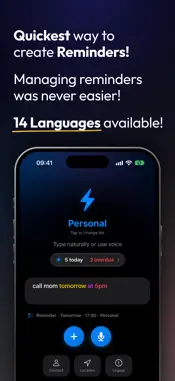
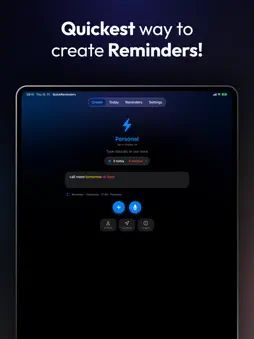
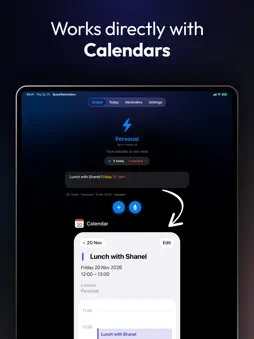
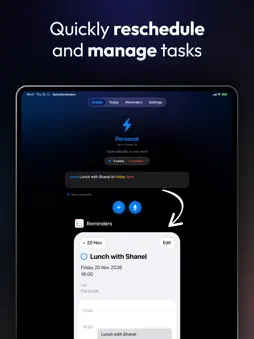
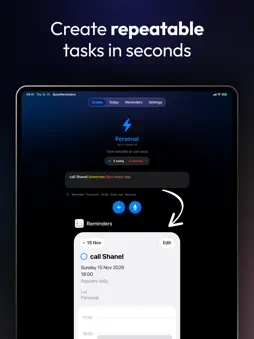
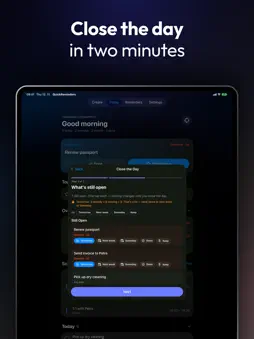
QuickReminders: The Fastest Way to Create Reminders Type or speak naturally and your thoughts become perfectly timed reminders and calendar events — saved in Apple Reminders and Calendar (or Google Tasks and Google Calendar), synced across iPhone, iPad and Mac, nothing locked in. A natural language reminder app, to-do list, daily planner and focus timer in one. No date pickers, no forms. Write it the way you'd say it: • "Coffee with Shanel next Monday 2pm" • "Lunch Friday 12-1pm" — becomes a calendar event • "Pay rent on the 1st every month" • "Workout tomorrow 7am every day" Get Started in 3 Steps 1. Allow Reminders, and Calendar for events 2. Type or say what you need — colors show the date, time and repeat as you write 3. Tap send — or use the QuickReminders keyboard in Messages, Mail, Notes and more What's New in 1.8 • The QuickReminders keyboard — write reminders from any app, with Today and your lists right in the keyboard • Focus — block distracting apps for a set time, with short breaks, or run a simple focus timer; save profiles like Work or Study • Focus filters — add QuickReminders to a Focus like Work and your distracting apps are blocked whenever it's on • AI Mode now works with Claude, ChatGPT and OpenRouter • See it before you send it — Create shows what will be saved: reminder or event, day and time, repeat, list or calendar • Widgets, Control Center buttons and Siri for adding, checking, moving and focusing • Places on a map, several lines at once, This Week in Insights and Undo Plan Your Day Today starts with your top priority (Done or Start Focus), then today's top 3, overdue reminders and your schedule. Plan my day finds the free time between your meetings. In the evening, Close the Day reviews what went well and picks tomorrow's top 3. Focus Without Distractions Block social media, games or any app you choose while a Focus session runs. Short breaks, a wait before ending early and a Focus widget with a live countdown keep you on track. Built on Apple's Screen Time — no account needed. Never Miss What Matters • Notifications before reminders are due • Urgent reminders break through Focus as Time Sensitive alerts • A live countdown to upcoming reminders in the Dynamic Island Voice With Auto-Send Tap the mic and say "pick up groceries tomorrow 3pm send" — the trigger word sends it hands-free. Choose your own trigger words. AI Mode Speak or type messy, free-form input in 14 languages and AI turns it into a perfectly timed reminder — your words stay your words. Works with your own API key for Gemini, Groq, Claude, ChatGPT (OpenAI API) or OpenRouter, or a self-hosted model. Smart Understanding Relative dates, weekdays, "every other day", "15 December 2026", time ranges, two-digit years — and percentages, prices and phone numbers stay in your title. If something can't be read, QuickReminders tells you why and keeps your text. Manage With Commands • "Move coffee meeting to next Tuesday" • "Remove dentist appointment" • "List today" Duplicate detection asks which one you mean. Everything Else You Need • Places — get reminded when arriving or leaving, picked on a map • Repeats: daily, weekdays, weekly, monthly or every 6 months • Insights: your streak, what got done and your focus time • Share links from Safari and other apps • Tap a highlighted word to keep it as plain text • Siri, Shortcuts, widgets and Control Center • iPhone, iPad and Mac — with a menu bar app and global shortcut on the Mac Perfect For Busy professionals, students, parents juggling family plans and anyone who'd rather say it than type it. Privacy Your reminders and events stay in Apple Reminders and Calendar (or your Google account). QuickReminders asks only for what it uses: Reminders, and optionally Calendar for events, the microphone for voice, notifications for alerts and Screen Time for Focus. The keyboard never sends what you type anywhere. AI features are optional and send text only to the provider you choose.
What's New
Version 1.8 2026-11-15
• The QuickReminders keyboard — write reminders from any app. It understands dates, times and repeats just like the app, shows Today and your lists, and works a...• The QuickReminders keyboard — write reminders from any app. It understands dates, times and repeats just like the app, shows Today and your lists, and works as a normal keyboard too • Focus — block distracting apps for a set time, with short breaks and a wait before ending early, or run a simple timer. Save profiles like Work or Study, each with its own apps • Focus filters — add QuickReminders to a Focus like Work in Settings, and your distracting apps are blocked whenever that Focus is on • A calmer, cleaner look across the app — one card per section, simple outline icons and a soft glow of your list's color • See it before you send it — a line under the field shows exactly what will be saved: a reminder or a calendar event, the day and time, the repeat, and the list or calendar • Paste or dictate several lines at once — each line becomes its own reminder or event, and you check them before anything is saved • Today starts with what to do next: your top priority with Done and Start Focus, today's top 3 (change them any time), then overdue and your schedule • Plan my day — QuickReminders finds the free time between your meetings and suggests a block for each thing that matters. Due dates never change. • Close the Day in three short steps: what went well, what's still open, and tomorrow's top 3 • Widgets: Today with checkboxes, Quick Add with a mic, and Focus with a live countdown — plus Control Center buttons • Siri and Shortcuts: add a reminder, ask what's next, mark it done, move it, start or end Focus, close the day • Places: pick a place on a map, choose arriving or leaving, and see all your saved places on one map • Hold the bolt on Create and slide to switch lists • Share to QuickReminders from Safari or any app — the page becomes a reminder with the link • This Week in Insights: what got done, focus time, and the things you keep putting off • Undo after deleting, completing or moving a reminder • "every weekday" repeats Monday to Friday, dictated "4 p.m." is understood, and "next week at 3pm" lands next week • A shorter welcome and Settings organized into pages with search • AI Mode now works with Claude, ChatGPT (OpenAI API) and OpenRouter too, with your own API key. Keys are stored in the Keychain, and the AI brief asks before sending anything • Better with VoiceOver, larger text and Reduce Motion Technical Analysis
Package Overview Basic metadata
Bundle ID
com.prodbykosta.QuickReminders Current Version 1.8
Minimum iOS 26.0
Package Size App Store Size
Package Metadata 0 / 4 version records
Detailed binary, privacy manifest, framework, and Info.plist results have not been indexed for this package yet. The verified App Store and archive metadata above remains available.
Developer Information
Known Version Records
0 version records with stored package metadata • 4 known version records
Stored metadata does not guarantee a package is currently available to download.
| Details | Version / IDs | Version date | Action |
|---|---|---|---|
| Not archived | App Store ID: 883589957 | Unknown | Paid / Arcade |
| Not archived | App Store ID: 882276871 | Unknown | Paid / Arcade |
| Not archived | App Store ID: 879831020 | Unknown | Paid / Arcade |
| Not archived | App Store ID: 879607814 | Unknown | Paid / Arcade |