
Preview



Description
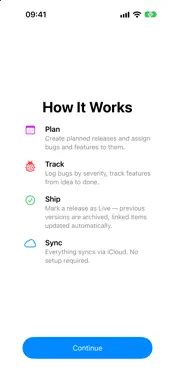
Versioneer is the calm command centre for indie developers managing one or several apps. Plan your next release, log bugs by severity, capture feature ideas, write your store listings, and watch it all flow through your release lifecycle — synced privately across your Apple devices via iCloud. Plan and ship releases • Planned releases — track upcoming versions with target dates, status, and release notes • Mark as Live — promote a planned release to a published release in one step. Previous releases are automatically archived; linked bugs and features are marked Fixed and Done • Release lifecycle — Live, Archived, In Development, Beta, Ready for Review, Submitted • Release notes with Markdown — bold, italic, code, links, bullet lists, and headers render beautifully • Export release notes as Markdown or plain text — paste straight into App Store Connect Track bugs • Severity levels — Critical, High, Medium, Low — colour-coded throughout the app • Status tracking — Open, In Progress, Fixed, with discovered and fixed-at dates • Affected and fix versions — know exactly which builds are impacted • Reproduction steps and workarounds — capture the full context of each bug • CSV export — share a bug list with collaborators Plan features • Priority levels — Must Have, Should Have, Nice to Have • Lifecycle — Idea → Planned → In Development → Done • Effort estimates — Small, Medium, Large • Link to a planned release — see at a glance what's coming next Write your store listings • One home for your App Store and Google Play copy — name, subtitle, short description, promotional text, description and keywords • Up to 39 languages per app, with a quick language switcher • Live character counts for every store limit, and clear markers for fields that only apply to one store • Copy any single field or URL with one tap, or copy out a ready-to-paste listing per store, with the correct language code for App Store Connect or the Play Console See the big picture • Dashboard — open bug count by severity, planned features, next release, latest release notes, all in one screen per app • Timeline view — chronological history of releases, fixed bugs, and shipped features across every app, grouped by month • Global search — find a bug, feature, release, or app across your entire library in a single keystroke • Sidebar indicators — a traffic-light work status for every app, a red ladybug with a count for critical bugs, and a version badge for the current live release • Real app icons — import each app's own icon instead of a symbol • Daily Focus widget — a daily nudge on your Home Screen toward one open bug or planned feature Sync and back up • iCloud sync — your data follows you to every supported device, automatically and privately • JSON backup — export everything to a single file, or per-app, anytime; import on a new device or after a fresh install • Local-only fallback — works offline; CloudKit catches up when you're back online Privacy and platform • No accounts, no servers, no analytics — your data stays on your devices and your private iCloud • Universal app — designed natively for iPhone and iPad with platform-appropriate layouts, and ready for iPhone Duo in every pose • Onboarding — quick three-screen walkthrough with the option to start fresh, load sample data, or jump into the help guide • In-app help — every feature documented • Dark mode and adjustable text size in Settings
What's New
Version 1.5 2026-10-28
• Work status: give each app a traffic-light status — Needs Attention, In Progress or On Track — and see at a glance where work is needed next. Set it from the ... Technical Analysis
Package Overview Basic metadata
Bundle ID
de.humanfactors.Versioneer Current Version 1.5
Minimum iOS 26.0
Package Size App Store Size
Package Metadata 1 / 2 version records
Detailed binary, privacy manifest, framework, and Info.plist results have not been indexed for this package yet. The verified App Store and archive metadata above remains available.
Known Version Records
1 version record with stored package metadata • 2 known version records
Stored metadata does not guarantee a package is currently available to download.
| Details | Version / IDs | Version date | Action |
|---|---|---|---|
| 1.71 MB | v1.3 App Store ID: 885897002Build: 1.3 | 2026-09-01 21:53:06 | Paid / Arcade |
| Not archived | App Store ID: 885750569 | Unknown | Paid / Arcade |