
Preview


Description
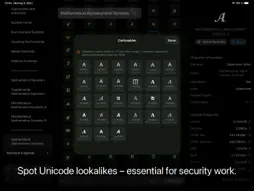
The Unicode reference tool for developers, designers, and curious minds. Unicode Companion puts the entire Unicode standard at your fingertips. Browse every block, search by name or value, inspect detailed properties, and copy characters in the exact notation your code or document requires — all in a clean, native interface built for iPhone, iPad, and Mac. BROWSE THE WHOLE STANDARD Every Unicode block is organised into clear categories with an expandable accordion list. Jump straight to Basic Latin, Mathematical Operators, Ancient Egyptian Hieroglyphs, or any of the hundreds of other blocks in seconds. Mark blocks you visit often as favourites so they're always one tap away. FIND EXACTLY WHAT YOU'RE LOOKING FOR • Search within the current block as you type • Switch to global search to scan all 150,000+ characters at once • Search by character name, code point, or notation (type U+2603 and land directly on the snowman glyph) INSPECT EVERY DETAIL Tap any character to open a full detail view showing: • Large glyph preview with left/right navigation • Unicode name, block, category, and numeric value • Every useful encoding: U+Hex, Decimal, HTML Hex, HTML Decimal, HTML Named entity, CSS escape, Swift literal, Python literal, UTF-8 bytes, UTF-16 code units • Related glyphs (NFD decompositions, directional variants) • Confusable characters (Unicode TR39 lookalikes — invaluable for security and accessibility work) Tap any encoding row to copy it instantly. Tap the Block name to jump straight to that block in the grid. COPY IN THE FORMAT YOU NEED Long-press any character in the grid to copy it as Character, U+Hex, Decimal, HTML Hex, HTML Decimal, CSS escape, Swift literal, or Python literal. Set your preferred default format in Settings — it's used every time you select a character. SCAN REAL-WORLD TEXT Point your camera at a sign, book page, or screenshot and Unicode Companion identifies every character it contains, grouped by Unicode block. On Mac, drop or paste any image to run the same OCR analysis. Perfect for identifying unfamiliar scripts or tracking down unusual glyphs in the wild. BUILT FOR EVERY APPLE PLATFORM • iPhone — full-screen grid with floating search bar, toolbar menus for blocks, favourites, and recents • iPad — adaptive three-column layout in landscape; push navigation in portrait; floating glass block header • Mac — three-column NavigationView, keyboard shortcuts, native Settings window, image-based text scanner FAVOURITES AND RECENTS Star individual characters or whole blocks. Your last ten selections appear in the Recents list, each tappable to jump straight back. Everything persists across launches. THOUGHTFUL DETAILS • Liquid Glass interface on iOS/iPadOS 26 and macOS 26 • Full Dynamic Type and accessibility support • Share any character with its name and code point in one tap • Tips carousel on first launch to help you discover every feature
What's New
Version 1.7 2026-10-25
NOW IN GERMAN Unicode Companion is now fully available in German. Choose the app language in Settings — English, German, or your device's language — independent... Technical Analysis
Package Overview Basic metadata
Bundle ID
com.humanfactors.de.UnicodeCompanion Current Version 1.7
Minimum iOS 17.6
Package Size App Store Size
Package Metadata 0 / 0 version records
Detailed binary, privacy manifest, framework, and Info.plist results have not been indexed for this package yet. The verified App Store and archive metadata above remains available.
Known Version Records
0 version records with stored package metadata
Stored metadata does not guarantee a package is currently available to download.
| Details | Version / IDs | Version date | Action |
|---|