Preview


Description
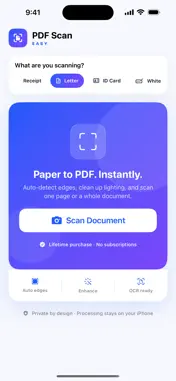
Turn receipts, letters and everyday paperwork into searchable PDFs on your iPhone. Scan, organize, sign and share from one app. Pay once. No subscription. No account required. Scanning, OCR and your document library stay on your device. SCAN PAPER INTO PDFs • Capture one page or a multi-page document • Automatically detect page edges and correct perspective • Scan in portrait or landscape, with automatic capture or manual control • Use presets for receipts, letters, ID cards, whiteboards and photos • Choose color, grayscale or crisp black and white FIND THE WORDS YOU NEED • Recognize text with on-device OCR • Search recognized text in your document library • Copy or export recognized text SHARE SMALLER SCANNED FILES • Choose Small File, Balanced or Best Quality • Preview the PDF and its actual file size before sharing • Import an existing scanned PDF and compare its export size • Save to Files or share with compatible apps SIGN, EDIT AND REDACT • Add a finger signature, text, checkmarks, highlights or drawings • Permanently redact selected content from a page and its stored original • Rotate pages and undo individual annotation marks KEEP YOUR PAPERWORK ORGANIZED • Save scans automatically and reopen unfinished documents • Organize with names, folders and tags • Import PDFs and photos, merge documents and reorder pages • Extract selected pages or split a document PRIVATE BY DESIGN Your scans, image processing, text recognition and library stay on your device. No account or cloud sync is required. BEFORE YOU GET STARTED Camera scanning requires an iPhone camera. The local library is excluded from backups; deleting the app removes its documents. Export important documents to a destination you choose. Imported PDFs become editable page images. Forms, links, digital signatures and original vector structure are not retained. Compact text-based PDFs may not become smaller; check the export preview. Redaction cannot be undone and does not change previously exported or copied documents.
What's New
Version 1.3 2026-10-12
Improved automatic scanning. • Better page-edge detection for smaller and angled pages • More reliable automatic capture when you hold the page steady • Improv... Technical Analysis
Package Overview Basic metadata
Bundle ID
com.markwainwright.PDFScanEasy Current Version 1.3
Minimum iOS 17.0
Package Size App Store Size
Package Metadata 0 / 0 version records
Detailed binary, privacy manifest, framework, and Info.plist results have not been indexed for this package yet. The verified App Store and archive metadata above remains available.
Developer Information
Known Version Records
0 version records with stored package metadata
Stored metadata does not guarantee a package is currently available to download.
| Details | Version / IDs | Version date | Action |
|---|