
Preview




Description
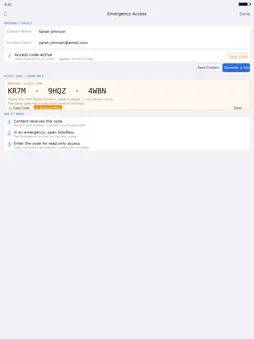
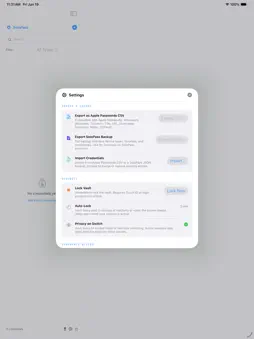
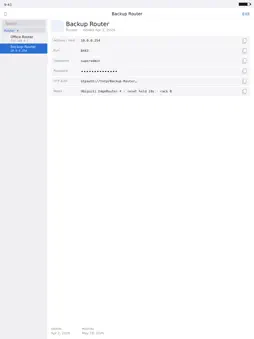
SoloPass is a secure credential vault designed for the accounts that send most people reaching for a spreadsheet — servers, routers, switches, firewalls, NAS devices, databases, VMs, and websites. The accounts that mainstream password managers were never built to include. SoloPass keeps every account organized, instantly accessible, and protected behind Touch ID, Face ID, or your device passcode. Most password managers are built around websites and autofill. SoloPass is built around devices. Every credential includes fields for hostname, port, username, password, OTP auth, and notes — everything you need when you're logging into a server at 2am. - Touch ID / Face ID authentication — same security as macOS and iOS, powered by Apple's LocalAuthentication framework - 11 device categories — Server, Router, Switch, Firewall, NAS, VM, Database, Service/API, Laptop, Desktop, and Online/Web - Large readable display — clearly legible fonts, one-tap copy for every field - Password generator — generate strong passwords with full control over length, uppercase, lowercase, numbers, and symbols - Search and filter — find any credential instantly by name, address, username, or device type - OTP Auth support — store TOTP URIs alongside your credentials - Import and export — fully compatible with Apple Passwords CSV format (Title, URL, Username, Password, Notes, OTPAuth), works with 1Password, Bitwarden, and most password managers - Emergency access — designate a trusted contact who receives a secure access code. In an emergency they can unlock a read-only view of your vault without your biometrics - Auto-locks on screen sleep or after 5 minutes of inactivity - Stays open while your session is active — no re-authentication just for switching apps SoloPass has no network entitlements. It cannot make any network request. Ever. All credentials are stored locally in your device's sandboxed app container, protected by complete file encryption. Nothing is sent to any server, synced to any cloud, or shared with any third party. No account required. No subscription. No tracking. SoloPass includes a thoughtful emergency access feature for peace of mind. Designate a trusted contact by name and email. Generate a secure access code and send it to them via your mail app. If something ever happens to you, they can enter that code on the lock screen to access your credentials in read-only mode. The code never expires unless you reset it. Already using Apple Passwords or another password manager? Import your existing credentials in seconds. SoloPass reads the standard Apple Passwords CSV export format directly — no conversion needed.
Technical Analysis
Package Overview Basic metadata
Bundle ID
com.gyozaman.solopass Current Version 1.0
Minimum iOS 17.0
Package Size App Store Size
Package Metadata 0 / 0 version records
Detailed binary, privacy manifest, framework, and Info.plist results have not been indexed for this package yet. The verified App Store and archive metadata above remains available.
Price History (USA store)
2 recorded price change points. These are historical observations, not a guarantee of the current price.
| Recorded at | Price | Currency |
|---|---|---|
| 6.99 | USD | |
| 4.99 | USD |
Known Version Records
0 version records with stored package metadata
Stored metadata does not guarantee a package is currently available to download.
| Details | Version / IDs | Version date | Action |
|---|