Cast Audio Remote App Icon

Cast Audio Remote

Music • MARK GREENING
4+ v1.7 Recorded price: Free App Store →
★★★★★
★★★★★
(1 App Store ratings)
IPA Analysis
Technical Specs
Bundle ID com.markg.dlnaremote
Version 1.7
App Store Size 2.92 MB
Minimum iOS 17.0
Devices iPhone, iPad, iPod touch
Catalog release date 2026-08-04
Latest recorded version date 2026-09-01
Features & Support
Advisory 4+
Top In App Purchases
No In App Purchases Listed

Preview

Cast Audio Remote screenshot 1 Cast Audio Remote screenshot 2 Cast Audio Remote screenshot 3 Cast Audio Remote screenshot 4 Cast Audio Remote screenshot 5 Cast Audio Remote screenshot 6

Description

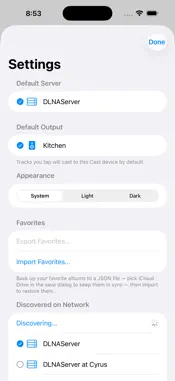
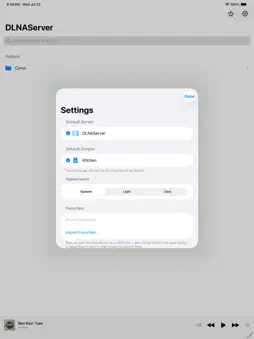
Cast Audio Remote turns your iPhone or iPad into a simple remote for the music on your home network. It finds your DLNA/UPnP media server automatically, lets you browse and search your whole library, and streams any track to your Cast-enabled speakers with a tap. Everything happens on your local network — no account, no sign-up, no ads, and nothing leaves your home. FEATURES • Automatic discovery of media servers and speakers on your Wi-Fi (via Bonjour) • Browse folders, albums and artists, or search your library instantly • Cast music to Google Cast audio devices • Full playback controls: play/pause, skip, shuffle, repeat, scrubbing and volume • Now Playing on the Lock Screen and in the Dynamic Island, powered by a Live Activity • Mark albums as Favorites and back them up to a file • Set a default server and default speaker so playback is always one tap away • Universal app — designed for both iPhone and iPad • Light and dark appearance Point it at your own media server, pick a speaker, and play.

What's New

Version 1.7 2026-09-01
NEW --- - Add a DLNA server by address — reach a server directly by host:port (Settings > Add Server by Address) when it isn't found on your local network, fo...NEW --- - Add a DLNA server by address — reach a server directly by host:port (Settings > Add Server by Address) when it isn't found on your local network, for example across a VPN like Tailscale, an HTTP proxy, or with iCloud Private Relay on. It's saved alongside your other servers for easy selection later, and shares its favorites and hidden folders with the same server when found on your local network (it's the same server, either route). CHANGED ------- - Volume — the app no longer changes your speaker's volume by itself. It simply reflects the speaker's current level and tracks it; you set the volume with the in-app slider or your device's own buttons. (The "Startup Volume" setting has been removed.) FIXED ----- - Switching servers — picking a different server now shows that server's folders right away, instead of keeping the previous server's list until you relaunched. - Another app taking your speaker — if a DLNA speaker you're playing to gets taken over by another app (e.g. Amazon Music on a WiiM), the app now stops cleanly instead of showing a phantom "playing" progress bar for a stream that isn't ours. - More reliable playback start — a little more time is allowed for playback to begin when the music is served from an external drive that has to spin up.

Technical Analysis

Package Overview Basic metadata
Bundle ID com.markg.dlnaremote
Current Version 1.7
Minimum iOS 17.0
Package Size App Store Size
Package Metadata 0 / 0 version records
Detailed binary, privacy manifest, framework, and Info.plist results have not been indexed for this package yet. The verified App Store and archive metadata above remains available.

Known Version Records

0 version records with stored package metadata

Stored metadata does not guarantee a package is currently available to download.

Details Version / IDs Version date Action