Preview







Description
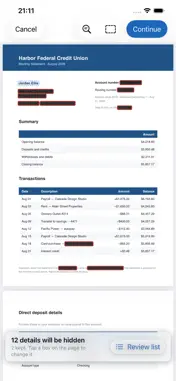
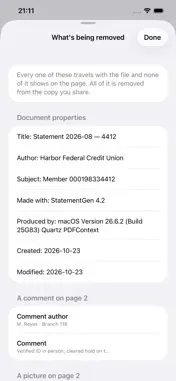
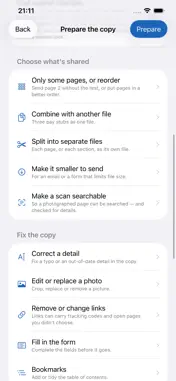
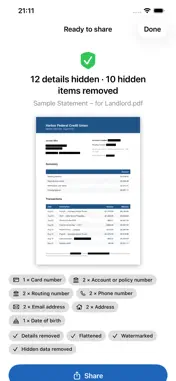
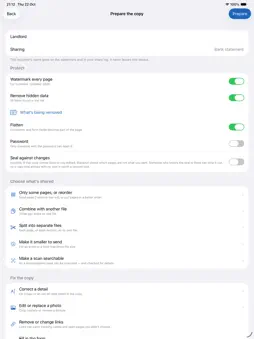
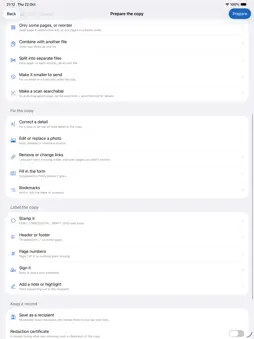
Share documents, not your details. Sooner or later someone asks for a bank statement, a pay stub, a passport, a medical record. They need the document; they do not need everything on it. Blackout finds the details a stranger shouldn't get, removes them from a copy, strips the data hiding inside the file, labels every page with who it's for — and never sends it anywhere. FINDS WHAT YOU'D MISS Open a PDF, a photo or a scan. Blackout reads it on your device and flags Social Security and account numbers, routing and card numbers, IBANs, phone numbers, email and postal addresses, dates of birth, passport and ID numbers, faces, barcodes and QR codes. Names are found too and left in by default, because they are usually the point. REMOVES, DOESN'T COVER Drawing a black box over a number is not redaction — the number is still in the file, one copy-and-paste away. Blackout deletes the characters from the page itself, erases the pixels from scanned images, and drops any note that overlapped. The box you see is the last step, not the whole job, and a test suite reopens every prepared copy with two independent extractors to prove it. STRIPS THE HIDDEN DATA — AND SHOWS YOU WHERE IT WAS A PDF carries more than what it shows: author, creation tool and dates, the editing history some apps tuck inside, every comment's author, attached files, scripts, and the camera model and GPS position inside embedded photos. Blackout removes all of it and, with Pro, lists it by where it was hiding — your name in the document properties, a colleague's in a comment on page 2, your home address in a photo's GPS tag on page 3. LABELS THE COPY Every page gets a watermark — "For Landlord · September 2026" — so a copy that turns up elsewhere says where it came from. Stamp it COPY or CONFIDENTIAL, add a header, number the pages, sign it. SEAL IT, AND KNOW IF IT COMES BACK CHANGED Seal a copy before you send it. The seal is invisible — nothing on the page. If that copy comes back, open it in Blackout and it tells you whether the content still matches, and which pages do not. It compares what the pages say, not the file's bytes, so an innocent re-save does not cry wolf. A PDF carries no identity that cannot be forged, so a name or date in a changed file is shown as a claim the file makes, never as proof of who changed it. KEEPS A LOG Who got which document, when, with what hidden. The log lives on your device and never holds the file. Or skip sending altogether: put the prepared copy on your screen for the person in the room, or have it read back to you first. PREPARE IT PROPERLY Send only some pages. Combine three pay stubs, or split one apart. Shrink it for email. Make a photographed page searchable. Correct a typo, replace a photo, remove tracking links, fill in the form. Send as PDF, Word, Excel, PowerPoint or images — conversions run after the details are gone, never before. NOTHING LEAVES YOUR DEVICE There is no server, no account and no code that uploads anything. Detection, text recognition and face detection all run on the device using Apple's own frameworks. Native on iPhone, iPad and Mac, with Dark Mode, Dynamic Type and VoiceOver throughout. FREE AND PRO The whole job — find, review, remove, strip, watermark, share — is free for your first copy, and the built-in sample is always free to try. Blackout Pro removes the limit and adds password protection, the itemised hidden-data report and every optional preparation step, for a single payment of $19.99. ONE PAYMENT, NOT A SUBSCRIPTION Blackout Pro is a one-time purchase of $19.99, charged once. It does not renew, there is nothing to cancel, and you will not be charged again. It stays unlocked on every device signed in to the same Apple Account, and Restore Purchase brings it back after a reinstall. Terms of Use: https://markbullock111.github.io/pdf_editor_privacy/terms.html Privacy Policy: https://markbullock111.github.io/pdf_editor_privacy/privacy.html
What's New
Version 1.3.0 2026-11-07
A page that cannot be read is now told to you. Some PDFs carry a page the app cannot open — damaged, or written by software that got the format wrong. Until no...A page that cannot be read is now told to you. Some PDFs carry a page the app cannot open — damaged, or written by software that got the format wrong. Until now a page like that was scanned, found nothing, and was shown to you as a clean page. That is the wrong way round for an app you trust to find what is hidden, so it no longer happens. If a page cannot be read, Blackout says so on the review screen and names the page, and it no longer tells you the document is clean when part of it was never checked. Everything it could read is still checked exactly as before. Also in this version: the sample statement now carries the kinds of hidden data a real document carries — a photograph with the camera and the place it was taken still attached, and a note with the name of whoever left it — so you can see what the hidden data report actually finds before you trust it with something of your own. Technical Analysis
Package Overview Basic metadata
Bundle ID
com.vensofts.pdfstudio Current Version 1.3.0
Minimum iOS 18.0
Package Size App Store Size
Package Metadata 0 / 0 version records
Detailed binary, privacy manifest, framework, and Info.plist results have not been indexed for this package yet. The verified App Store and archive metadata above remains available.
Developer Information
Known Version Records
0 version records with stored package metadata
Stored metadata does not guarantee a package is currently available to download.
| Details | Version / IDs | Version date | Action |
|---|