Preview





Description
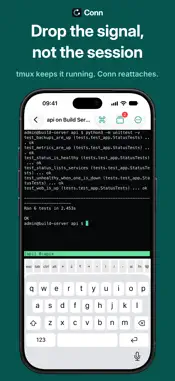
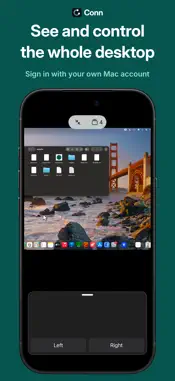
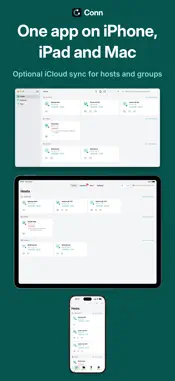
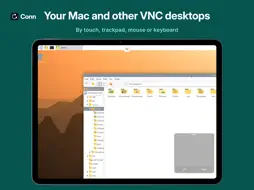
Conn opens a terminal, a screen and files on your own machines, from iPhone, iPad and Mac. It connects straight to them over SSH, VNC and SFTP, with no account and nothing in between. No AI built in. TERMINAL An SSH terminal. Choose tmux and a session keeps running on the host when Conn closes or the link drops, and comes back by itself after a drop. The Sessions tab lists your tmux sessions. New Session starts a shell, a command or an AI coding tool. Needs you marks a session that is waiting while Conn is open. Snippets with variables run in a terminal or across a group. The command palette holds them, your history and over 50 built in commands. SCREEN See and control the whole desktop of a Mac, a Raspberry Pi or another computer with a VNC server, by touch, trackpad, mouse or keyboard. Sign in to a Mac with its own account through Screen Sharing, and to a Raspberry Pi with its own account over an encrypted link. Screen keeps the picture encrypted, over SSH where needed, and asks before anything would go unencrypted. Copy and paste go both ways. If the link drops while you watch, Screen reconnects by itself. Drop a file onto a screen on iPad or Mac to send it to that machine's Desktop. FILES Browse your machines over SFTP. Upload, download, rename, delete, make folders and change permissions. Edit a text file with syntax colouring and save it straight back: a save cut off halfway never leaves the file half written. Preview images and PDFs. Transfers shows progress, with Stop and Resume. HOSTS AND SYNC Find machines on your network, add them by hand or paste an SSH config. Tiles show which machines answer. When a connection fails, Conn says what happened and why. Conn shows when a link goes over Tailscale. Share hosts in a .conn file, which never holds a password or a key. Optional iCloud sync brings hosts, groups and snippets to your other devices. JUMP HOSTS AND PORT FORWARDS Reach machines behind a bastion through a jump host, or a chain of them. Forward a port on a machine to this device to open its web page, database or dashboard over SSH. On iPhone a forward runs while Conn is open. SECURITY AND PRIVACY • Make your SSH key in the Secure Enclave, where the device has one: it never leaves it. • Passwords, keys and command history are kept on this device only, never synced. Saved SSH and Mac passwords ask for Face ID or Touch ID. • Conn checks each server's SSH key and warns if it changes. • No account, no analytics, no ads, no Conn servers. Conn sends nothing to any AI service. ALSO INCLUDED • App lock with Face ID or Touch ID • A key bar with esc, ctrl, alt, arrows and F1 to F12 • Menus and keyboard shortcuts on Mac and iPad • A menu bar icon on Mac with your sessions and hosts • Wake-on-LAN, Handoff, and actions in the Shortcuts app WORKS WITH (tested 25 October 2026) • Mac, macOS 26.7: Screen (Screen Sharing) and Terminal (Remote Login) • Mac, macOS 27.0: Screen • Raspberry Pi 4, Raspberry Pi OS (Debian 13): Screen with its own WayVNC 0.10.1, and Terminal • Debian 12: Terminal and Files with OpenSSH, Screen with TigerVNC 1.12 • Debian 13: Screen with TigerVNC 1.15, x11vnc 0.9.17 and TightVNC 1.3.10 Everything else is untested, including Files on a Mac or a Raspberry Pi, other macOS versions and VNC servers on Windows. GOOD TO KNOW • Terminal, Files and a drop on a screen need SSH on the host. Sign in with a password, or an Ed25519 or ECDSA key. On a Mac, turn on Remote Login, and Screen Sharing for Screen. • Conn reaches machines on your network, over Tailscale or another VPN, through a jump host, or through an SSH port you open. • Conn speaks VNC, not RDP (Windows Remote Desktop). Buy once and use Conn on iPhone, iPad and Mac. No subscription and no in-app purchases. Raspberry Pi is a trademark of Raspberry Pi Ltd. VNC is a trademark of RealVNC Limited.
What's New
Version 2 2026-11-02
Resource Monitoring, more ways to sign in, and a SOCKS proxy. • Resource Monitoring: a host's page has a System card. It shows CPU, memory and disk as rings, th... Technical Analysis
Package Overview Basic metadata
Bundle ID
com.maritime.master.conn Current Version 2
Minimum iOS 17.0
Package Size App Store Size
Package Metadata 0 / 0 version records
Detailed binary, privacy manifest, framework, and Info.plist results have not been indexed for this package yet. The verified App Store and archive metadata above remains available.
Developer Information
Known Version Records
0 version records with stored package metadata
Stored metadata does not guarantee a package is currently available to download.
| Details | Version / IDs | Version date | Action |
|---|