TS Control for Kenwood App Icon

TS Control for Kenwood

Utilities • Marcus Roskosch
4+ v27.0.10 Recorded price: $89.99 App Store →
🏆 Best: #66 Paid (DEU)
IPA Analysis
Technical Specs
Bundle ID de.roskosch.TS-ControliOS
Version 27.0.10
App Store Size 59.46 MB
Minimum iOS 17.0
Devices iPhone, iPad, iPod touch
Catalog release date 2025-02-25
Latest recorded version date 2026-10-27
Features & Support
Advisory 4+
Languages (1)
EN
Top In App Purchases
No In App Purchases Listed

Preview

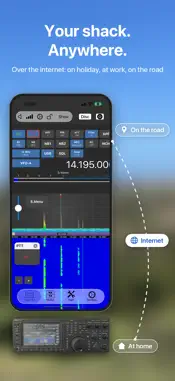
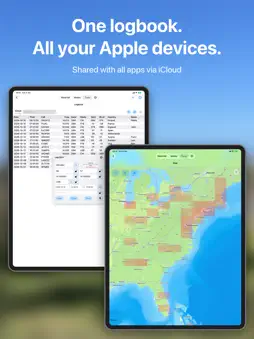
TS Control for Kenwood screenshot 1 TS Control for Kenwood screenshot 2 TS Control for Kenwood screenshot 3 TS Control for Kenwood screenshot 4 TS Control for Kenwood screenshot 5 TS Control for Kenwood screenshot 6 TS Control for Kenwood screenshot 7 TS Control for Kenwood screenshot 8 TS Control for Kenwood screenshot 9 TS Control for Kenwood screenshot 10 TS Control for Kenwood screenshot 11 TS Control for Kenwood screenshot 12 TS Control for Kenwood screenshot 13 TS Control for Kenwood screenshot 14 TS Control for Kenwood screenshot 15 TS Control for Kenwood screenshot 16

Description

Your Kenwood TS-890 on your iPhone and iPad: at home over Wi-Fi or from anywhere over the internet. Made by a ham, for hams, with personal support included. TS-Control connects to the TS-890's built-in network interface (KNS). No extra hardware, no PC and no extra software needed. WORKS WITH ■ Kenwood TS-890S, connected to your network by cable The app connects over the network only. A USB cable connection is not supported. OPERATE ■ Spectrum scope and waterfall with band plan, DX Cluster and FT8 spots ■ VFO A and B, filters, preamp, attenuator, NB, NR, notch, AGC and more ■ Compact floating panels: tuning, PTT, CW, memories, tune stack, macros, Command Bar, DTMF, RIT / ∆TX ■ Your iPhone or iPad as microphone and speaker; the radio keeps playing in the background ■ Ready for iPhone Duo, iPad split screen and Apple Vision Pro MODES ■ FT8-Improved with AutoAnswer and AutoCQ, plus the classic FT8 ■ JS8 keyboard chat ■ CW with decoder, keyer, ESM and CW keyboard: send CW remotely, by keyboard or with a paddle on a CTR2 or MIDI controller ■ Speech: incoming voice transcribed and translated, your typed text sent as speech ■ SSTV, HF-Fax, APRS and WSPR FT8-Improved, JS8, Speech and WSPR need iOS 26. TOOLS ■ Logbook with ADIF import and export, shared via iCloud with SmartSDR, SDR-Control, FT-Control and K4-Control, on iPhone, iPad and Mac ■ DX Cluster with alerts, POTA, PSK Reporter, Call Lookup, Band Plan, Network Stats, Memories ■ Controllers: MIDI, CTR2, HaliKey, Pryme, Flic ■ 4O3A Genius devices, Ultra Beam antennas, rotators and relay boards MADE BY A HAM Made by Marcus, DL8MRE, who has been developing apps for Apple devices since 2009 and uses this app every day in his own shack, where all supported radios are on the desk. Personal online support and a detailed manual are included. Updates with new modes and features are free: no subscription, no in-app purchases. WHAT YOU NEED ■ A Kenwood TS-890S on your network, with its KNS remote access set up (user name and password) ■ An iPhone or iPad with iOS 18 or later ■ For use over the internet: access to your home network from outside (see the manual) Manual: https://go-to.me/ts-control-ios-manual More apps: https://ham-radio-apps.com TS-Control is developed independently and is not affiliated with or endorsed by Kenwood.

What's New

Version 27.0.10 2026-10-27
This update contains the following changes and improvements: ◉ A new look: the app now follows Apple's own iOS design, in light and dark mode, on the iPad and ...This update contains the following changes and improvements: ◉ A new look: the app now follows Apple's own iOS design, in light and dark mode, on the iPad and the iPhone ◉ New tab bar with Waterfall, Modes, Tools and Settings ◉ Modes and tools keep running when you leave their screen; a green dot on the tile shows which ones are running ◉ Runs on Apple Vision Pro ◉ New on iOS: JS8 and Speech (iOS 26); CW and HF-Fax renewed (CW with decoder and CW keyboard) ◉ CW: improved decoder ◉ CW: the new ESM mode (Enter Sends Message) ◉ Fixed: SSTV and HF-Fax could not save received pictures into Photos ◉ All tools redesigned: DX Cluster, POTA, PSK Reporter, Band Plan, Call Lookup, Logbook, Network Stats, Memories, Command Bar, Ultra Beam, Genius (4O3A) and the controllers ◉ Several MIDI controllers can be used at the same time ◉ The radio controls are now compact floating panels (Tuning, PTT, CW, Memories, Tune Stack, Macros, Command Bar, DTMF, RIT / ∆TX) ◉ The band plan is shown on the waterfall as a coloured ribbon ◉ Demo radio: try the app without a radio ◉ The radio keeps playing in the background, for example with the iPad cover closed or the screen locked ◉ Fixed: the audio didn't come back after a phone call or after an interruption by another app ◉ New audio settings: Speaker and Microphone ◉ New controller actions: RIT Up / Down, Main Audio Mute toggle, Clear Log Window, Memory Up / Down; knobs on RIT / XIT change it in 10 Hz steps from the current offset ◉ Memories: Save only stores the channel and no longer tunes the radio ◉ WSPR: received spots reach WSPRnet again; the status line shows the result ◉ Better VoiceOver support ◉ Prevent device sleep in the settings ◉ The manual has been updated ◉ Ready for iPhone Duo: the radio screen, the modes and the tools use the whole screen, folded and open ◉ Waterfall: the level slider, S.Menu and the zoom buttons are now at the left; drag the edge between scope and waterfall to change their sizes ◉ SSTV: new receiver for all modes, including Robot 36 (the mode the ISS sends); pictures start in the right place by themselves, also with weaker signals, and the sender's call sign (FSK ID) is shown ◉ SSTV: every mode can now be sent, including Robot 36, Robot 72, Robot 24 and PD-50 to PD-290 ◉ FT8-Improved: Auto CQ answers callers while "Only Show CQ" or "Only Show Containing" is on; touch and hold the filter button to switch the filter on or off ◉ JS8: the correct grid locator is sent south of the equator ◉ WSPR: the radio goes back to receive after each transmission ◉ PSK Reporter: changing the time, band or mode in the filter loads the list again ◉ Logbook: QSL "sent" marks of the iCloud log are no longer lost after an app update ◉ Alerts with states, grid locators or countries no longer ring for stations where these are unknown ◉ Network Stats: a Saved Radios section shows whether each of your saved radios answers, also while not connected ◉ Available Radios: a dot before each radio shows whether it answers, its address below the name ◉ Before connecting, the app tells you when the radio's user name or password is missing ◉ If the radio doesn't answer, the connection ends with a message ◉ Radio passwords are kept in the radio list in iCloud again, so all your devices have them ◉ Antenna Genius with firmware 4.1.9: a tap selects the receive antenna, while transmitting the transmit antenna ◉ MIDI controllers such as the HaliKey MIDI connect more reliably ◉ CW texts longer than 24 characters are sent completely ◉ Voice Guidance in the settings shows the radio's setting ◉ Implemented several additional improvements and optimizations behind the scenes Kindly use the ‘CONTACT SUPPORT’ feature under Settings of the app in case of questions or issues. I will ensure your request is promptly answered or resolved. Your continued support and valuable feedback play a crucial role in further improving this app. 73s, Marcus, DL8MRE

Technical Analysis

Package Overview Basic metadata
Bundle ID de.roskosch.TS-ControliOS
Current Version 27.0.10
Minimum iOS 17.0
Package Size App Store Size
Package Metadata 0 / 21 version records
0.0 / 5.0 (0 ratings)
Detailed binary, privacy manifest, framework, and Info.plist results have not been indexed for this package yet. The verified App Store and archive metadata above remains available.

Developer Information

Known Version Records

0 version records with stored package metadata • 21 known version records

Stored metadata does not guarantee a package is currently available to download.

Details Version / IDs Version date Action
TS Control for Kenwood icon
Not archived
App Store ID: 888047294 Unknown Paid / Arcade
TS Control for Kenwood icon
Not archived
App Store ID: 886921568 Unknown Paid / Arcade
TS Control for Kenwood icon
Not archived
App Store ID: 885430704 Unknown Paid / Arcade
TS Control for Kenwood icon
Not archived
App Store ID: 884924128 Unknown Paid / Arcade
TS Control for Kenwood icon
Not archived
App Store ID: 884639415 Unknown Paid / Arcade
TS Control for Kenwood icon
Not archived
App Store ID: 884409577 Unknown Paid / Arcade
TS Control for Kenwood icon
Not archived
App Store ID: 881734720 Unknown Paid / Arcade
TS Control for Kenwood icon
Not archived
App Store ID: 881540030 Unknown Paid / Arcade
TS Control for Kenwood icon
Not archived
App Store ID: 881501232 Unknown Paid / Arcade
TS Control for Kenwood icon
Not archived
App Store ID: 878645969 Unknown Paid / Arcade
TS Control for Kenwood icon
Not archived
App Store ID: 877088867 Unknown Paid / Arcade
TS Control for Kenwood icon
Not archived
App Store ID: 876617142 Unknown Paid / Arcade
TS Control for Kenwood icon
Not archived
App Store ID: 876571415 Unknown Paid / Arcade
TS Control for Kenwood icon
Not archived
App Store ID: 876157114 Unknown Paid / Arcade
TS Control for Kenwood icon
Not archived
App Store ID: 874475997 Unknown Paid / Arcade
TS Control for Kenwood icon
Not archived
App Store ID: 874270735 Unknown Paid / Arcade
TS Control for Kenwood icon
Not archived
App Store ID: 874049771 Unknown Paid / Arcade
TS Control for Kenwood icon
Not archived
App Store ID: 873578400 Unknown Paid / Arcade
TS Control for Kenwood icon
Not archived
App Store ID: 873124141 Unknown Paid / Arcade
TS Control for Kenwood icon
Not archived
App Store ID: 872941711 Unknown Paid / Arcade
TS Control for Kenwood icon
Not archived
App Store ID: 870838239 Unknown Paid / Arcade