Preview



Description
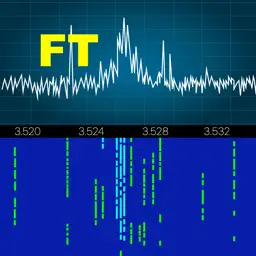
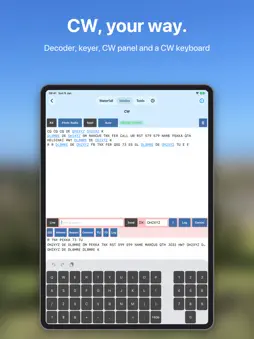
Your Yaesu FTdx101 (D or MP), FTdx10 or FT-710 on your iPhone and iPad: at home over Wi-Fi or from anywhere over the internet. Made by a ham, for hams, with personal support included. FT-Control connects to your radio through Yaesu's SCU-LAN10 network interface, at home and over the internet. No PC and no extra software needed. WORKS WITH ■ FTdx101D and FTdx101MP ■ FTdx10 ■ FT-710 Each radio connected to a Yaesu SCU-LAN10, which is needed both for Wi-Fi at home and for remote access over the internet. A USB cable connection is not supported. OPERATE ■ Spectrum scope and waterfall with band plan, DX Cluster and FT8 spots; both receivers with their own waterfalls (FTdx101) ■ Main and Sub VFO, filters, IPO, attenuator, NB, DNR, DNF, notch, AGC and more ■ Compact floating panels: tuning, PTT, CW, memories, tune stack, macros, Command Bar, DTMF, RIT / ∆TX ■ Your iPhone or iPad as microphone and speaker; the radio keeps playing in the background ■ Ready for iPhone Duo, iPad split screen and Apple Vision Pro MODES ■ FT8-Improved with AutoAnswer and AutoCQ, plus the classic FT8 ■ JS8 keyboard chat ■ CW with decoder, keyer, ESM and CW keyboard: send CW remotely, by keyboard or with a paddle on a CTR2 or MIDI controller ■ Speech: incoming voice transcribed and translated, your typed text sent as speech ■ SSTV, HF-Fax, APRS and WSPR FT8-Improved, JS8, Speech and WSPR need iOS 26. TOOLS ■ Logbook with ADIF import and export, shared via iCloud with SmartSDR, SDR-Control, TS-Control and K4-Control, on iPhone, iPad and Mac ■ DX Cluster with alerts, POTA, PSK Reporter, Call Lookup, Band Plan, Network Stats, Memories ■ Controllers: MIDI, CTR2, HaliKey, Pryme, Flic ■ 4O3A Genius devices, Ultra Beam antennas, rotators and relay boards MADE BY A HAM Made by Marcus, DL8MRE, who has been developing apps for Apple devices since 2009 and uses this app every day in his own shack, where all supported radios are on the desk. Personal online support and a detailed manual are included. Updates with new modes and features are free: no subscription, no in-app purchases. WHAT YOU NEED ■ One of the radios above with a Yaesu SCU-LAN10, both on your network ■ An iPhone or iPad with iOS 18 or later ■ For use over the internet: access to your home network from outside (see the manual) Manual: https://go-to.me/ft-control-ios-manual More apps: https://ham-radio-apps.com FT-Control is developed independently and is not affiliated with or endorsed by Yaesu.
What's New
Version 27.0.20 2026-11-17
This update contains the following changes and improvements: ◉ CW: new tuning display, an audio waterfall around the pitch: tap a station or turn the wheel to ...This update contains the following changes and improvements: ◉ CW: new tuning display, an audio waterfall around the pitch: tap a station or turn the wheel to tune to it (can be switched off in the CW settings) ◉ New: Recordings (Tools): record the receive audio, play it, transmit it or export it; Continuous, Pause on SQL or Split on SQL (one file per transmission, following the radio's squelch), and a scheduled recording (once or every day); a green frame shows that recording is running ◉ Macros: new Repeat setting for every macro (for example a CQ call every 10 seconds); the macro buttons show a repeating macro and count down the pause ◉ Logbook: Export POTA Files, one file per park for the POTA upload (also for two-fers); enter your park(s) in the new My POTA Ref setting ◉ Logbook: Send All by UDP sends all or the filtered QSOs to your logging program ◉ Command Bar: Test shows the radio's answer to a command ◉ Tuner Genius: manual tuning of C1, L and C2 (L / C), Power meter 200 or 2000 W, and the SWR reached stays visible after tuning ◉ New: Radio Information in Settings: the radio's address, model and more ◉ New: Mute Speaker While Transmitting (Audio settings, off by default): no receive audio from the speaker at the start of a transmission ◉ Digital modes no longer switch the AGC off: your AGC stays as you set it ◉ Digital modes in USB ("Use DATA Mode for Tools" off): MIC EQ and the speech processor are off while the mode runs, and back on afterwards ◉ Yaesu: RIT on / off is shown, break-in and VOX delays are set as chosen, and the filter widths are labelled correctly, FTDX101 with its own SSB list ◉ TX Data gain goes much lower, for a clean signal with the FTDX101's ALC ◉ FTDX101MP: the power slider goes up to 200 W; FT-710: split works ◉ FTDX10 and FT-710: setting the dimmer no longer darkens the display; FTDX10: the R FIL list matches the radio; FT-710: no R FIL (the radio has none) ◉ Band up / down skip the bands the radio doesn't have (FT-710, FTDX10) ◉ FT8-Improved: the map button shows all stations, and the globe and map buttons do what they show ◉ FT8-Improved: a different sound when a QSO attempt stops ◉ FT8-Improved: the WSJT-X decode message now includes the station you work, so programs like PstRotator and JTAlert can follow it ◉ Log Entry: a QSO logged by hand after FT8-Improved is no longer saved as FT8 ◉ LoTW: the P12 certificate is no longer lost at start ◉ DX Cluster: a dropped connection shows the reason ◉ S.A.T.: the TX row is above RX ◉ Controllers: ten more LED states (Tune / ATU, Split, RIT, XIT, VOX, NB, NR, Break-In, Speaker Mute, VFO B) ◉ Logbook: QSO details have a Delete… button ◉ Logbook: the date filter works when your device uses 12-hour time ◉ PSK Reporter: leave the call empty to see all stations heard in the last 10 minutes ◉ Fixed: short dropouts in the receive audio ◉ Implemented several additional improvements and optimizations behind the scenes Kindly use the ‘CONTACT SUPPORT’ feature under Settings of the app in case of questions or issues. I will ensure your request is promptly answered or resolved. Your continued support and valuable feedback play a crucial role in further improving this app. 73s, Marcus, DL8MRE Technical Analysis
Package Overview Basic metadata
Bundle ID
de.roskosch.FT-ControliOS Current Version 27.0.20
Minimum iOS 17.0
Package Size App Store Size
Package Metadata 1 / 22 version records
Detailed binary, privacy manifest, framework, and Info.plist results have not been indexed for this package yet. The verified App Store and archive metadata above remains available.
Developer Information
Known Version Records
1 version record with stored package metadata • 22 known version records
Stored metadata does not guarantee a package is currently available to download.
| Details | Version / IDs | Version date | Action |
|---|---|---|---|
| 49.36 MB | v1.132 App Store ID: 888047262Build: 1.132 | 2026-07-09 20:28:34 | Paid / Arcade |
| Not archived | App Store ID: 886921534 | Unknown | Paid / Arcade |
| Not archived | App Store ID: 885430641 | Unknown | Paid / Arcade |
| Not archived | App Store ID: 884924033 | Unknown | Paid / Arcade |
| Not archived | App Store ID: 884639275 | Unknown | Paid / Arcade |
| Not archived | App Store ID: 884409555 | Unknown | Paid / Arcade |
| Not archived | App Store ID: 881734691 | Unknown | Paid / Arcade |
| Not archived | App Store ID: 881540024 | Unknown | Paid / Arcade |
| Not archived | App Store ID: 881427668 | Unknown | Paid / Arcade |
| Not archived | App Store ID: 881351157 | Unknown | Paid / Arcade |
| Not archived | App Store ID: 878645725 | Unknown | Paid / Arcade |
| Not archived | App Store ID: 877088851 | Unknown | Paid / Arcade |
| Not archived | App Store ID: 876617135 | Unknown | Paid / Arcade |
| Not archived | App Store ID: 876571391 | Unknown | Paid / Arcade |
| Not archived | App Store ID: 876157093 | Unknown | Paid / Arcade |
| Not archived | App Store ID: 874475989 | Unknown | Paid / Arcade |
| Not archived | App Store ID: 874270710 | Unknown | Paid / Arcade |
| Not archived | App Store ID: 874049729 | Unknown | Paid / Arcade |
| Not archived | App Store ID: 873578356 | Unknown | Paid / Arcade |
| Not archived | App Store ID: 872941666 | Unknown | Paid / Arcade |
| Not archived | App Store ID: 872702863 | Unknown | Paid / Arcade |
| Not archived | App Store ID: 870837572 | Unknown | Paid / Arcade |